Determining power in hypothesis testing for confidence in test results
Introduction
Thanks for visiting my blog.
Today’s post concerns power in statistical tests. Power, simply put, is a metric of how reliable a statistical test. One of the inputs we will see later on pertains to effect size, which I have a previous blog on. Power is usually a metric one calculates before performing a test. The reason we do this is because low statistical power may nullify test results. Therefore, we can save time and skip all the effort required to perform a test if we know our power is low.
What actually is power?
The idea of what power is and how we calculate power is relatively straight-forward. The mathematical concepts, on the other hand, are a little more complicated. In statistics we have two important types of errors; type 1 and type 2. Type 1 error corresponds to a case of rejecting the null hypothesis when it is in fact true. In other words, we assume input has effect on output when it actually does not. The significance level in a test, alpha, corresponds to type 1 error and represents the probability of type 1 error. As we increase alpha, we may see a higher probability of rejecting the null hypothesis, but our probability of type 1 error increases. Type 2 error is the other side of the coin; we don’t reject the null hypothesis when it is in fact false. Type error is linked to statistical power in that power, as a percentage, can be characterized as the complement of type 2 error probability. In other words, it is the probability that we reject the null hypothesis given that it is false. If we have a high probability that we made the correct prediction, we can enter a statistical test with confidence.
What does this all look like in the context of an actual project?
We know why power matters and what it actually is statistically. Now that we know all this, it’s time to see statistical power in action. We’ll use python to look at some data, propose a hypothesis, find the effect size, solve for statistical power, and run the hypothesis. My data comes from kaggle (https://www.kaggle.com/datasnaek/chess) and concerns chess matches.
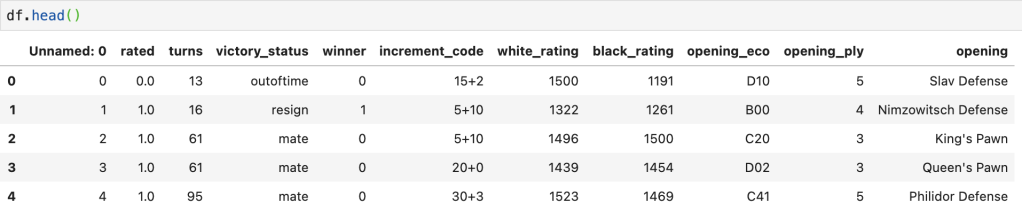
Here’s a preview of the data:
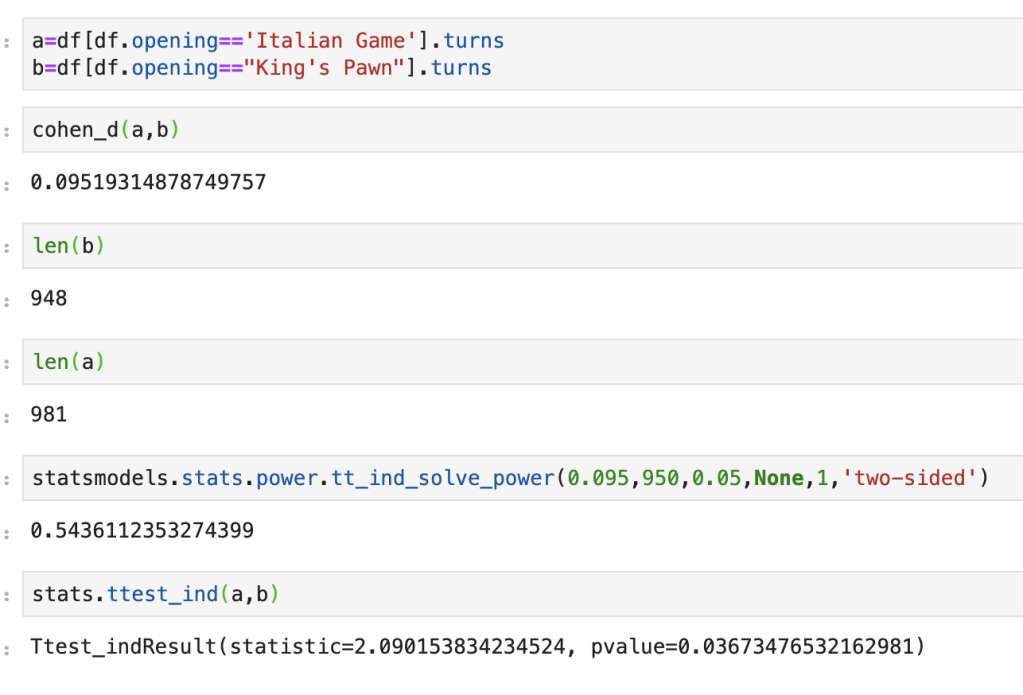
My question is as follows: do games that follow the King’s Pawn process take about as long as games that follow the Italian Game process. Side note: I have no idea what an Italian Game is, or most of the openings listed in the data. We start by looking at effect size. It’s about 0.095, which is pretty low. Next we input the data of turn length from Italian Game processes and King’s Pawn processes. Implicit in this data is everything we need; size, standard deviation, and mean. If we set alpha to 5%, we get a statistical power slightly above 50%. Not great. Running a two-sample-t-test leads to a 3.67% p-value which tells us that these two openings lead to games of differing lengths. The problem is power is low, so it wasn’t quite worth running these tests. And that… is statistical power in action.
Conclusion
Statistical power is important as it can modify how we look at hypothesis tests. If we don’t take a look at power, we may be led to the wrong conclusions. Conversely, when we believe to be witnessing something interesting or unexpected, we can use power to enforce our beliefs.
Understanding the use of z scores in performing statistical inquiries
Introduction
Thanks for visiting my blog today!
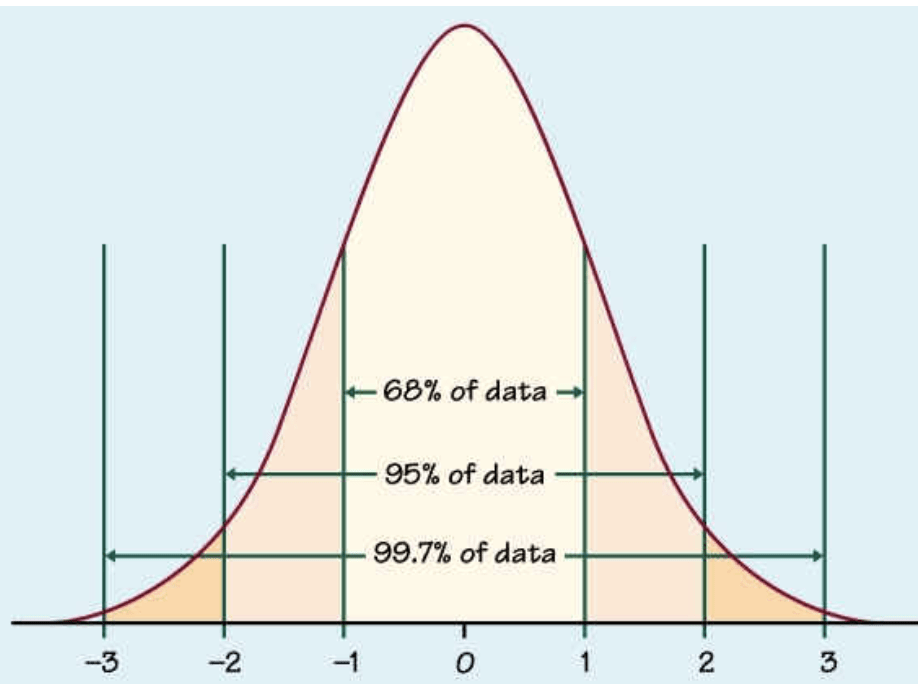
Today’s blog concerns hypothesis testing and the use of z scores to answer questions. We’ll talk about what a z score is, when it needs to be used, and how to interpret the results from a z score-related analysis. While you may or may not be familiar with the term z score, you are very likely to have encountered the normal distribution / bell curve depicted above. I tend to think almost everything in life, like literally everything, is governed by the normal distribution. It’s got a low amount of mass toward the “negative” end, a lot of mass in the middle, and another low amount of mass toward the “positive” side. So if we were to poll a sample of a population on any statistic, say athletic ability, we will find some insane athletes like Michael Phelps or Zach Lavine, some people who are not athletic at all, and everyone else will probably fall into the vast “middle.” Think about anything in life, and you will see the same distribution applies to a whole host of statistics. The fact that this normal / bell-curve is so common and natural to human beings means that people get comfortable using it when trying to answer statistical questions. The main idea of a z score is to see where an observation of data (say IQ of 200, I think that’s a high IQ) falls on the bell curve. If it falls smack in the middle, you are probably not an outlier. On the other hand, if you’re IQ is so high that there is almost no mass at the area of that IQ, we can assume you’re pretty smart. Z scores create a demarkation point that allows us to make use the normal distribution.
When do we even need the z score test in the first place?
We use the z score to see how much a sample from a population represents an outlier. We will need to also use a threshold to decide at what point we call an observation a significant outlier. In hypothesis testing, “alpha” refers to the threshold where we decide whether something is an extreme outlier or not. Often, alpha will be 5%. This means that if the probability of something not being an outlier is 5% or lower, we can assume it is a true outlier. On the standard normal distribution graph (mean zero, standard deviation 1), 5% usually corresponds to 1.96 standard deviations away from the mean of zero. This means if our z score is greater than 1.645 or less than -1.645, we are witnessing a strong outlier. If we have two outliers, we can look at their respective z score to see which outlier is more extreme.
How do we calculate a z score?
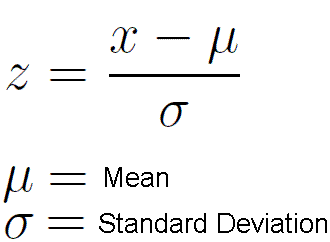
It’s actually pretty simple. A z score is equal to the particular observation minus the population mean. That value just described above is then divided by the standard deviation of the population.
Example: if we have a distribution with mean 10 and standard deviation 3, is an observation of 5 a strong outlier? 5-10 = -5. -5/3 = -1.67. So at alpha = 5%, this is a strong outlier. If we restricted alpha and decreased it to 2%, 5 is no longer such a strong outlier. So basically 5 is 1.67 standard deviations from the mean and does represent a significant outlier under alpha at 5%.
If we don’t know the full details of an entire population, things change slightly. Assuming we have more than 30 data points in our sample, the equation becomes observation minus sample (not population) mean. That quantity is then first multiplied by the sample size and then divided by the sample standard deviation.
This process also works if we are trying to evaluate a broader trend. If we want to look at 50 points from a set of 2000 points and see if those 50 points are outliers, we take the mean of 50 points and insert that value as our “observation” input.
Ok, so what happens when we have less than 30 data points? I have another blog to explain what happens there currently in the works.
Conclusion
The z score / z statistic element of hypothesis testing is quite elegant due to its simple nature and connection to the rather natural-feeling normal distribution. It’s an easy and effective tool anyone should have at their disposal whenever trying to perform a meaningful statistical inquiry.
Understanding how pruning works in the context of decision trees.
Introduction
Thank you for visiting my blog today!
In previous posts, I discussed the decision tree model and how it mathematically goes along its different branches to make decisions. A quick example of a decision tree is the following: if it rains I don’t go to the baseball game, otherwise I go. Assuming it doesn’t rain, if I go to the game and the score has one team winning by 5 or more runs by the eighth inning I leave early, otherwise I stay. Here the target variable is whether I will be at the stadium under different unique situations. Decision tree models are very intuitive as it is part of human nature to create mental decision trees in everyday life. In machine learning, decision trees are a common classifier but they have many flaws that are, in fact, able to be addressed. Let me give you an example. Say we are trying to figure out if Patrick Mahomes (NFL player) is going to throw for 300 yards and 3 touchdowns in a given game and among other information we know about the game, we know that he is playing the Chicago Bears (as a Bears fan it is hard to mention of Mahomes and the Bears in the same sentence). For all you non-football fans – Patrick Mahomes, as long as he stays with the Chiefs, will almost never play the Bears. I’m serious about this. According to the structure of the NFL, they will only play each other once in every four years for one game only (with the exception of possibly meeting in the Super Bowl leading to a maximum of five meetings in a four-year period). The problem we have with this situation is that whether or not the Bears win this game, we haven’t really learned anything meaningful because this situation is rather uncommon and a fluke may occur and therefore this observation only serves to cloud our ability to analyze this situation. I would imagine if we had the same exact situation, but did not mention that the team being played was the Bears, and all we knew was the rankings of the teams and other statistics, we would have a much higher accuracy when predicting the game’s outcome (and performance of Mahomes). That’s what pruning is all about; getting rid of the extra information that doesn’t teach you anything. This is not a novel idea. Amos Tversky and Daniel Kahneman talk about the idea that adding additional information to a problem or question often confuses people and leads them to the wrong conclusions. Say I told you that there was an NFL player who averaged 100 rushing yards per game and 20 receiving yards per game. If I were to ask you whether it’s more likely that he is a NFL running back or an NFL player, you may think with absolute certainty that he is a running back (and you’d probably be right) but since the running back position is a subset of being an NFL player, it is actually more likely that he is an NFL player. You laugh when you read this now but this is actually a fairly common mistake. Anyway, pruning is the process of cutting off lower branches of a tree (top-down approach) and eliminating noise. Getting back to the first example of whether I stay at the baseball game, to prune that tree – if we were to assume I never leave games early – the only feature that matters is the presence of rain and we could cut that tree after the first branch. So let’s see how this actually works.
Fundamental Concept
The fundamental concept is pretty simple, we look at each additional continuation of the tree and see if we actually learn an amount of significant or information or that extra step doesn’t really tell us anything new. In python, you can even specify how deep you want or trees to be. However, that still leaves the question as to how we statistically determine a good stopping point. We can guess-and-check in python with relative ease until we find a satisfying stopping point, but that isn’t really so exciting.
Statistical Method
So this is actually somewhat complex. There are two common methods. There is the cost complexity method and the chi-square method. The cost complexity method operates similarly to optimizing a linear regression using gradient descent in the sense that you leverage calculus to find a minimum. Using this method you create many trees that are all of varying length and solve for the one that leads to the highest accuracy. This concept is not novel to statisticians or data scientists as optimizing a cost function is a key tool in creating models. The chi-square method uses the familiar chi-square test to basically look at each subsequent branch of the tree actually matters. In the football example above, we learn next to nothing from a game between the Bears and Chiefs as they can play a maximum of 13 games against each other in a ten-year period assuming they meet in ten straight super bowls. The Chiefs probably average 195 games in a ten-year period including a minimum of 20 games against the Broncos, Raiders, and Chargers each individually per ten-year period. In python, scipy.stats has a built-in chi-square function that should allow you to perform the test. I currently have a blog in the works with more information on the chi squared test and will provide that link when that blog is released.
Conclusion
Decision trees are fun and intuitive and drive our everyday lives. The issue with them is they can easily overfit. Pruning trees allows us to take a step back and look for broader trends and stories instead of focussing in on features that are two specific to provide any helpful information. Hopefully, this blog can help you to start thinking about ways to improve decision trees!
Thank you for visiting my blog today. Today I would like to discuss my capstone project that I worked on as I graduated from the Flatiron School data science boot camp (Chicago Campus). At the Flatiron School, I began to build a foundation in python and its applications in data science. It was an exciting and rewarding experience. For my capstone project, I investigated insurance fraud using machine learning. After having worked on some earlier projects, I definitely can say that this one was a bit more complete and suiting of a capstone project. I’d like to take you through my process and share what insights I gained and what problems I faced along the way. I’ve since worked on some other data science projects and have expanded my abilities in areas such as exploratory data analysis (EDA from henceforth) and this project represents where I had progressed as of my 4th month into data science. I’m very proud of this project and hope you enjoy reading this blog.
Data Collection
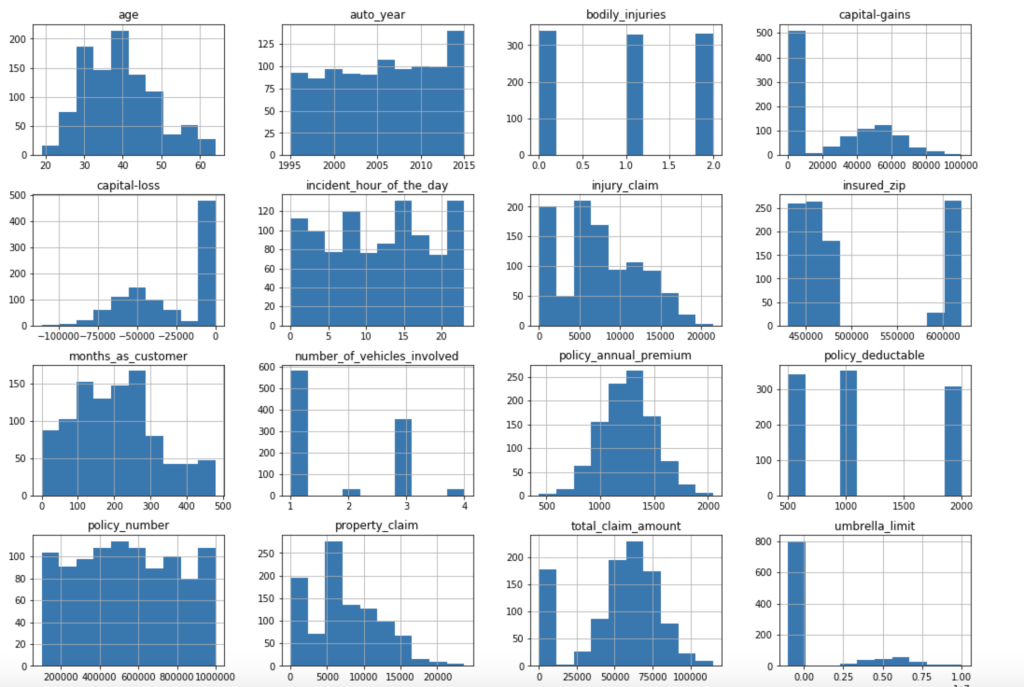
My data comes from kaggle.com, a site with many free data sets. I added some custom features but the ones that came from the initial file are as follows (across 1000 observations): months as customer, age, policy number, policy bind date, policy state, policy csl, policy deductible, policy premium, umbrella limit, zip code, gender, occupation, education level, relationship to policy owner, capital gains, capital losses, incident date, incident type, collision type, incident severity, authorities contacted, incident state, incident city, incident location, incident hour of the day, number of vehicles involved, property damage, witnesses, bodily injuries, police report available, total claim amount, injury claim, property claim, vehicle claim, car brand, model, car year, and the target of feature of whether or not the report was fraudulent. The general categories of these features can be described as: incident effects, policy information, incident information, insured information, car information. (Here’s a look at a preview of my data and some histograms of explicitly numerical features).
Data Preparation
There weren’t many null values and the ones present were actually expressed in an unusual way, but in the end I was able to quickly deal with these values. After that, I encoded binary features in 0 and 1 form. I also broke down policy bind date and incident date into month and year format as day format was not general enough to be meaningful. I also added a timeline variable between policy bind and incident date. I then mapped a car type to each car model such as sedan or SUV. Next, I removed age, total claim amount, and vehicle claim from the data due to correlation with other features. I then was ready to encode my categorical data. Here, I used a new method I had never really used before and I discuss this process in detail in another blog on my website. I then revisited correlation having converted all my features to numeric values and remove incident type from my data. I performed very short exploratory data analysis that does not really warrant discussion. (This is one big change I have taken since doing more projects. EDA is a very exciting part of the data science process and provides exciting visuals, however at the time I was very focussed on modeling). (I’ll include one visual to show my categorical feature encoding).
Feature Selection
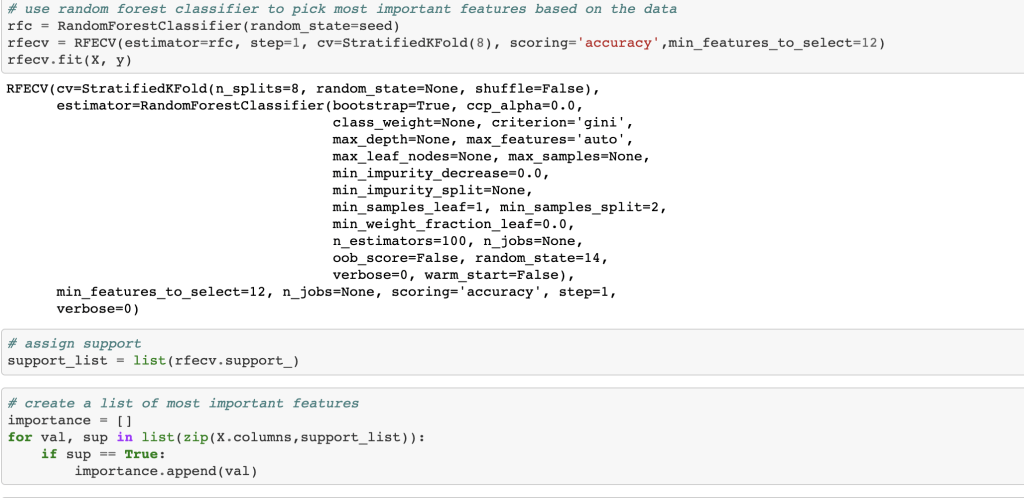
Next, I ran a feature selection method to reduce overfitting and build a more accurate model. This was very important as my model was not working well early on. The other item that helped improve my model was the new type of categorical feature encoding. To do this, I ran RFE (I have a blog about this) using a random forest classifier model (having already run this project and found random forest to work best, I went back and used it for RFE) and reduced my data to only 22 features. After doing this, I filtered outliers, scaled my data using min-max scaling, and applied Box-Cox transform to normalize my data. Having done this, I was now ready to split my data into a set with which to train a model and a separate set with which to validate my model. I also ran PCA but found RFE to work better and didn’t keep my PCA results. (Here’s a quick look at how I went about RFE).
Balancing Data
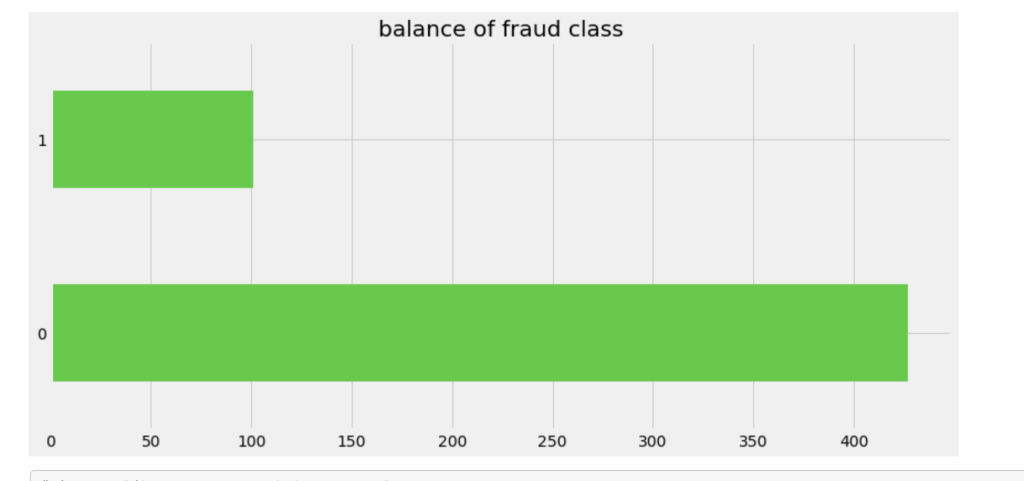
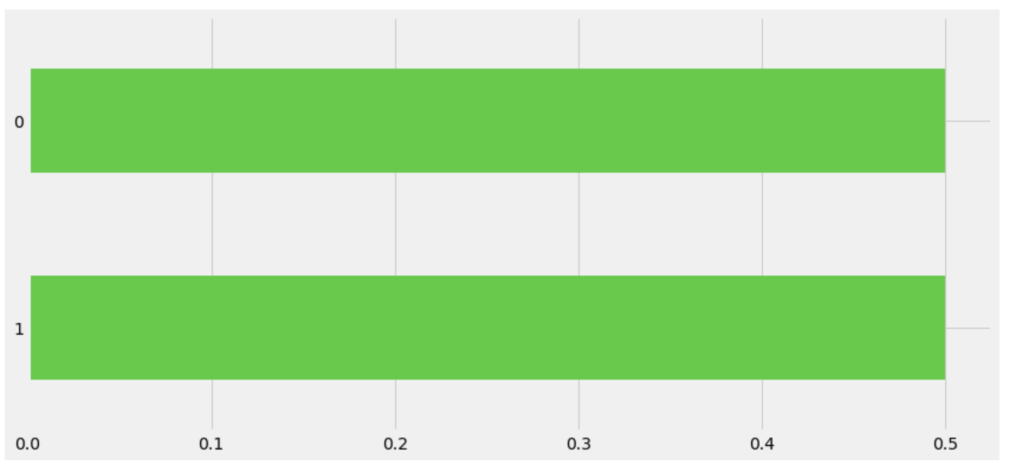
One common task in the data science process is balancing your data. If you are predicting a binary outcome, for example, you may have many values of 0 and very few values of 1 or vice-versa. In order to have an accurate and representative model you need to have the same amount of 1 values and 0 values when training your models. In my case, there were a lot more cases that involved no fraud compared to those that involved fraud. I artificially created more cases that were fraudulent to have a more evenly distributed model.
Old Target Class DistributionNew Distribution (In terms of percentage)
Model Data
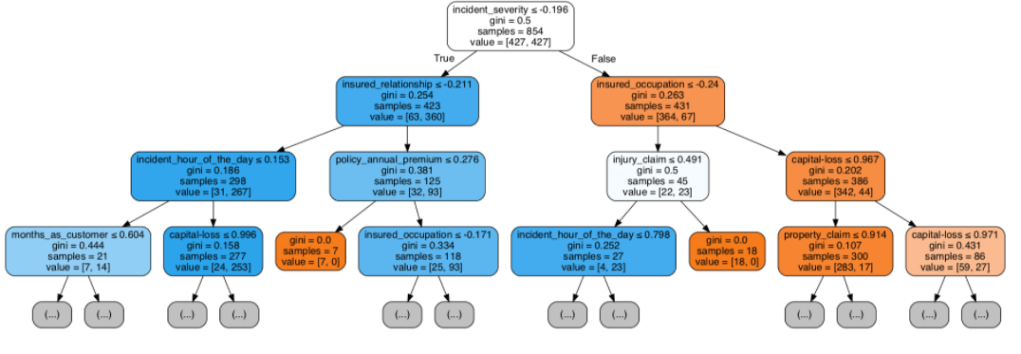
Having prepared all my data, I was now ready to model my data. I ran a couple of different models while implementing grid-search to get optimal results. I found the random forest model to work best with ~82% accuracy. My stochastic gradient descent model had ~78% accuracy but had the highest recall score at ~85%. This recall score matters as it captures how often fraud is identified when the case is actually a case that involved fraud (and not just a case that is said to be fraud but isn’t – recall is the true positives divided by true positives plus false negatives or fraud identified divided by fraud identified and fraud not identified). The most indicative features of potential fraud in order were: high incident severity, property claim, injury claim, occupation, and policy bind year. Here’s a quick decision tree visual:
Here is the leading indicators sorted (top ten only):
Other Elements of the Project
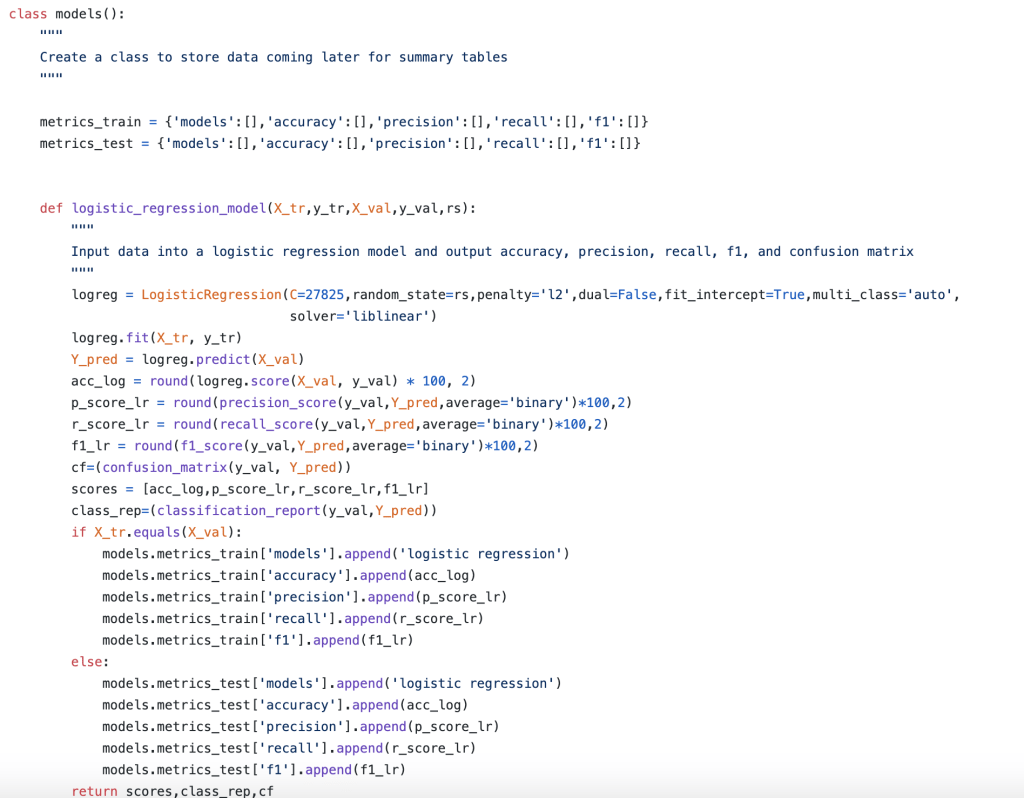
In addition to my high level process, there were many other elements of my capstone project that were not present in my other projects. The main item I would like to focus on is the helper module. The helper module (this may have a more proper term but I am just going to call it a helper module) was where I wrote 700 lines of backend code to create functions that would automate everything I wanted to happen in my project. I even used classes to organize things. This may sound basic to some readers, but I don’t really use classes that often. The functions I wrote were designed to be robust and not specific to my project (and I have actually been able to borrow a lot of code from that module when I have gotten stuck in recent projects). Having created a bunch of custom functions I was now able to compress my entire notebook where I did all my work into significantly fewer cells of code. Designing this module was difficult but was ultimately a rewarding experience. I think the idea of a helper module is valuable since you want to enable automation while allowing to account for the nuances and specifics present in each real-world scenario. (Here’s a look at running logistic regression and using classes).
Conclusion
In short, I was able to develop an efficient model that would do a good job of predicting fraudulent reports as well as identify key warning signs all in the context and framework of a designing what a complete data science project should look like.
Thank you for reading my blog and have a great day.
To provide some context to today’s blog, I have another blog I have yet to release called “Bank Shot” which talks about NBA salaries. Over there, I talked a little bit about contracts and designing a model to predict NBA player salaries. However, that analysis was pretty short and to the point. Over here, I want to take a deeper and more technical dive into the data as well as the more technical aspects of how I created and tuned my model.
What about the old model?
What do we need to know about the old model? For the purposes of this blog, all we need to know is that it included a lot of individual NBA statistics from the 2017-18 season predicting next year’s salary (look at GitHub for a full list) and that my accuracy when all was said and done sat just below 62%. I was initially pleased with this score until revisiting my project with fresh eyes. After doing so, I made my code more efficient, added meaningful EDA, and had a better accuracy score.
Step 1 – Collect and merge data
My data came from kaggle.com. In addition, it was in the form of a three different files, so I merged them all into one database representing one NBA season even though some of them went a lot further back in history (So that should intuitively be like 450 total rows before accounting for null values; 15 player rosters, 30 teams). Also, even though this doesn’t really belong here, I added a BMI feature before any data cleaning or feature engineering so I might as well mention that.
Step 2 – Hypothesis Testing (Round 1)
Here are a couple inquiries I investigated before feature generation, engineering, and data cleaning. This is not nearly comprehensive. There is so much to investigate so I chose a couple of questions. First: can we say with statistical significance (I’m going to start skipping that prelude) that shorter players shoot better than taller players? Yup! Better yet, we have high statistical power despite a small sample size. In other words, we can trust this finding. Next: do shooting guards shoot 2-pointers better than point guards? We fail to reject the null hypothesis (likely their averages are basically the same) but we have low power. So this finding is harder to trust. However, what we do find, with high statistical power, is that centers shoot 2-pointers better than power forwards. Next: do point guards tend to play more or less minutes than shooting guards? We can say with high power that these players tend to play very similar amounts of minutes. The next logical question is to compare small forwards and centers who, on an absolute basis, play the most and least minutes respectively. Well, as no surprise, we can say with high power that they tend to play different amounts of minutes.
Step 3 – Feature Generation and Engineering
So one of the first things I did here was to generate per game statistics like turning points and games into points per game. Points per games is generally more indicative of scoring ability. Next, I dropped the season totals (in favor of per game statistics) and some other pointless columns. I also created some custom and non-existent stats to see if they would yield any value. An example includes: PER/Games Started – I call this “start efficiency.” Before I dropped more columns to reduce correlation, I did some visual EDA. Let’s talk about that.
Step 4 – EDA
Here is the fun part. Just going to hit you with lots of visuals. Not comprehensive, just some interesting inquiries that can be explained visually.
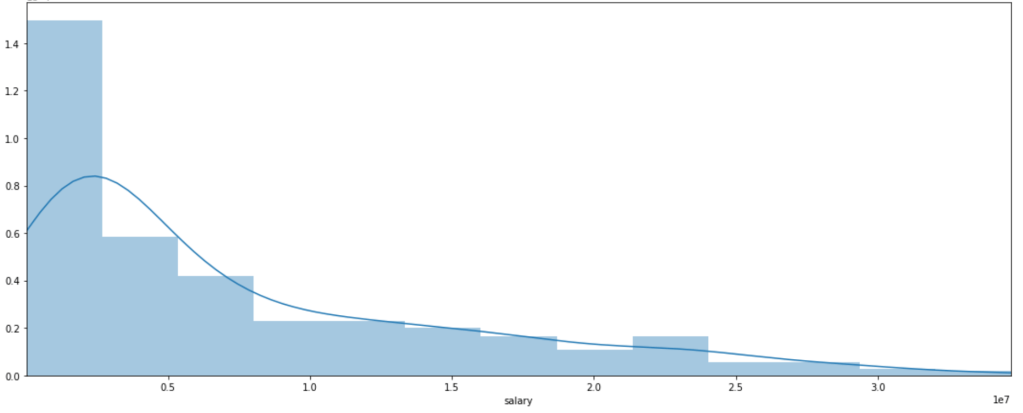
Distribution of NBA Salaries (ignore numerical axis labels):
What do we see? Most players don’t make that much money. Some, however, make a lot of money. Interestingly, there is a local peak between x-labels 2 and 2.5. Perhaps this is some representation of the average max salary whereas beyond the salaries get higher but appear far less frequently. That’s just conjecture, keep in mind.
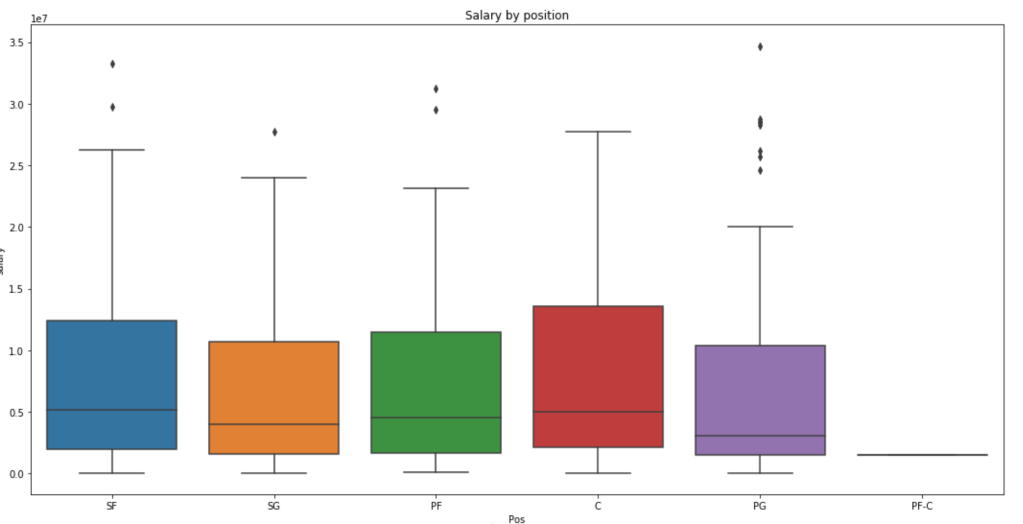
Distribution of Salary by Position (ignore y-axis labels)
We see here that centers and small forwards have the highest salaries within their interquartile range but the outliers on point guards are more numerous and have a higher maximum. Centers, interestingly, have very few outliers.
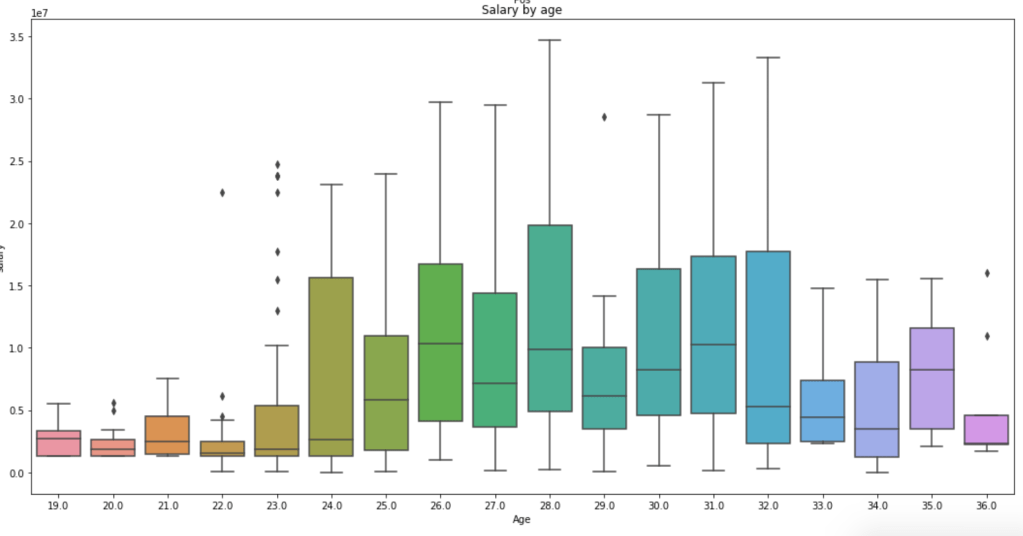
Salary by Age
This graph is a little messy so sort it out yourself, but we see that the time players make the most money is between the ages of 24 and 32 on average. Rookie contracts tend to be less lucrative and older players tend to be less relied on, so this visual makes a lot of sense.
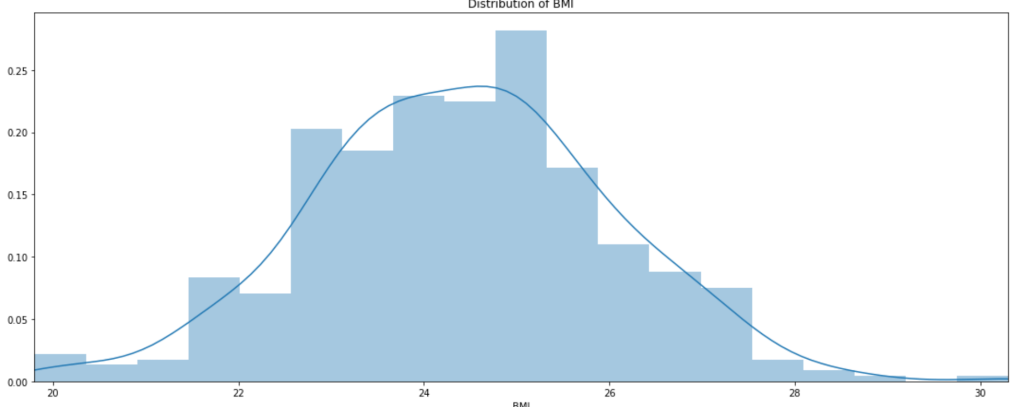
Distribution of BMI
Well, there you have it; BMI is looks normally distributed.
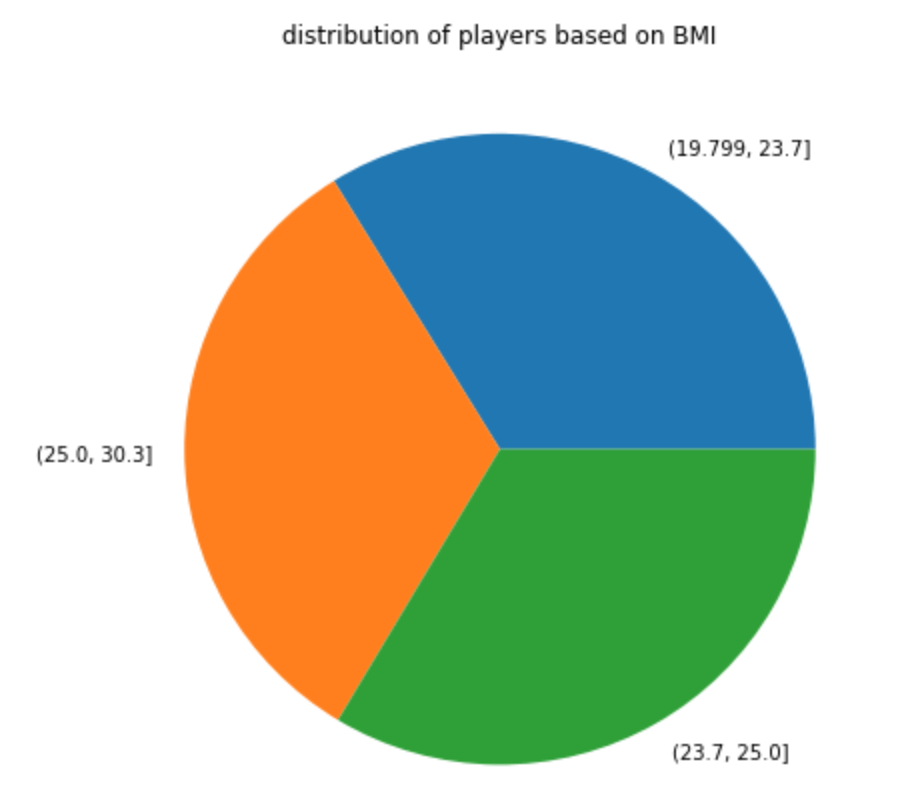
In terms of a pie chart:
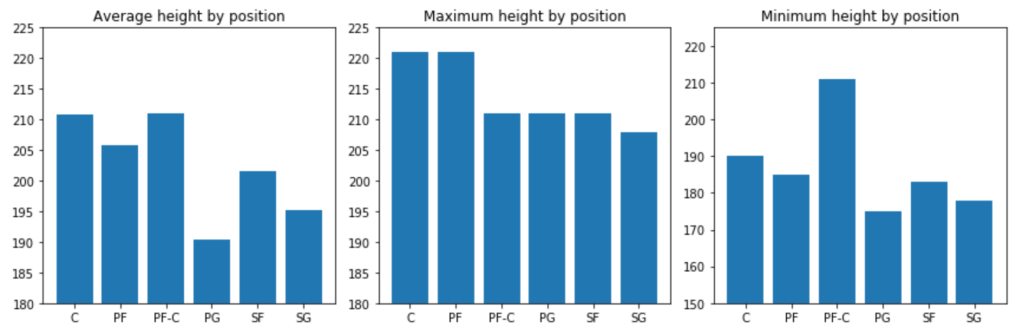
Next: A couple height metrics
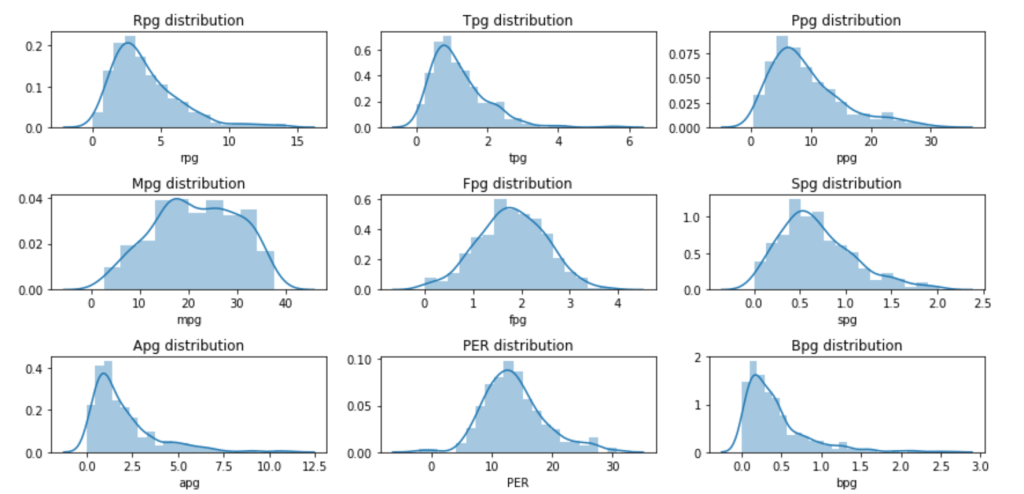
Next: Eight Per Game Distributions and PER
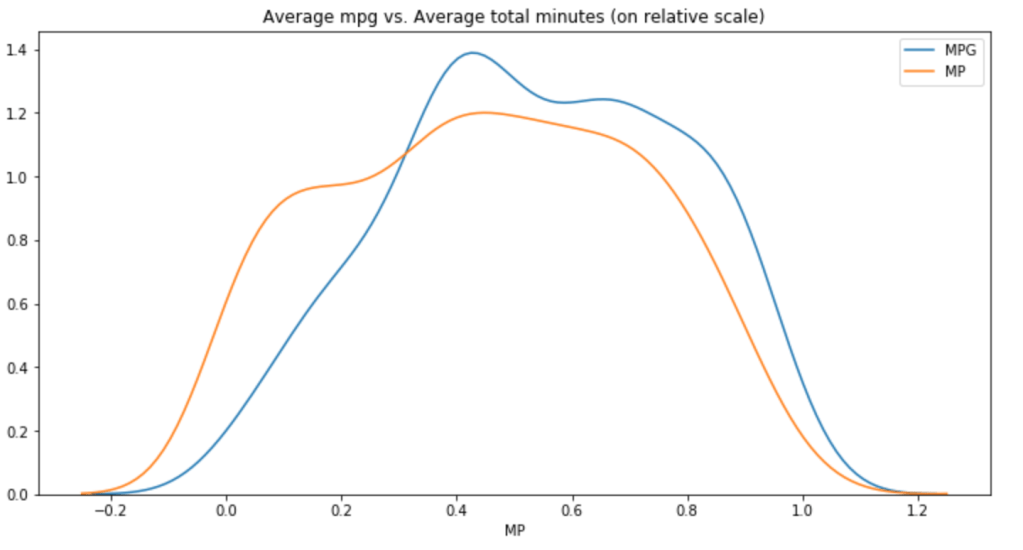
Minutes Per Game vs. Total Minutes (relative scale)
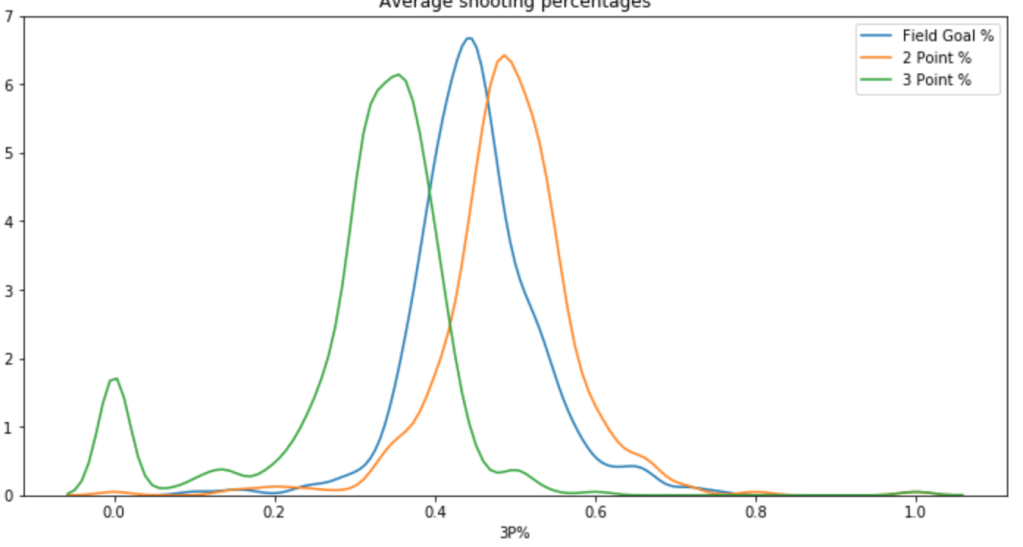
Next is a Chart of Different Shooting Percentages by Type of Shot
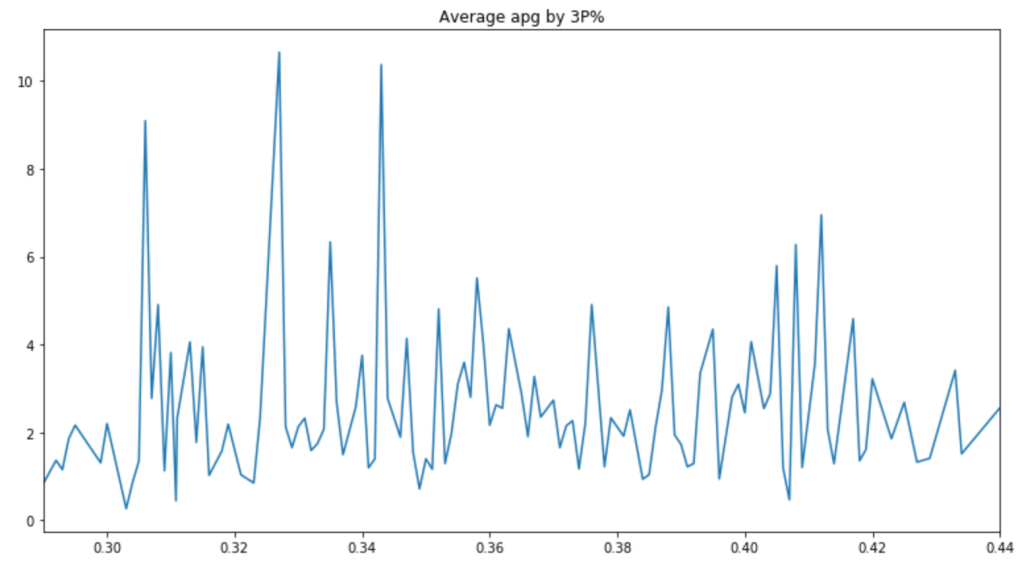
Next: Do Assist Statistics and 3-Point% Correlate?
There are a couple peaks, but the graph is pretty messy. Therefore, it is hard to say whether or not players with good 3-Point% get more assists.
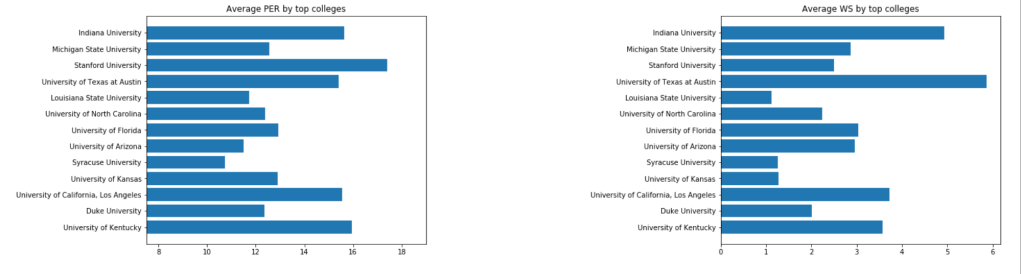
Next, I’d like to look at colleges:
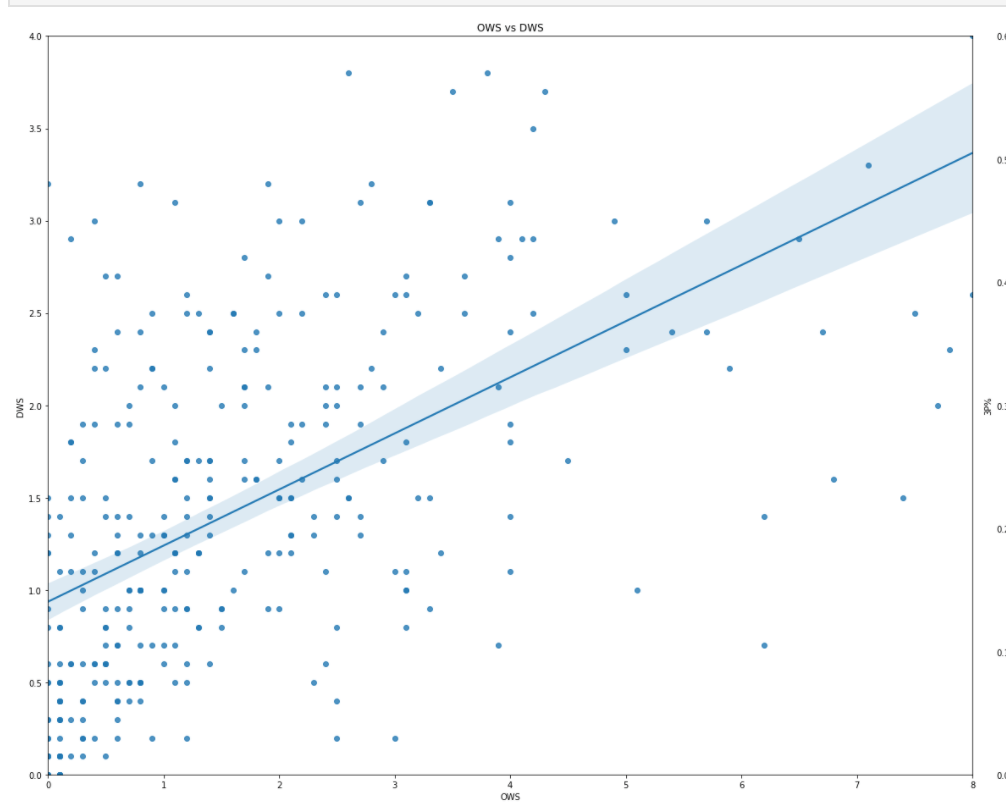
Does OWS correlate to DWS highly?
It looks like there is very little correlation observed.
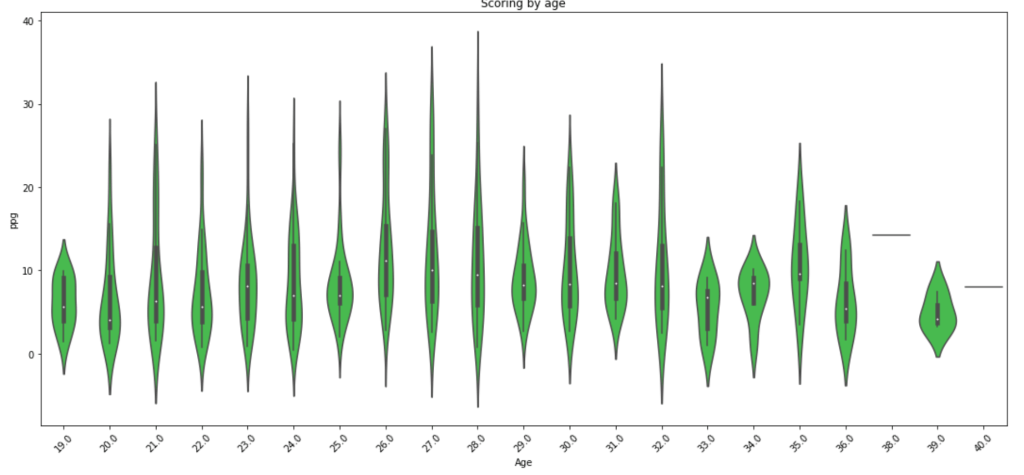
What about scoring by age? We already looked at salary by age.
Scoring seems to drop off around 29 years old with a random peak at 32 (weird…).
Step 2A – Hypothesis Testing (Round 2)
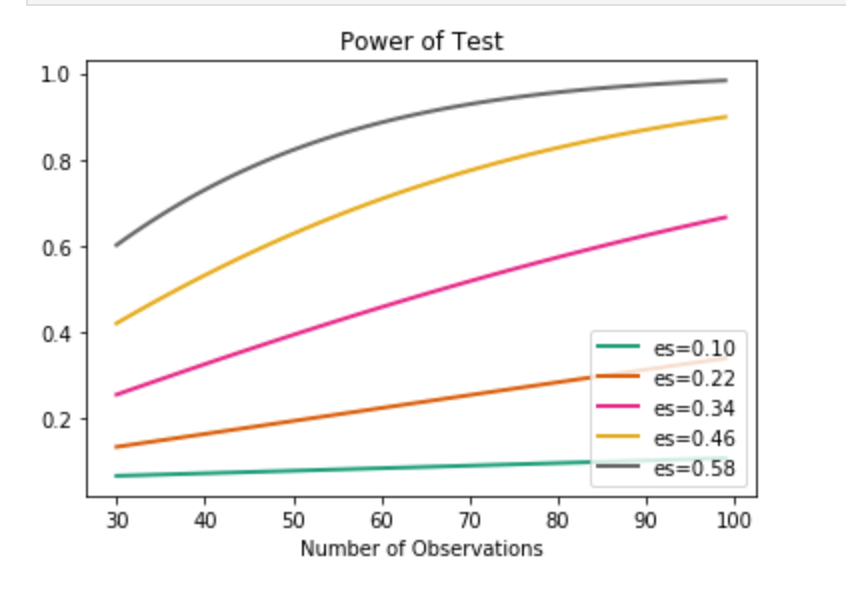
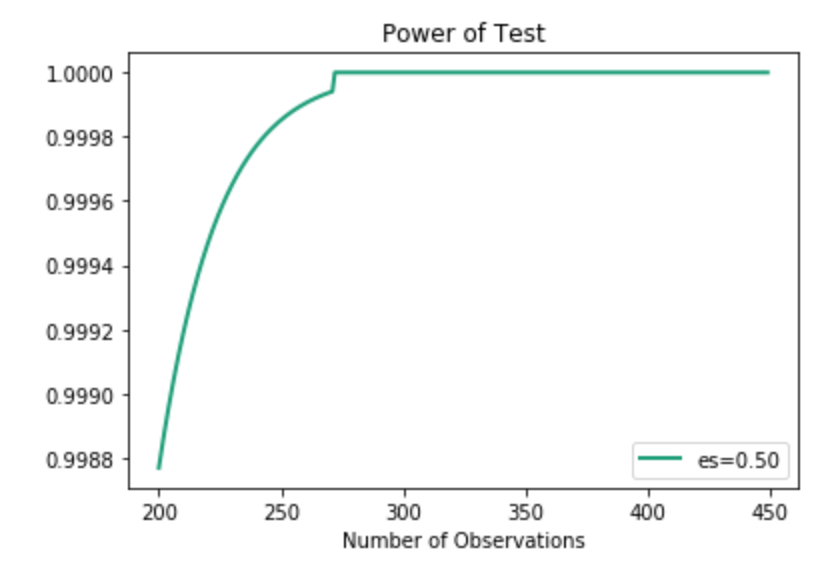
Remember how I just created a bunch of features? Time to investigate those features also. Well, one question I had was to compare the older half of the NBA to the younger half. I used the median of 26 to divide my groups. In terms of stats like scoring, rebounding, and PER I found little statistically significant differences. I decided to do an under-30 and 30+ split and check PER. Still nothing doing. Moderately high statistical power was present in this test which leaves room for suggesting that age matters somewhat. This is especially likely since I had to relax alpha in the power formula despite the absurdly high p-value. In other words, the first test said that age doesn’t affect PER one bit with high likelihood, but the power metric suggests that we can’t trust that test enough to be confident. I’ll provide a quick visual to show you what I mean where I measure Power against number of observations. (es = effect size). The following visual actually represents pretty weak power in our PER evaluation. I’ll have a second visual to show what strong power looks like.
We find ourselves on the orange curve. It’s not promising.
Anyway, I also wanted to see if height and weight correlated highly on a relative scale. Turns out that we can say that they are likely deeply intertwined and have high correlation. This test also has high power, indicating we can trust its result.
Above, I just showed one curve. As you can see, the effect size is 0.5. In the actual example, however, the effect size is actually much higher. Even with lower effect size, we can see how quickly the power spikes, so I chose to use this visual.
Step 3A – Feature Engineering (Round 2)
When I initially set up my model, I did very little feature engineering and just cut straight to a linear regression model that ultimately wasn’t great. This time around I decided to use pd.qcut(df.column,q) from the Pandas library to bin the values of certain features and generalize my model. I gave the specific code above because it is very powerful and I encourage its use for anyone who wants a quick way to simplify complex projects. for most of the variables I used 4 or 5 different ranges of values. Example (1,10) becomes (1,2 , 2,5 , 5,9 , 9,10). Having simplified the inputs, I encoded all non-numerical data (including my new binned intervals). Next, I removed correlation by dropping highly correlated features while also dropping some other columns of no value.
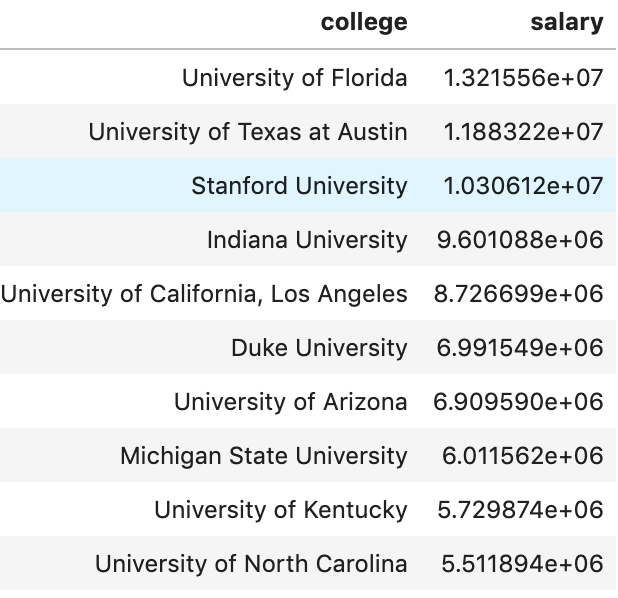
I’d like to quickly let you know you how I encoded non-numeric variables as it was a great bit of code. There are many ways to deal with categorical or non-numeric data. Often times people use dummy variables (see here for explanation: https://conjointly.com/kb/dummy-variables/) or will assign a numeric value. That means either adding many extra columns or just assigning something like gender the values of 0 and 1. What I did is a little different – and I think everyone should learn this practice. I ran a loop to run through a lot of data so I’ll try and break down what I did for a couple features. Ok… so my goal was to find the mean salary for each subset of a feature. So let’s say (for example only) that average salary is $5M. I then grouped individual features together with the target variable of salary in special data frames organized by the mean salary for each unique value.
What we see above is an example of this. Here we looked at a couple (hand-picked) universities to see the average salary by that university in the 2017-18 NBA season. I then assigned the numerical value to each occurrence of that college. Now, University of North Carolina is equal to ~5.5M. There we have it! I repeated this process with every variable (and then later applied scaling across all columns).
Here is a look at my code I used.
I run a for loop where cat_list represents all of my categorical features. I then created a local data frame grouping one feature together wit the target. I then created a dictionary using this data and mapped each unique value in the dictionary to each occurrence of those values. Feel free to steal this code.
Step 5 – Model Data
So I actually did two steps together. I ran RFE to reduce my features (dear reader – always reduce the amount of features, it helps a ton) and found I could drop 5 features (36 remain) while coming away with an accuracy of 78%. That’s pretty good! Remember: by binning and reducing features I got my score from ~62% to ~78% on the validation set. Not the train set, the test set. That is higher than my initial score on my initial train set. In other words, the model got way better. (Quick note: I added polynomial features with no real improvement, and if you look at GitHub you will see what I mean).
Step 6 – Findings
What correlates to a high salary? High field goal percentage when compared to true shooting percentage (that’s a custom stat I made), high amounts of free throws taken per game, Start% (games started/total games), STL%, VORP, points per game, blocks per game and rebounds per game to name some top indicators. Steals per game, for example, has low correlation to high salary. I find some of these findings rather interesting, whereas some seem more obvious.
Conclusion
Models can always get better and become more informative. It’s also interesting to revisit a model and compare it to newer information as I’m sure the dynamics of salary are constantly changing, especially with salary cap movements and a growing movement toward more advanced analytics.















 Inquiries