Pokemon: EDA and Battle Modeling

Exploratory data analysis and models for determining which Pokemon tend to have the biggest pure advantages in battle given no items in play.

CHARIZARD

Thanks for visiting my blog today!

Context

Pokémon is currently celebrating 25 years in the year 2021 and I think this is the perfect time to reflect on Pokémon from a statistical perspective.

Introduction

If you’re around my age (or younger), then I hope you’re familiar with Pokémon. It’s the quintessential Gameboy game we all used to play as kids before we started playing “grown-up” games on more advanced consoles. I remember how excited I used to get when new games would be released and I remember equally as well how dejected I was when I lost my copy of the Pokémon game “FireRed.” Pokémon has followed a basic formula running through each iteration of the game, and it’s pretty simple. It revolves around creatures known as “Pokémon.” You start with a “starter” Pokémon who usually has high potential but starts with very little power and you then can catch Pokémon, train Pokémon, buy items, beat gym leaders, find “legendary” Pokémon (I suppose the word “Pokémon” works as singular and plural), create a secret base, trade Pokémon with other gameboy owners, and of course – beat the Elite 4 like 500 times with different parties of Pokémon. With each new set of games (games were released in sets usually labeled by a color – silver & gold and green & red – as two examples), came a new group of Pokémon. The first generation was pretty bland. There were some cool ones like Charizard, Alakazam, and Gyarados but there were far more weird and boring ones like Slowpoke (Slowpoke has got to be the laziest name ever), Pidgey (second most lazy name?), and Arbok (Cobra backwards, yes it’s a snake). As the generations of Pokémon new to each set of games progressed there was a lot more diversity and creativity. Some generations like Gen 2 and Gen 3 really stuck out in my head. Examples include Skarmory and a special red (not blue) Gyarados in Gen 2 and Blaziken and Mightyena in Gen 3. The most important part of the Pokémon games are battles. Pokémon grow in skill and sometimes even transform in appearance through battling and gaining experience. You also earn badges and win prize money through battles. Battles are thrilling and require planning and tactics. This is expressed in many ways; the order of your Pokémon in your party, the type of Pokémon you bring to counteract your potential opposing Pokémon, the items you use to aid you in battle, when you choose to use certain moves (there is a limit to the amount of times each move can be used), switching Pokémon in battle, sacrificing Pokémon, diminishing the health of a “wild” Pokémon to the point where it doesn’t faint but is weak enough to be caught, and there’s a lot more I could probably add. Ok, so the point of this blog is to look for interesting trends and findings through visualizations in the exploratory data analysis section (EDA) and later I will examine the battles aspect and look for key statistics that indicate when a Pokémon is likely to win or lose a battle.

Let’s get started!

Data

My data comes from Kaggle and spans about 800 Pokémon across the first 6 generations of the series. I’d like to quickly note that this includes mega-Pokémon which are basically just more powerful versions of certain regular Pokémon. Let me show you what I mean; we have Charizard at the top of this post and below we have mega-Charizard.

3D Printed Mega Charizard X - Pokemon by Gnarly 3D Kustoms | Pinshape

Yeah, it’s pretty cool. Anyway, we also have legendary Pokémon in this dataset but, while legendary Pokémon may have mega types, they are not a fancy copy of another Pokémon. I’ll get more into how I filtered out mega Pokémon in the data prep section. One last note on Pokémon classes – there are no “shiny” Pokémon in this data set. Shiny Pokémon are usually not more powerful than their regular versions but they are more valuable in the lexicon of rare Pokémon. Next, we have 2 index features (why not just 1?). Pokémon are by construction at least one “type.” Type usually connects to an element of nature. Types include grass, poison, and fire (among others) but also less explicit and nature-related terms such as dragon, fairy, and psychic. A Pokémon can have up to two types with one usually being primary and the other secondary. Type is a critical part of battles as certain types have inherent advantages and disadvantages against other types (fire beats grass but water beats fire, for example). Unfortunately, creating a dataset containing battle data between every possible Pokémon would be a mess and we therefore are going to use the modeling section to see what types of Pokémon are strongest in general, and not situationally. Our next features will be related to Pokémon stats. HP – or hit points – represent your health. After Pokémon get struck with enough attack power (usually after a couple turns), their HP runs out and they faint. This takes me to the next four features: attack, defense, special attack, and special defense. Attack and defense are the baseline for a Pokémon’s, well… attack and defense. Certain moves may nullify these stats though. A great example is a one-hit knockout move; attack doesn’t matter at all. Special attack and special defense are the same as attack and defense but refer to moves where there is no contact between Pokémon. So a move like “body slam” is attack-based while a move like “flamethrower” is special attack based. Total represents the sum of HP, special attack/defense, attack/defense and speed. Speed is a metric that basically determines who strikes first in battle. Occasionally some moves will take precedence and strike first but in the absence of those moves the turn-based battle begins with the attack of the faster Pokémon. The feature generation refers to which generation between 1 and 6 that the Pokémon in question first appeared in. Pokémon often make appearances in later generations once introduced in a previous generation. This is sometimes the case for legendary Pokémon as well. This takes us to our next feature which is a binary legendary Pokémon indicator. Legendaries are Pokémon that appear once per game usually in one specific spot that are generally quite powerful (and cool-looking). There are “roaming legendaries” that are unique but will appear at random locations until caught as opposed to being confined to one special location. Most legendaries are delegated to specific areas at specific points in a game’s storyline. Latios and Latias, from Pokémon Ruby and Sapphire are roaming and are incredibly hard to locate and subsequently catch while Groudon and Kyogre are easier to find and catch and play a key role in the storyline of their respective games. Finally, our last feature is win rate (and it’s continuous) – and that is the target feature. I added some features to the dataset which will be discussed below. The only one I’ll mention now is that I binned win rate into three groups in order to have a discrete model as well.

Data Preparation

This section will outline how I manipulated my data for modeling purposes. I started by dropping extra columns like the index feature. Next, I created a feature which was a binary representation of whether a Pokémon was of one or two types. I also scanned the data to see if the word “mega” appears in any names and added a feature to indicate if a Pokémon was or was not a mega type. In addition to the collective data I also separated datasets into common, mega, and legendary Pokémon while aiming for no overlapping Pokémon. I had enough data where I could comfortably delete all rows with null values. I added another feature as well to measure the ratio of special attack divided by attack and did the same with defense. I originally thought special attack meant something different than what it actually means and ended up calling these features “attack bonus” and “defense bonus.” Next, I filtered out any rows containing numerical outliers which would be 2.5 standard deviations away from the rest of the data in said feature. This reduced my data by about 15%. Next, I applied max-absolute scaling to gauge the value of each data point relative to the other values in each feature (this puts every result somewhere between 0 for low and 1 for high). I also noticed through hypothesis tests that speed might have an outsized impact on battle outcome (more on this later) so created an extra feature called “speed ratio” to reflect how much of a Pokémon’s total comes from speed alone. To deal with categorical data, I leveraged target encoding. I published an article on Towards Data Science which can be found here if you would like to learn more about target encoding. This was the end of my main data prep. I did a quick train-test-split which pertains more to modeling but is technically an element of data prep.

EDA

This section contains a sampling of all the exciting graphs to describe what Pokémon has looked like over the years.

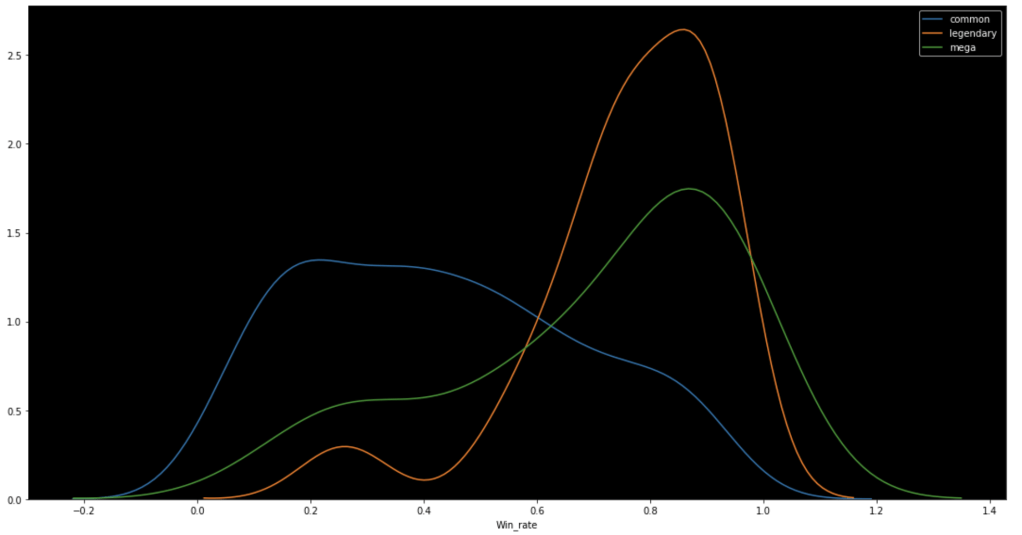
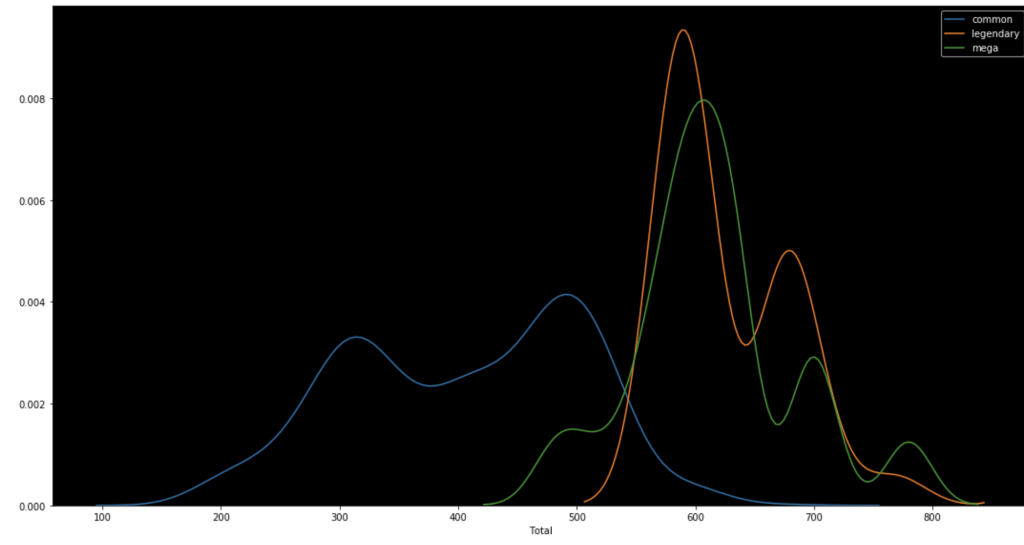
The following graph shows the distributions of win rate and total stats respectively segmented by Pokémon class.
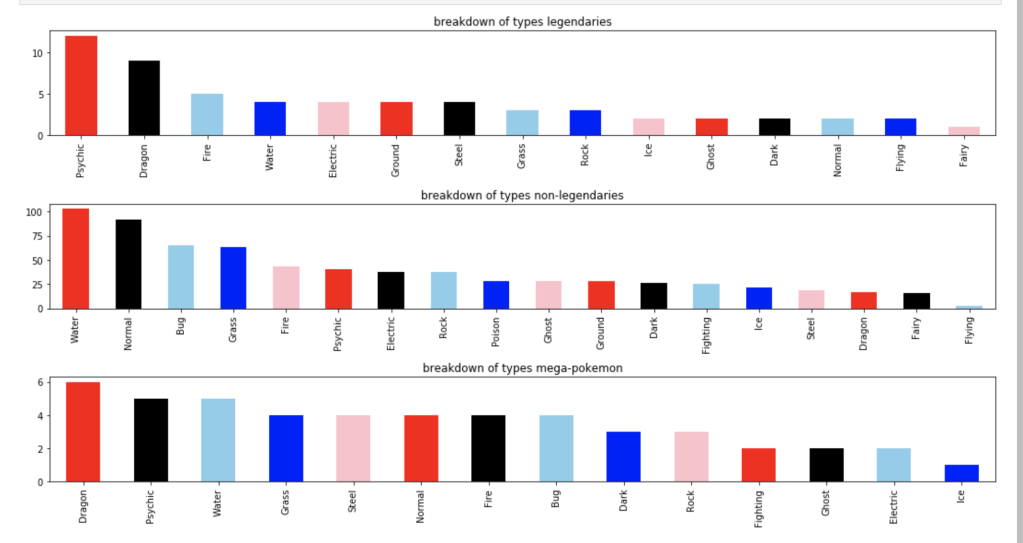
The following graph shows how many Pokémon appear for each type:
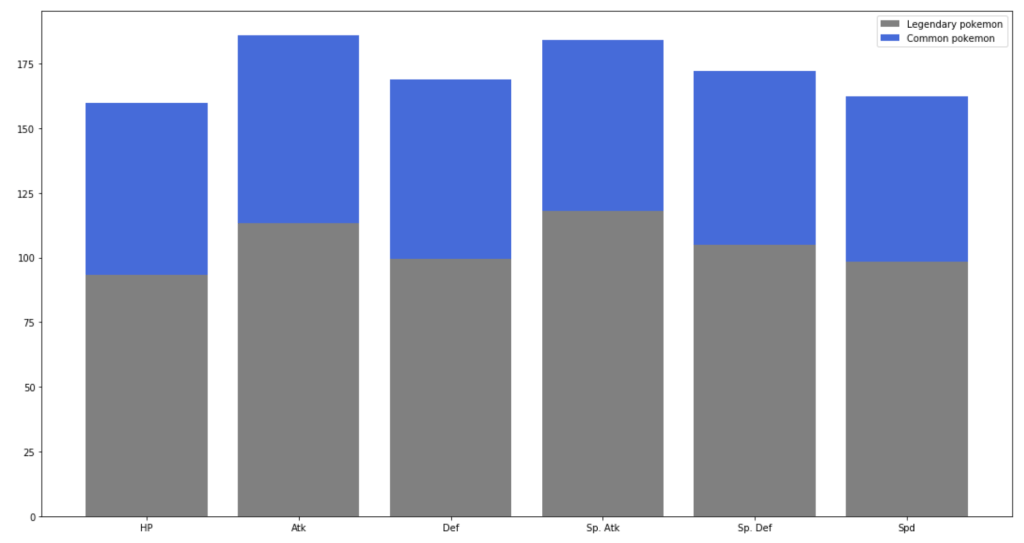
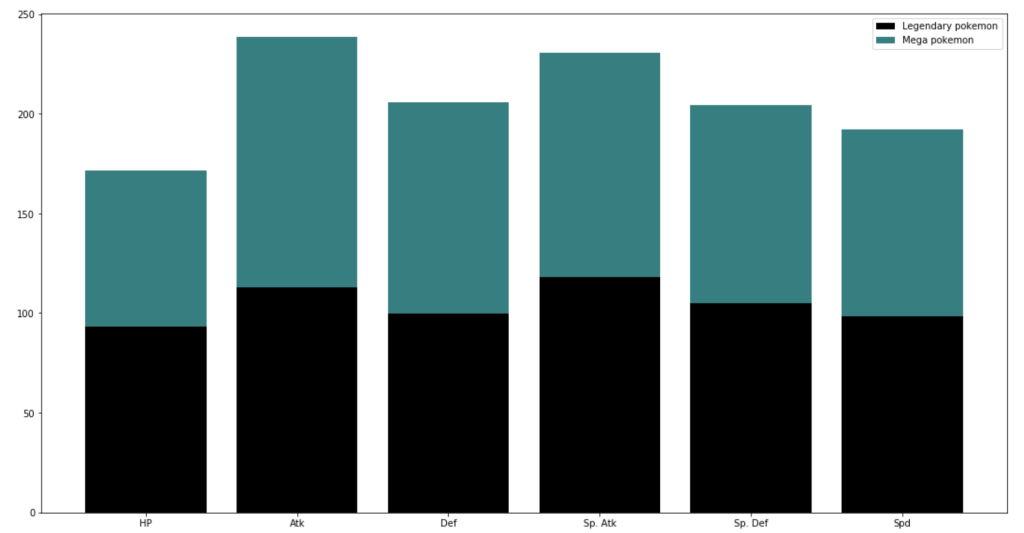
The graph below shows the difference between stats of legendary Pokémon and regular ones.
And next…
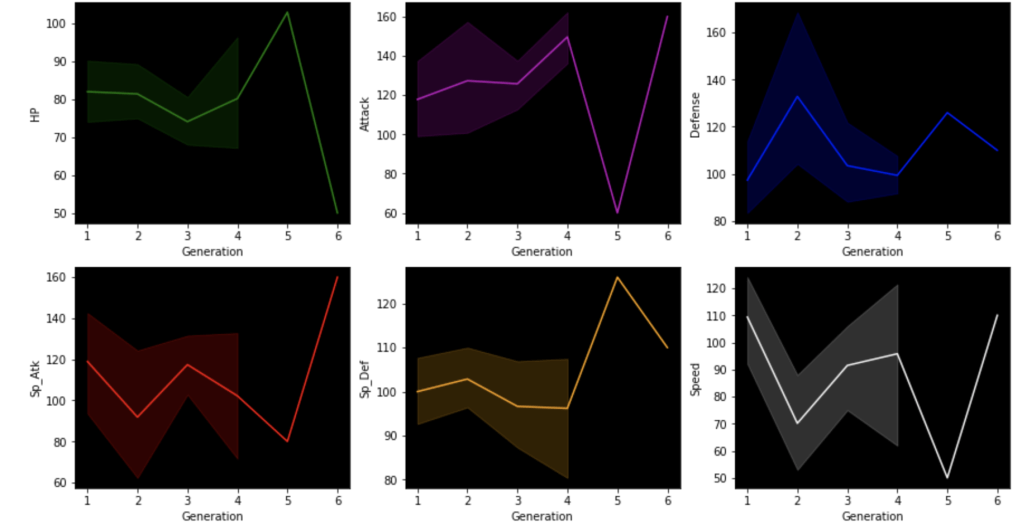
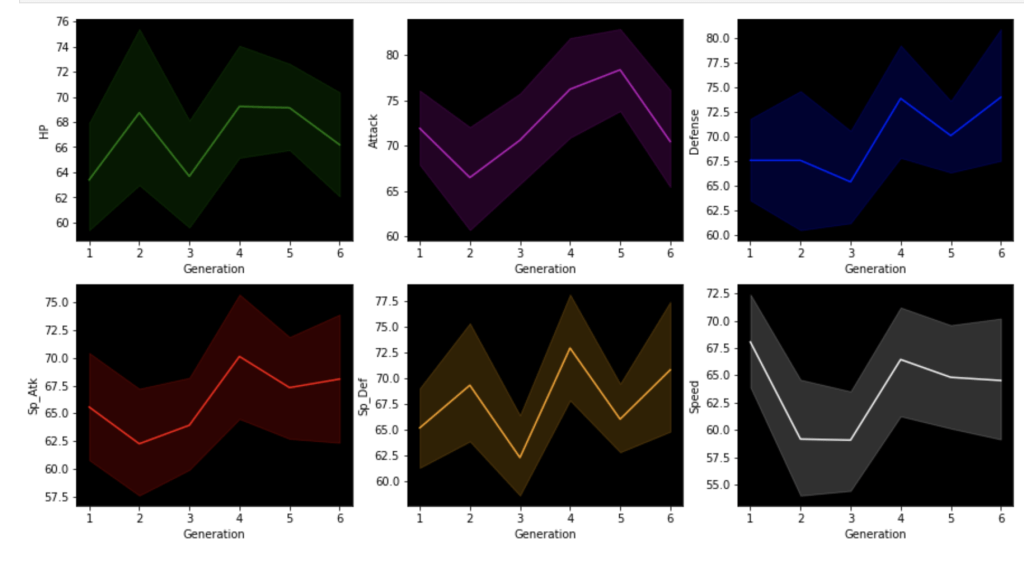
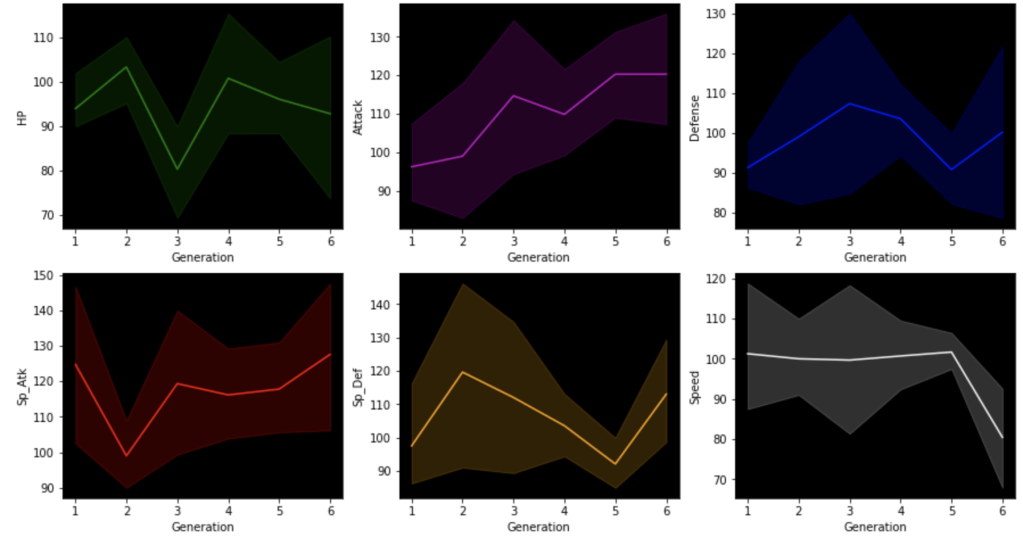
This next set of visuals show trends over the years in common, legendary, and mega Pokémon respectively.
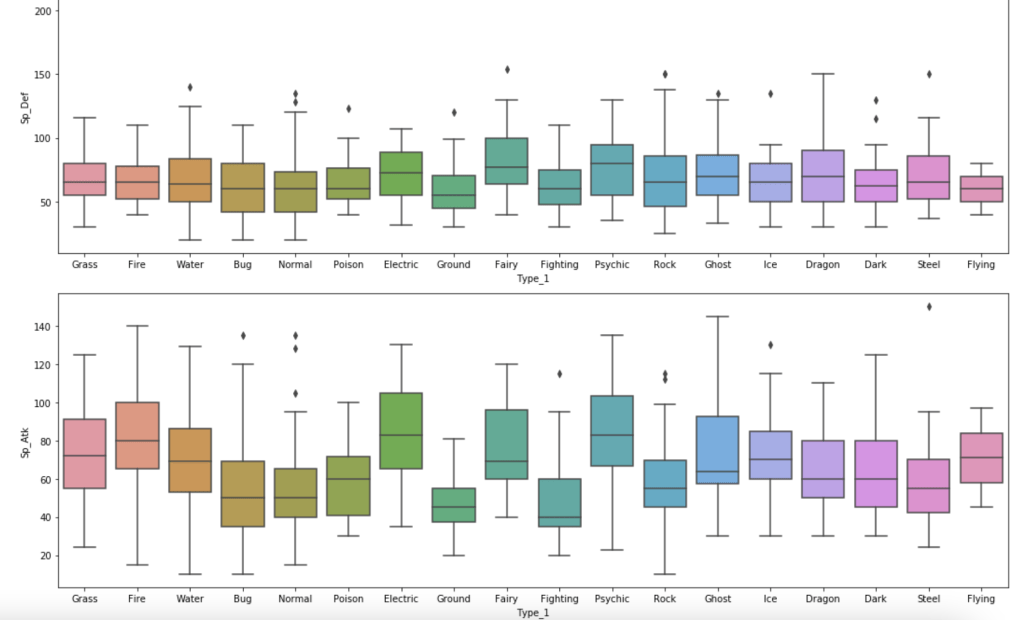
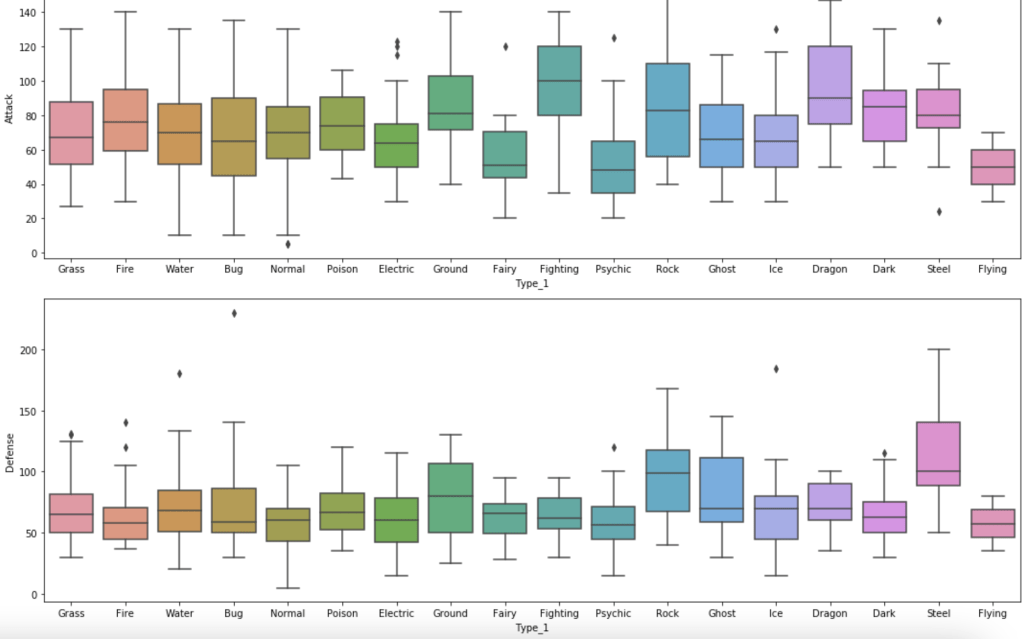
The next series of charts shows the distribution of stats by type with common Pokémon:

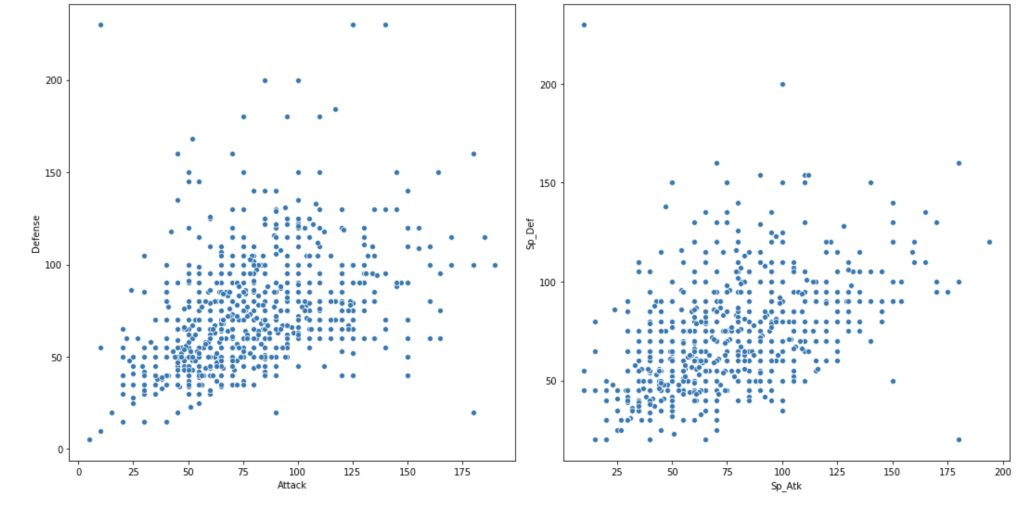
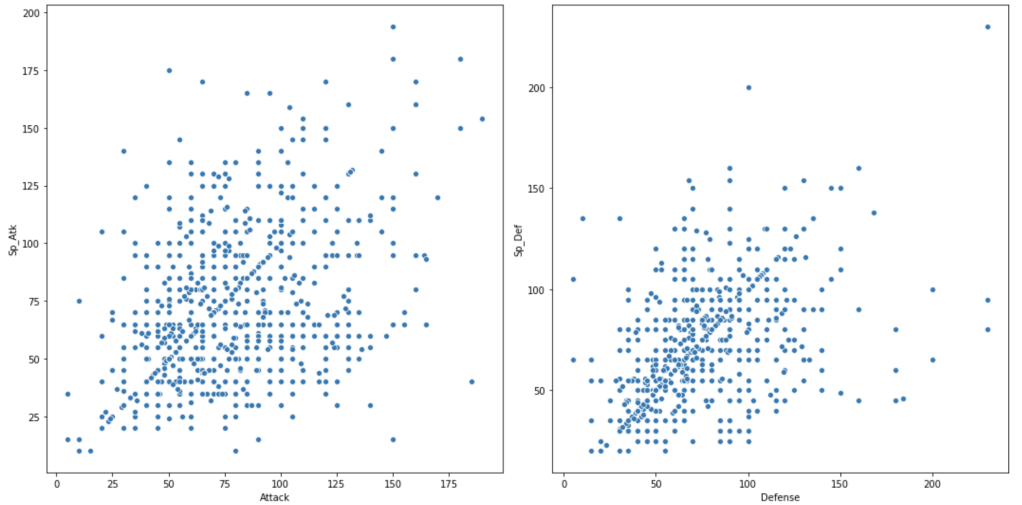
Next, we have scatter plots to compare attack and defense.
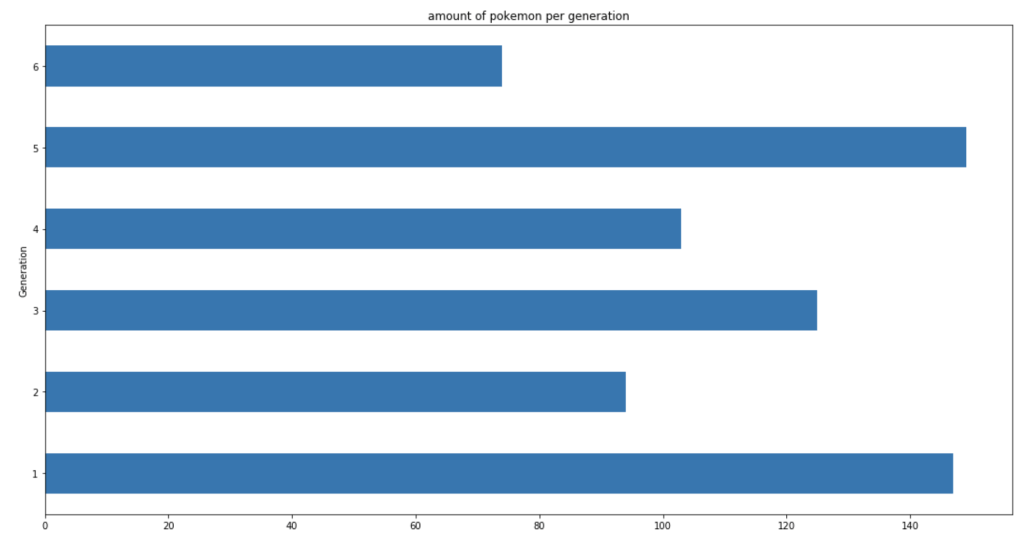
The next chart shows the distribution of total Pokémon across 6 generations.
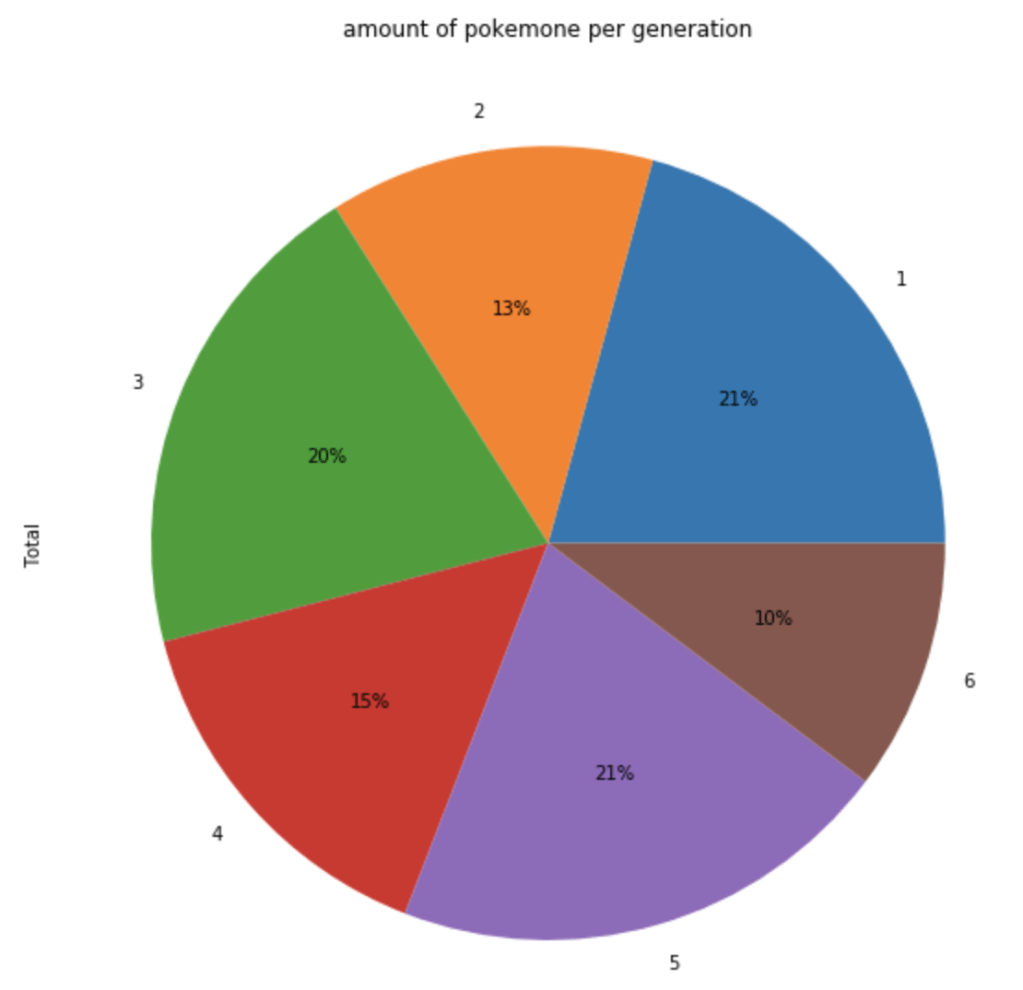
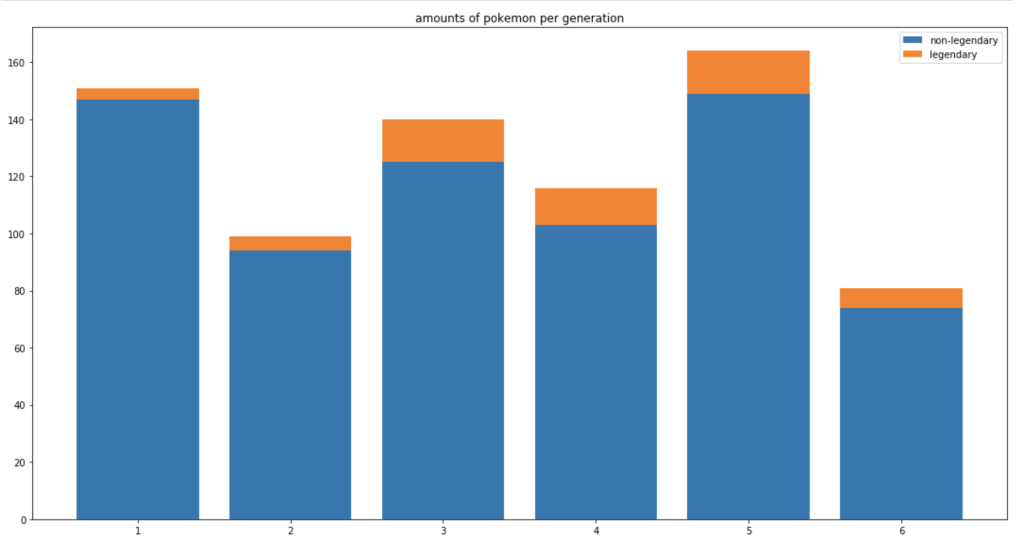
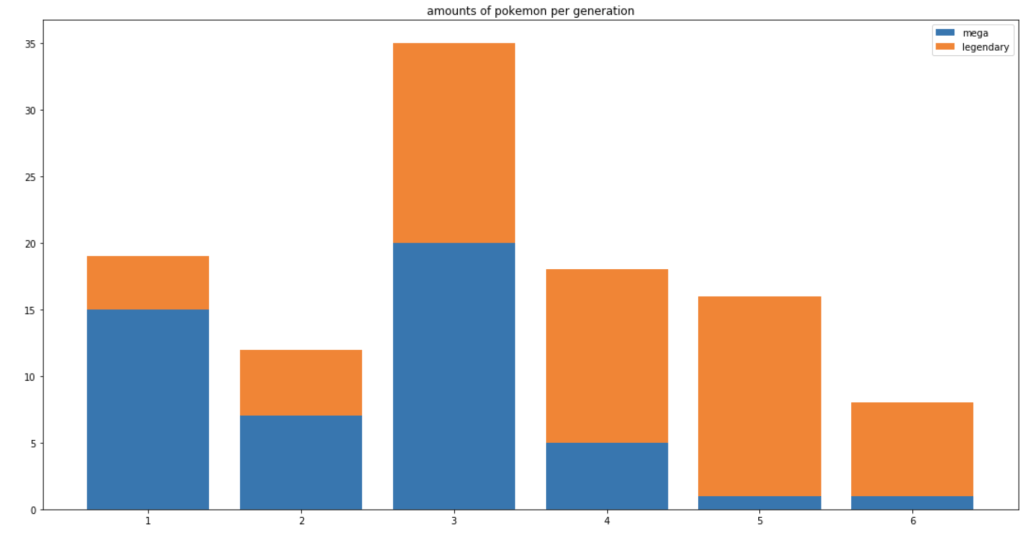
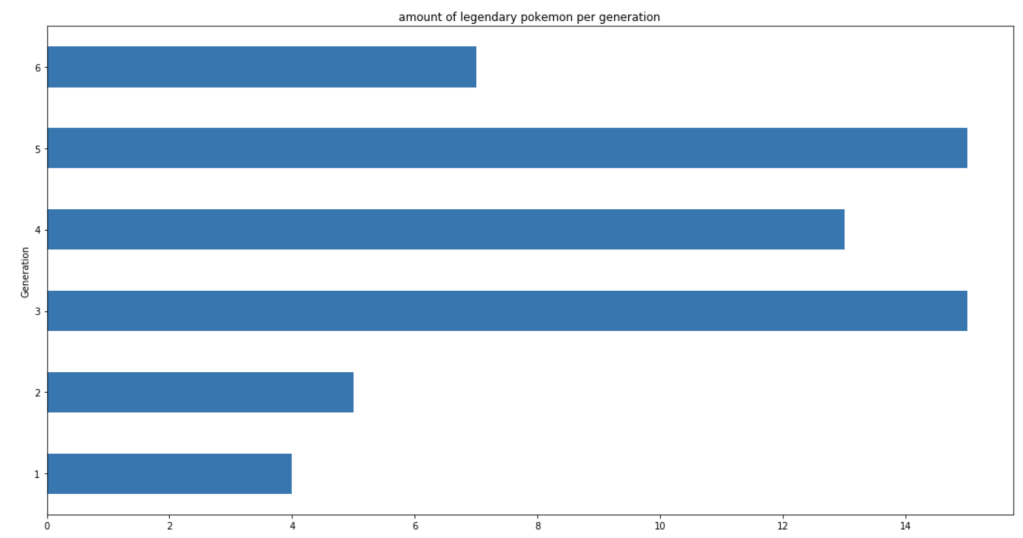
Let’s look at legendary and mega Pokémon.
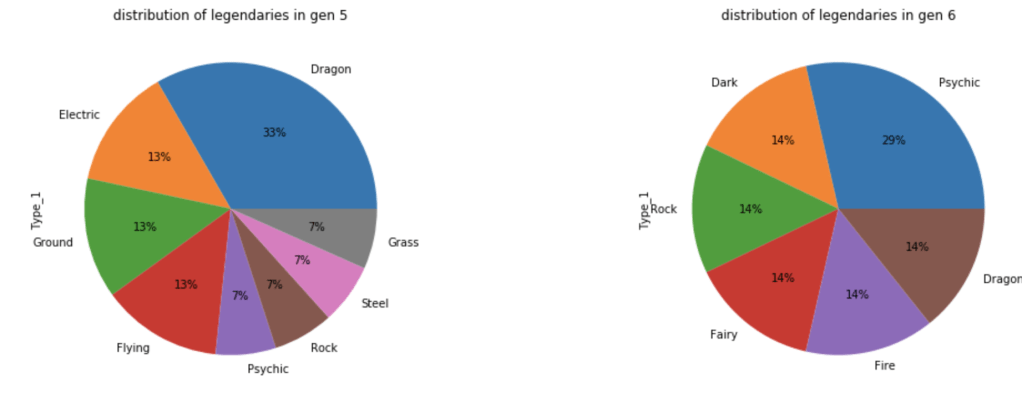
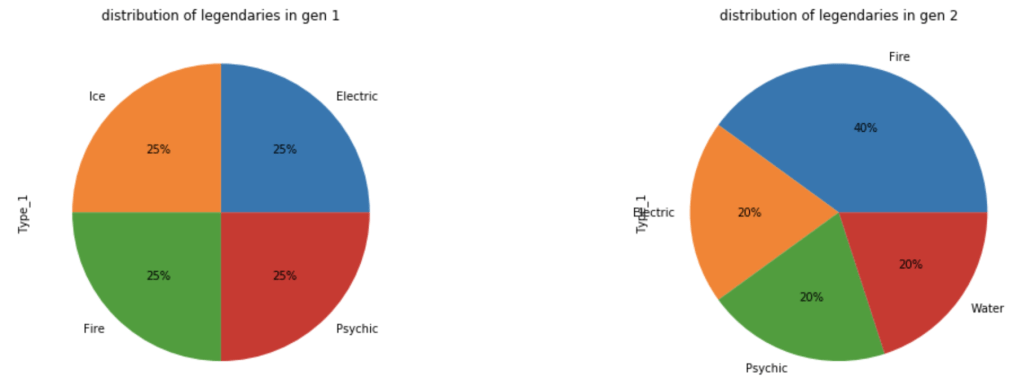
Let’s look at how these legendaries are distributed by type.
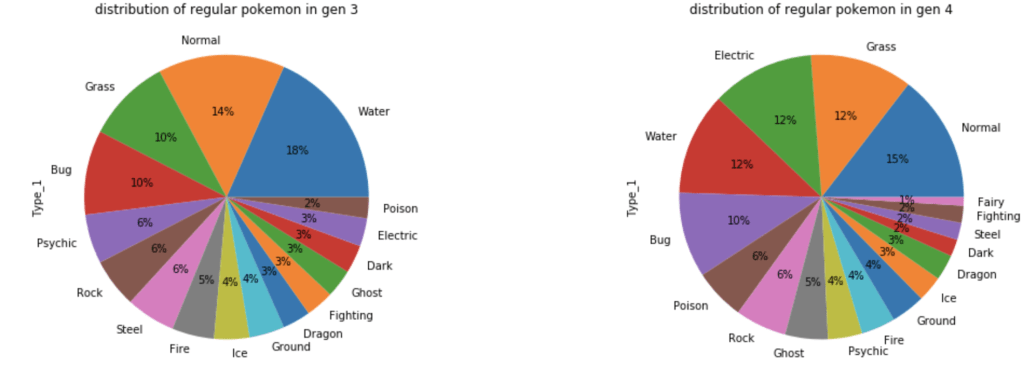
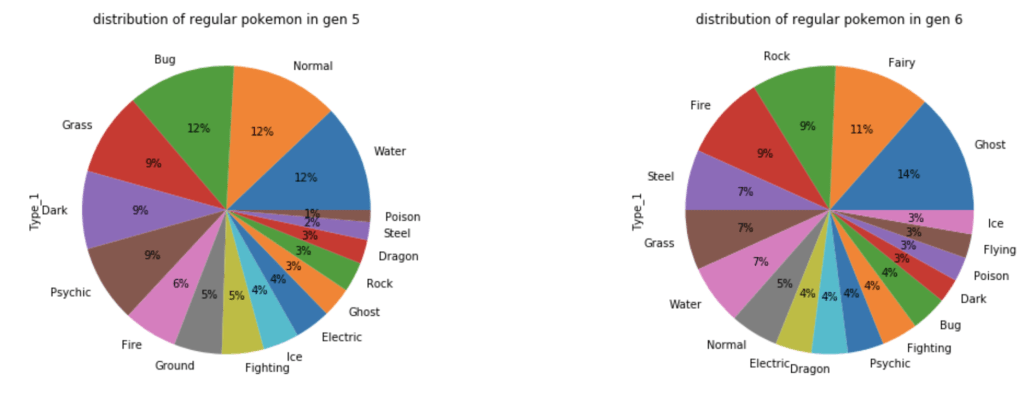
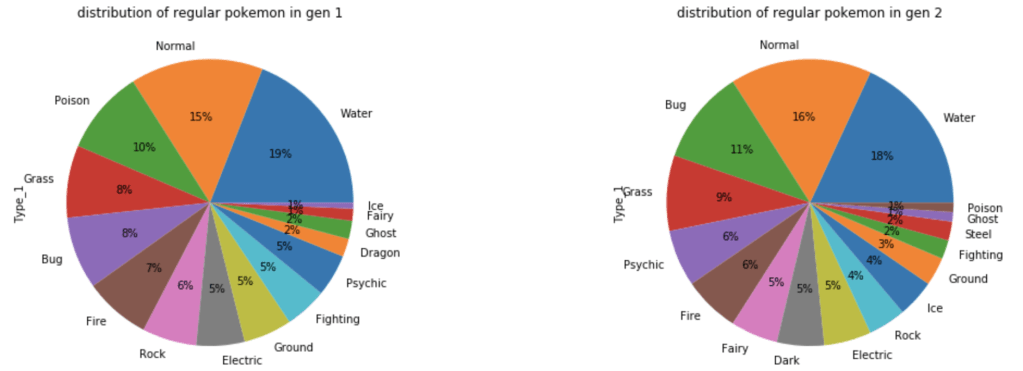
What about common Pokémon?
The next group of visuals shows distribution of stats by generation among legendary Pokémon.

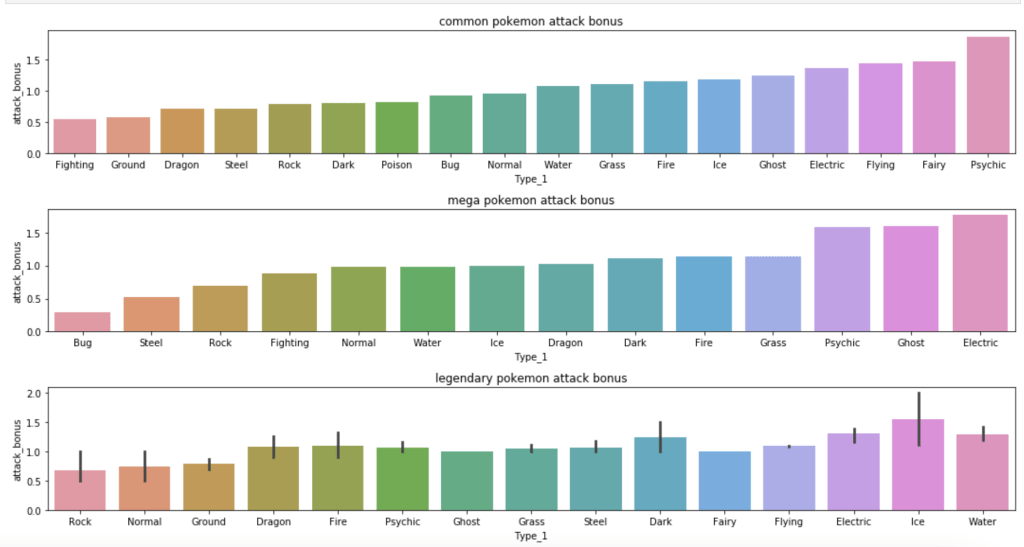
The next set of visuals shows which Pokémon have the highest ratio of special attack to attack
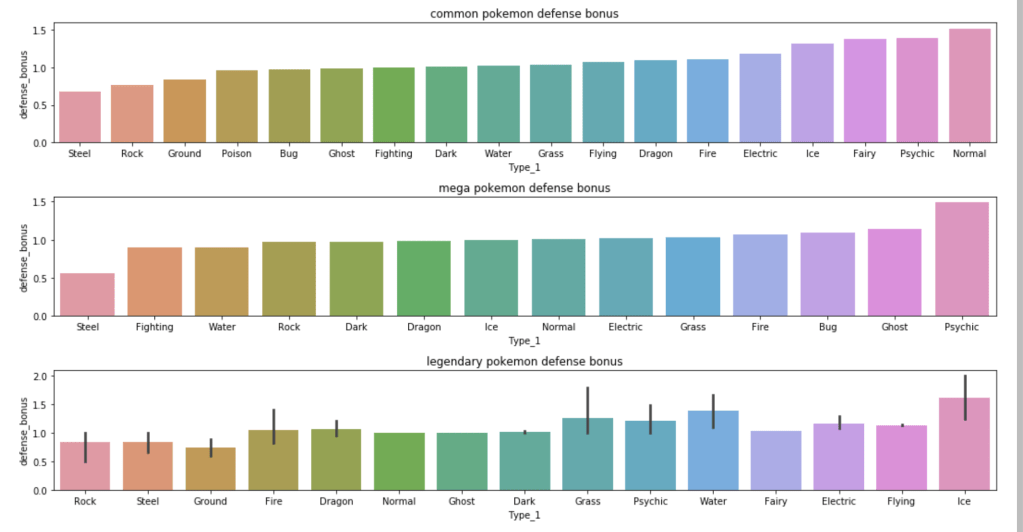
The next set of visuals shows which Pokémon have the highest ratio of special defense to defense
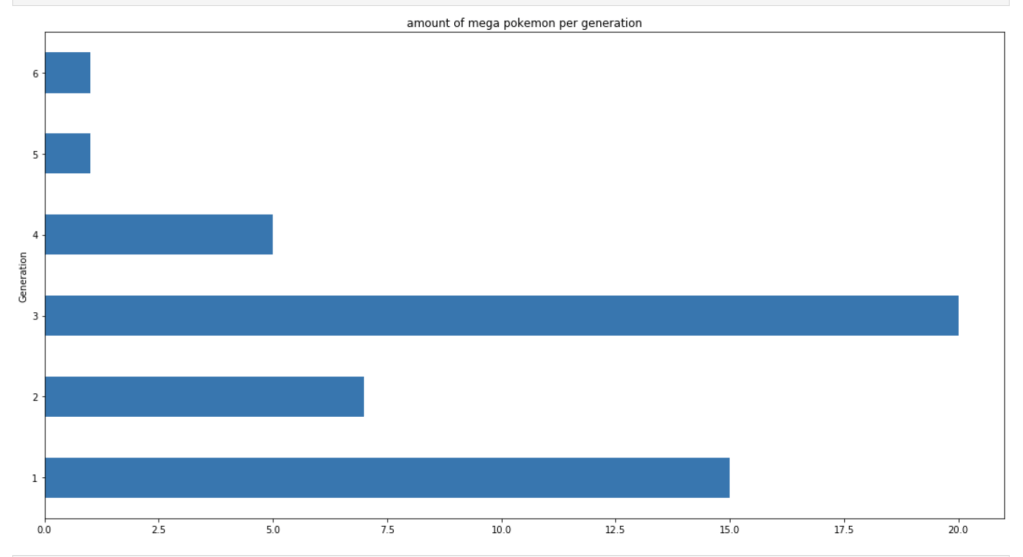
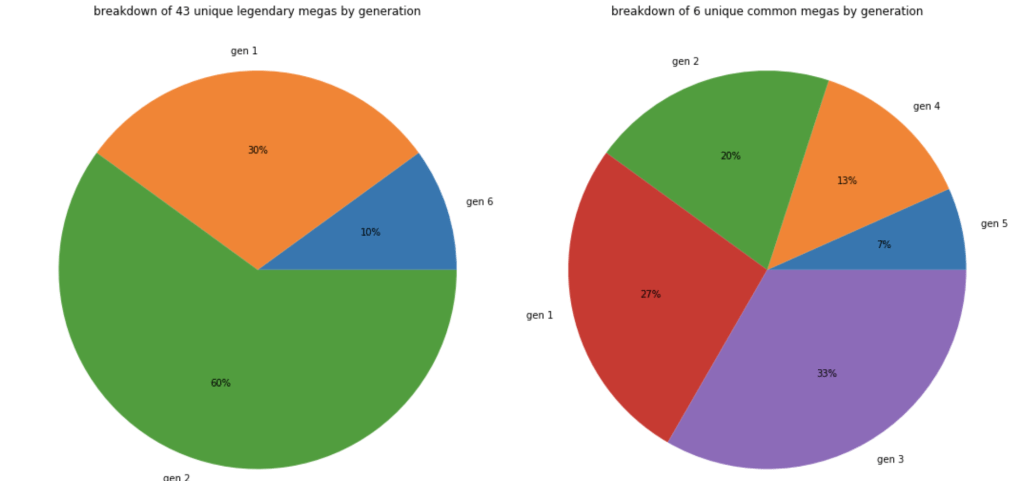
This next set of charts show where mega Pokémon come from.
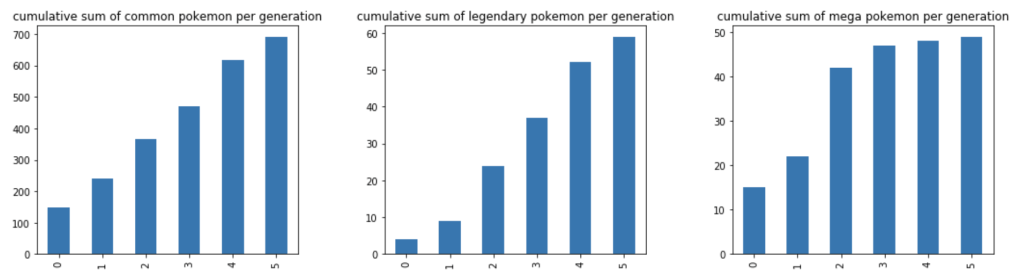
Next, we have a cumulative rise in total Pokémon over the generations.
Models

As I mentioned above, I ran continuous models and discrete models. I ran models for 3 classes of Pokémon: common, legendary, and mega. I also tried various groupings of input features to find the best model while not having any single model dominated by one feature completely. We’ll soon see that some features have outsized impacts.

Continuous Models

The first and most basic model yielded the following feature importance while having 90% accuracy:

Speed and speed ratio were too powerful, so after removing them my accuracy dropped 26% (you read that right). This means I need speed or speed ratio. I chose to keep speed ratio. Also, I removed the type 1, type 2, generation, and “two-type” features based on p-values. Now, I had 77% accuracy with the following feature ranks.

I’ll skip some steps here, but the following feature importances, along with 75% accuracy, seemed most satisfactory:

Interestingly, having special attack/defense being higher than regular attack/defense is not good. I suppose you want a Pokémon’s special stats to be in line with regular ones.

I’ll skip some steps again, but here are my results for mega and legendaries within the continuous model:

Legendary with 60% accuracy:

Mega with 91% accuracy:

Discrete Models

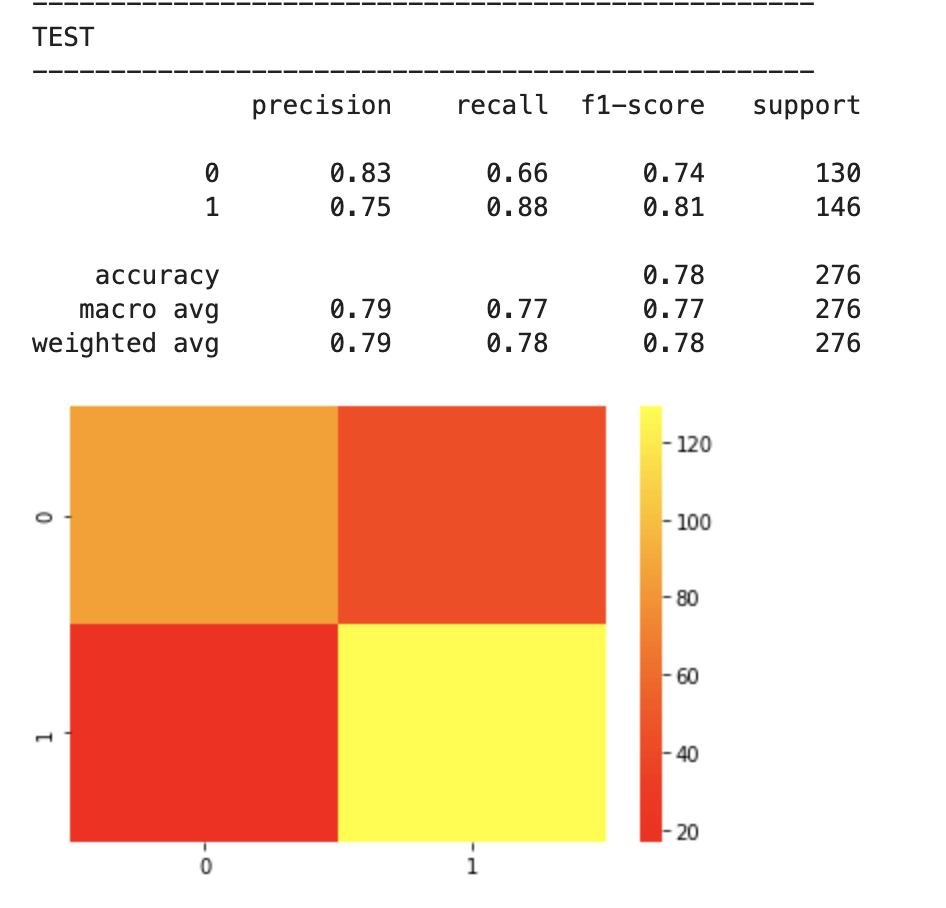
First things first – I need to upsample data. My data was pretty evenly balanced but needed minor adjustments. If you don’t know what I mean by target feature imbalance, check out my blog (on Towards Data Science) over here. Anyway, here comes my best model (notice the features I chose to include):
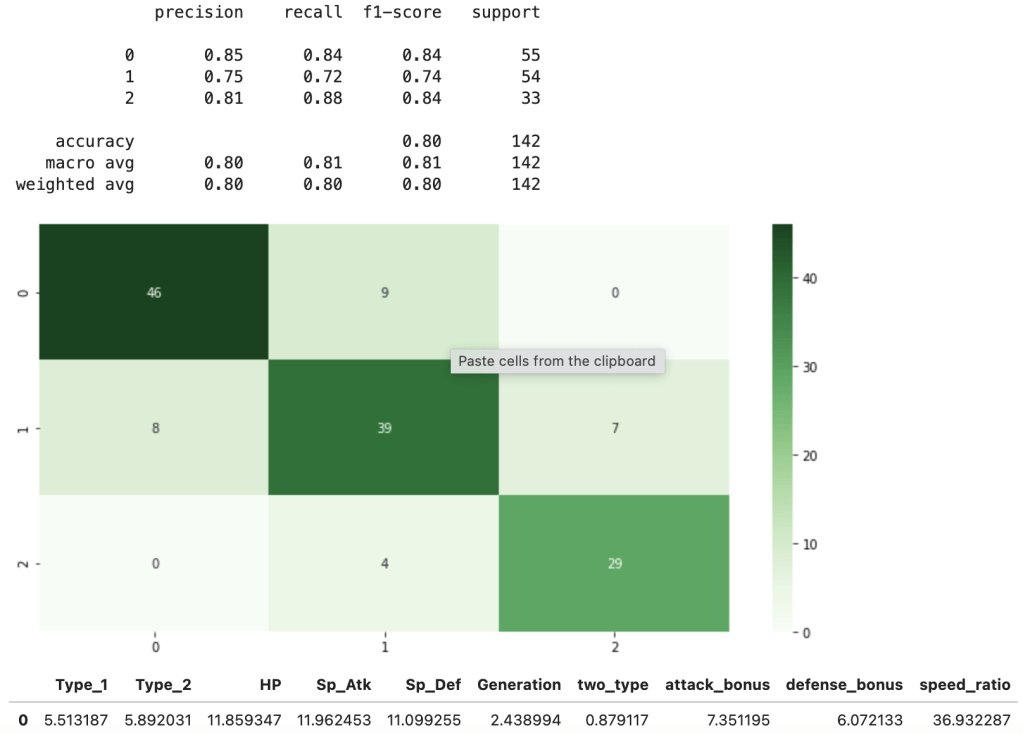
This shows a strong accuracy at 80% along with a good confusion matrix and interesting feature importances. For more information on what the metrics above, such as recall, actually mean, check out my blog over here.

Next Steps

One-Hot Encoding. I think it would be interesting to learn more about which specific types are the strongest. I plan to update this blog after that analysis so stay tuned.

Neural Network. I would love to run a neural network for both the continuous and discrete case.

Polynomial Model. I would also love to see if polynomial features improve accuracy (and possibly help delete the speed-related features).

Conclusion

For all you Pokémon fans and anyone else who enjoys this type of analysis, I hope you liked reading this post. I’m looking forward to the next 25 years of Pokémon.

Sink or Swim

Effectively Predicting the Outcome of a Shark Tank Pitch

Pin on Funny
yikes

Introduction

Thank you for visiting my blog today!

Recently, during my quarantine, I have found myself watching a lot of Shark Tank. In case you are living under a rock, Shark Tank is a thrilling (and often parodied) reality TV show (currently on CNBC) where hopeful entrepreneurs come into the “tank” and face-off against five “sharks.” The sharks are successful entrepreneurs who are basically de-facto venture capitalists looking to invest in the hopeful entrepreneurs mentioned above. It’s called “Shark Tank” and not something a bit less intimidating because things get intense in the tank. Entrepreneurs are “put through the ringer” and forced to prove themselves worthy of investment in every way imaginable while standing up to strong scrutiny from the sharks. Entrepreneurs need to demonstrate that they have a good product, understand how to run a business, understand the economic climate, are a pleasant person to work with, are trustworthy, and the list goes on and on. Plus, contestants are on TV for the whole world to watch and that just adds to the pressure to impress. If one succeeds, and manages to agree on a deal with a shark (usually a shark pays a dollar amount for a percentage equity in an entrepreneur’s business), the rewards are usually quite spectacular and entrepreneurs tend to get quite rich. I like to think of the show, even though I watch it so much, as a nice way for regular folks like myself to feel intelligent and business-savvy for a hot second. Plus, it’s always hilarious to see some of the less traditional business pitches (The “Ionic Ear” did not age well: https://www.youtube.com/watch?v=FTttlgdvouY). That said, I set out to look at the first couple seasons of Shark Tank from a data scientist / statistician’s perspective and build a model to understand whether or not an entrepreneur would succeed or fail during their moment in the tank. Let’s dive in!

Scary Shark GIFs | Tenor

Data Collection

To start off, my data comes from kaggle.com and can be found at (https://www.kaggle.com/rahulsathyajit/shark-tank-pitches). My goal was to predict the target feature “deal” which was either a zero representing a failure to agree on a deal or a 1 for a successful pitch. My predictive features were (by name): description, episode, category, entrepreneurs, location, website, askedFor, exchangeForStake, valuation, season, shark1, shark2, shark3, shark4, shark5, episode-season, and Multiple Entrepreneurs. Entrepreneurs meant the name of the person pitching a new business, asked for means how much money was requested, exchange for stake represents percent ownership offered by the entrepreneur, valuation was the implied valuation of the company, shark1-5 is just who was present (so shark1 could be Mark Cuban or Kevin Harrington, for example), and multiple entrepreneurs was a binary of whether or not there were multiple business owners beforehand. I think those are the only features that require explanation. I used dummy variables to identify which sharks were present in each pitch (this is different from the shark1 variable as now it says Mark Cuban, for example, as a column name with either a zero or one assigned depending on whether or not he was on for that episode) and also used dummy variables to identify the category of each pitch. I also created some custom features. Thus, before removing highly correlated features, my features now also included the dummy variables described above, website converted to a true-false variable depending on whether or not one existed, website length, a binned perspective on the amount asked for and valuation, and a numeric label identifying which unique group of sharks sat for each pitch.
EDA (Exploratory Data Analysis)
The main goal of my blog here was to see how strong of a model I could build. However, an exciting part of any data-oriented problem is actually looking at the data and getting comfortable with what it looks like both numerically and visually. This allows one to easily share fun observations, but also provides context on how to think about some features throughout the project. Here are some of my findings:

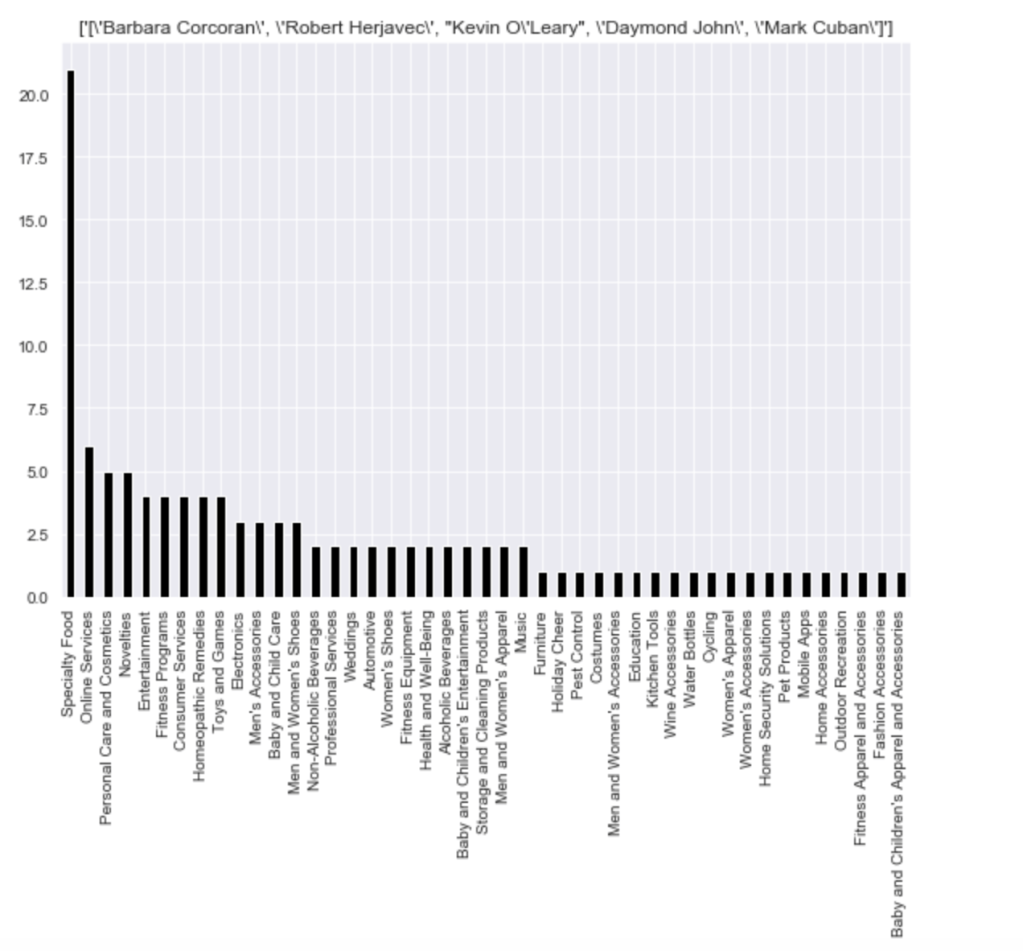
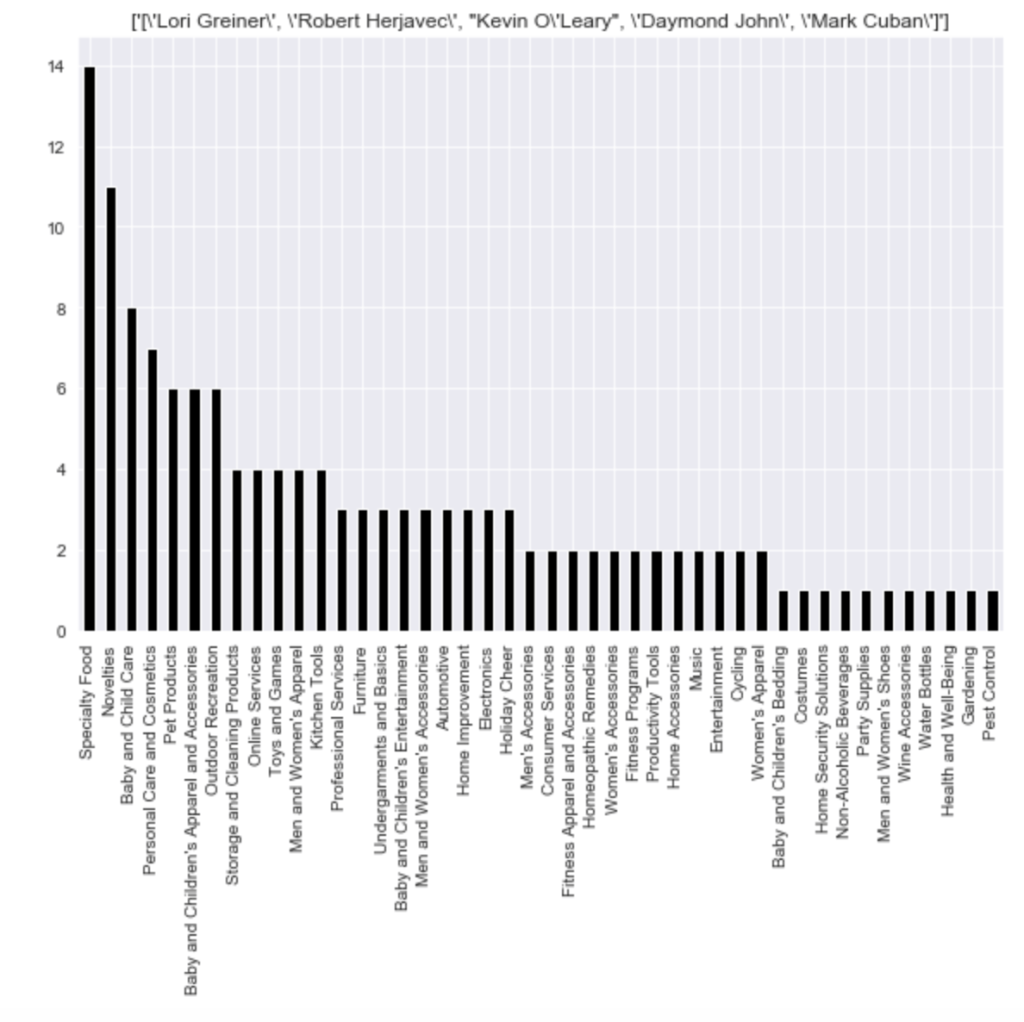
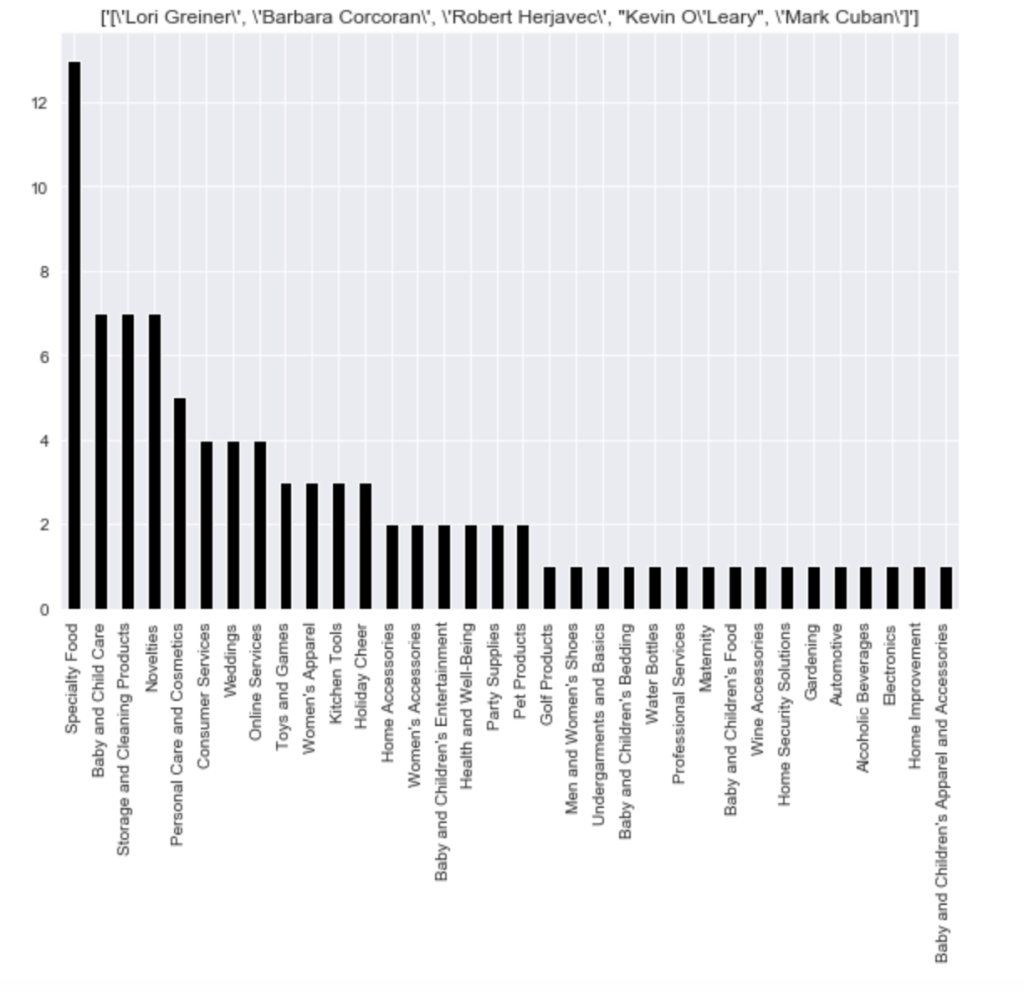
Here is the distribution of the most common pitches (using top 15):

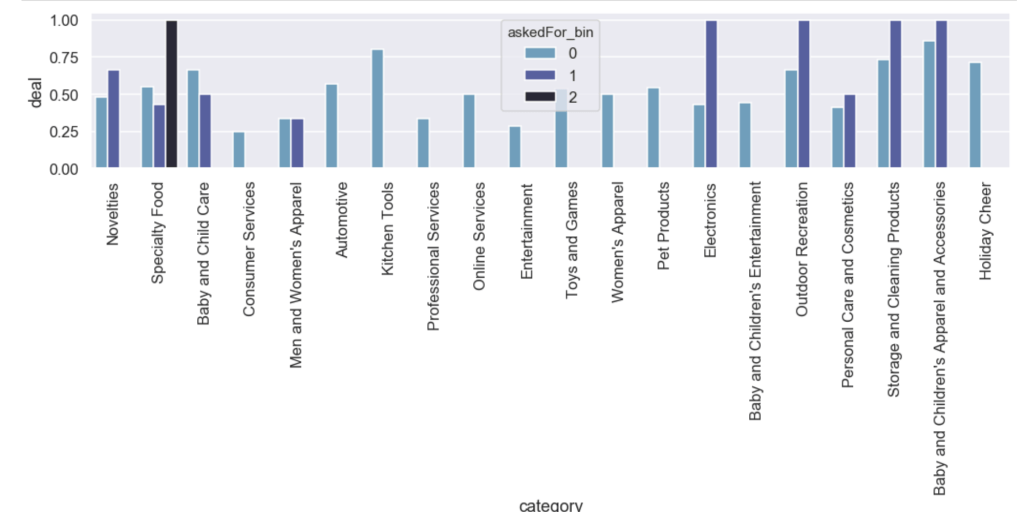
Here is the likelihood of getting a deal by category with an added filter for how much of a stake was asked for:

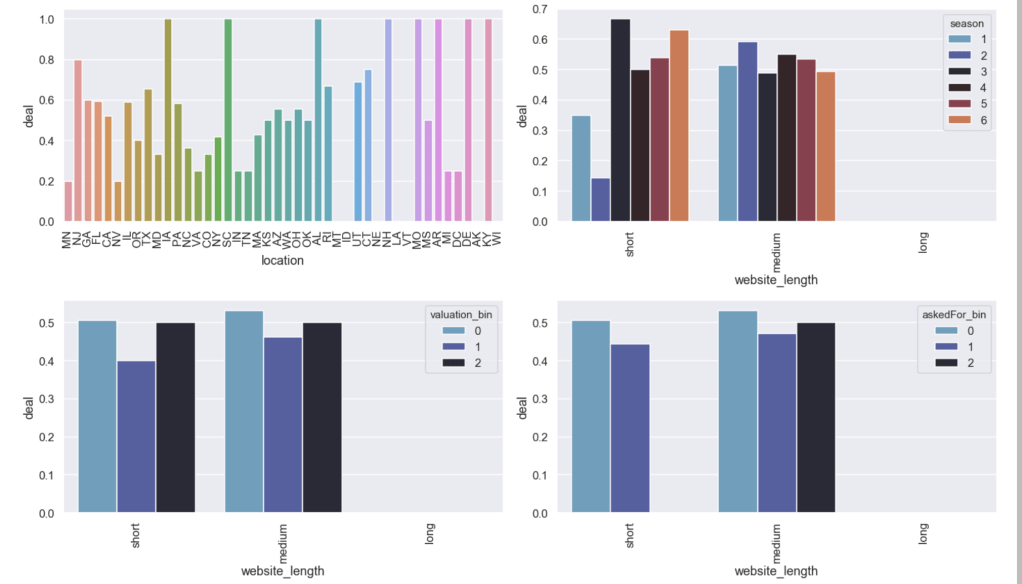
Here are some other relationships with the likelihood of getting a deal:

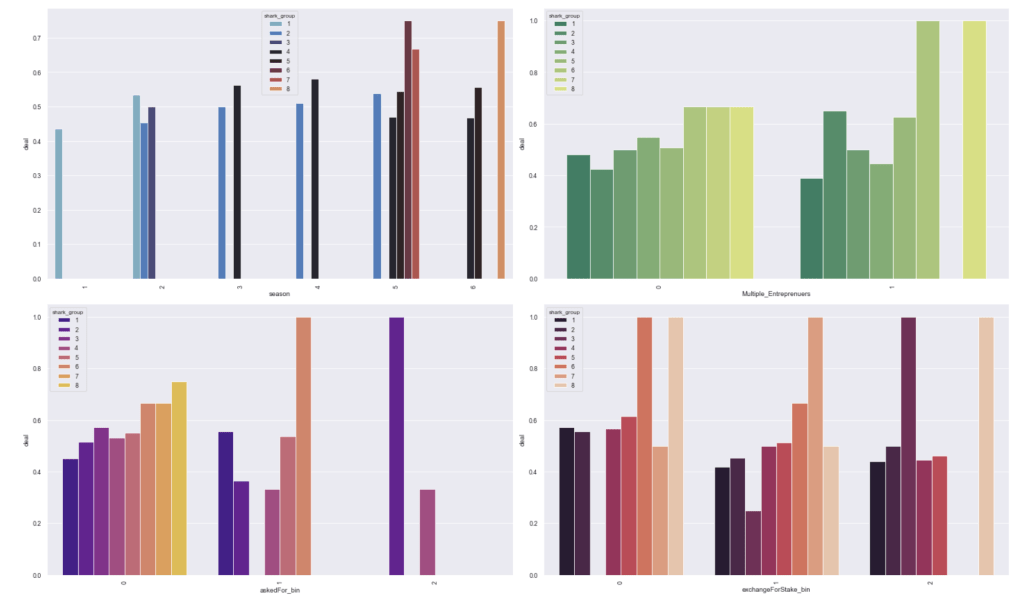
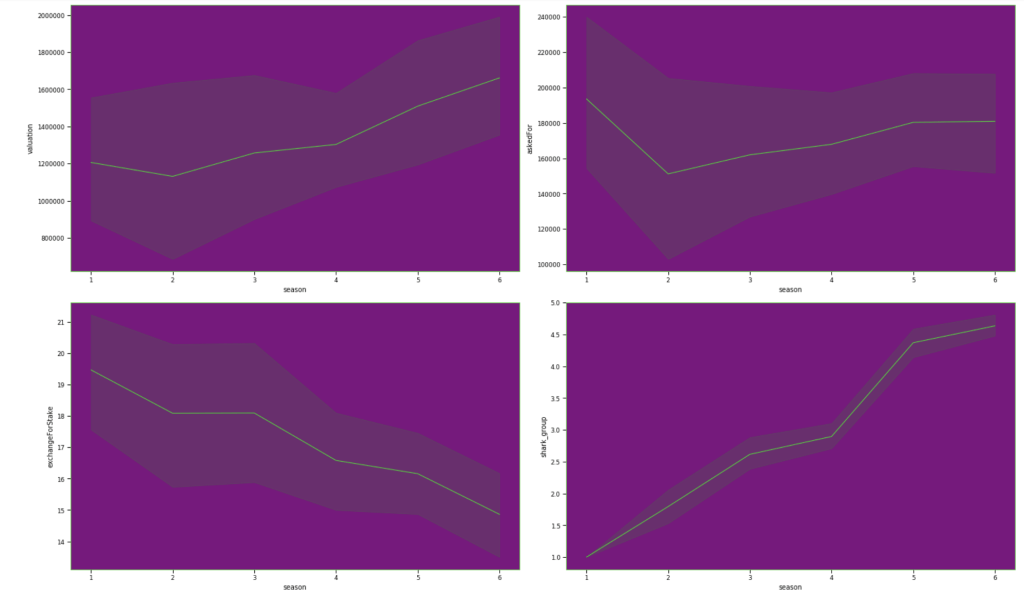
Here are some basic trends from season 1 to season 6:

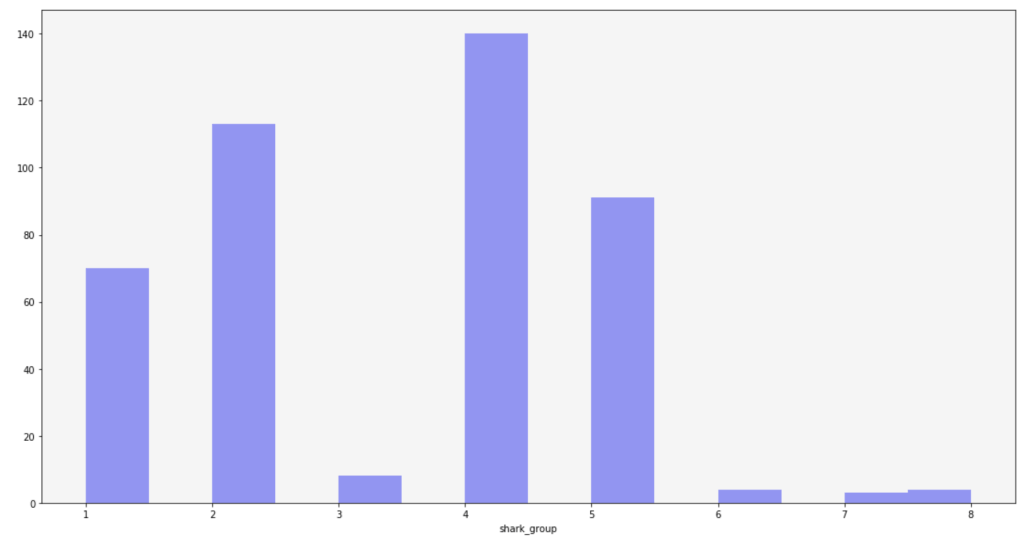
Here is the frequency of each shark group:

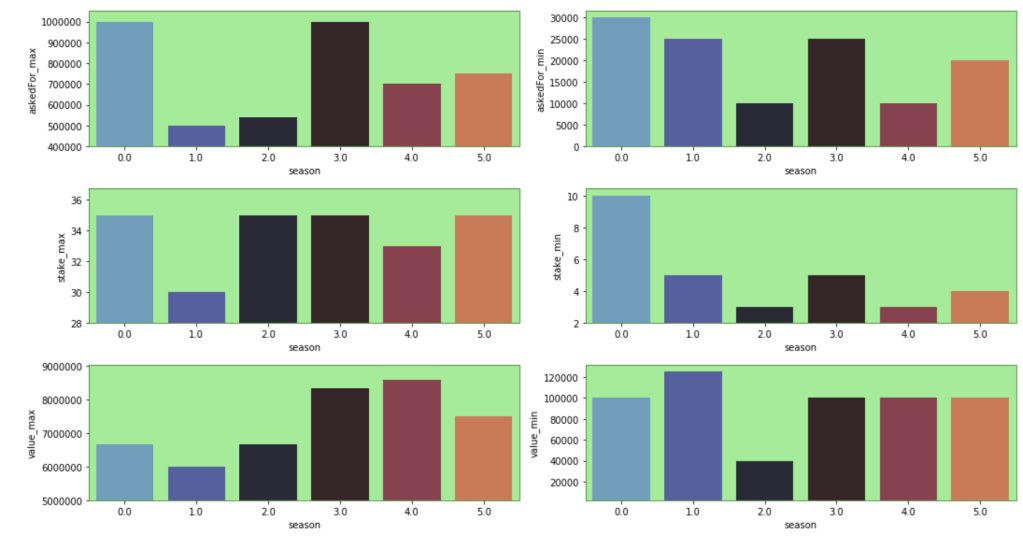
Here are some other trends over the seasons. Keep in mind that the index starts at zero but that relates to season 1:

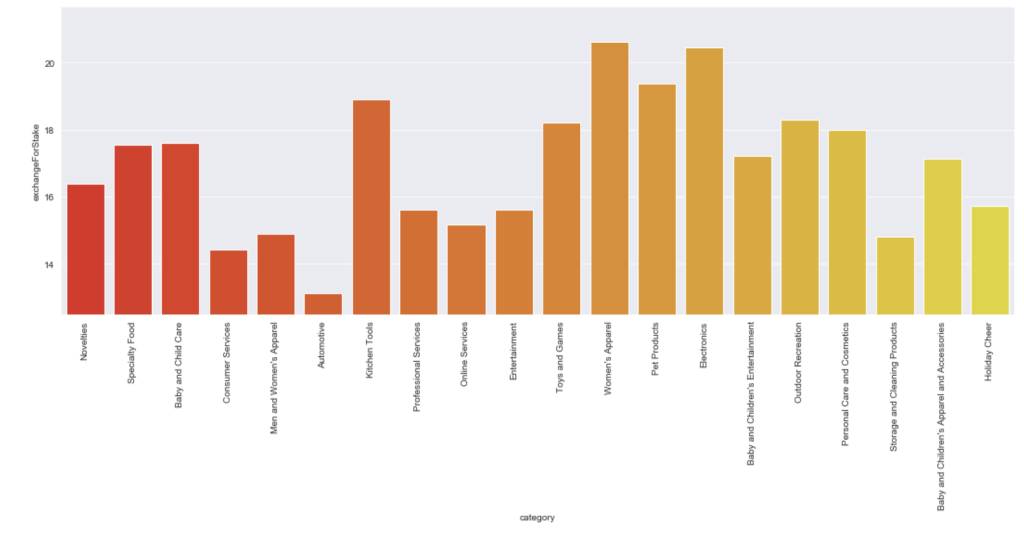
Here is the average stake offered by leading categories:

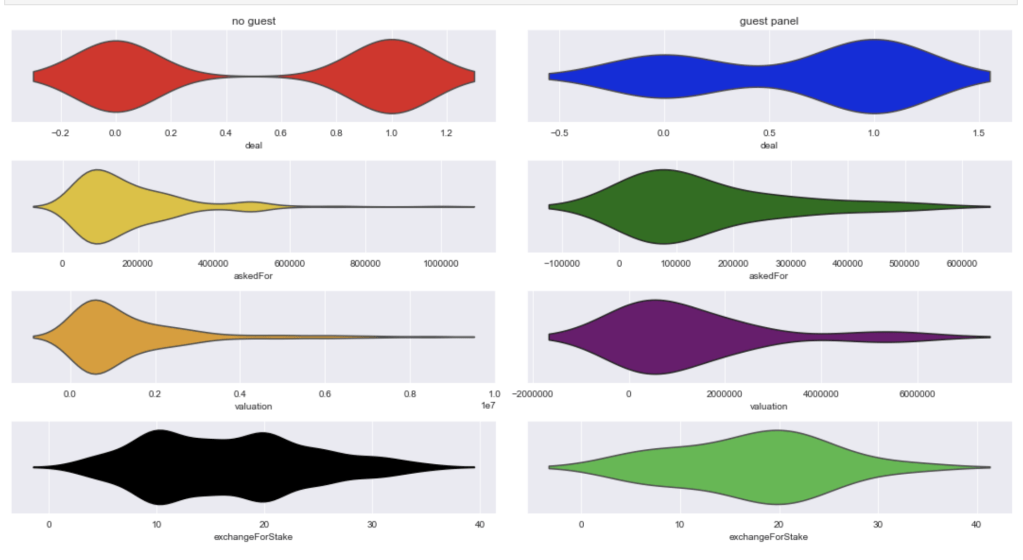
Here comes an interesting breakdown of what happens when there is and is not a guest shark like Richard Branson:

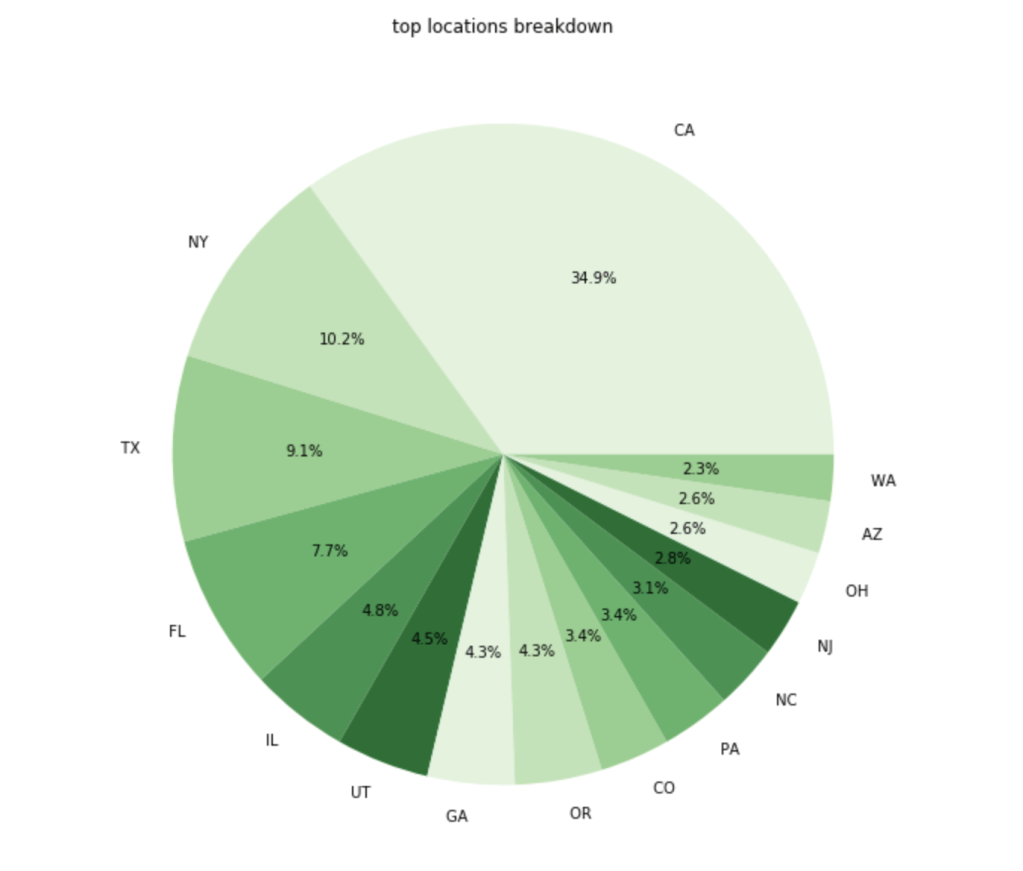
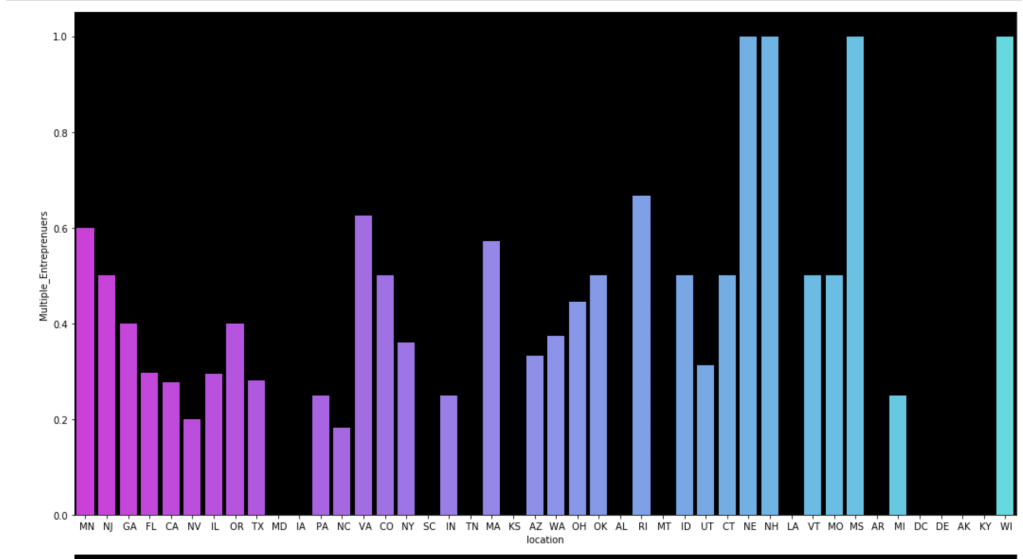
Here is a breakdown of where the most common entrepreneurs come from:

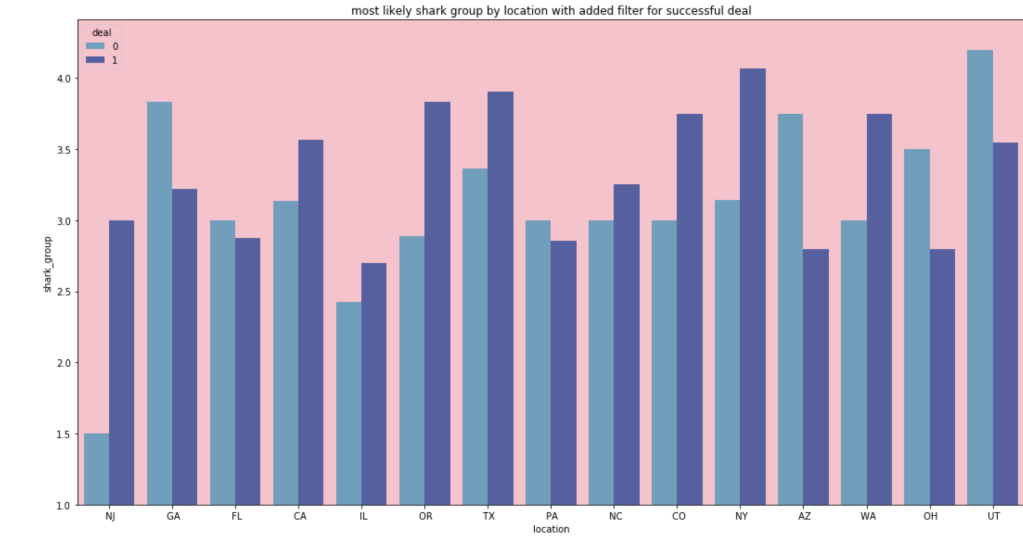
In terms of the most likely shark group for people from different locations:

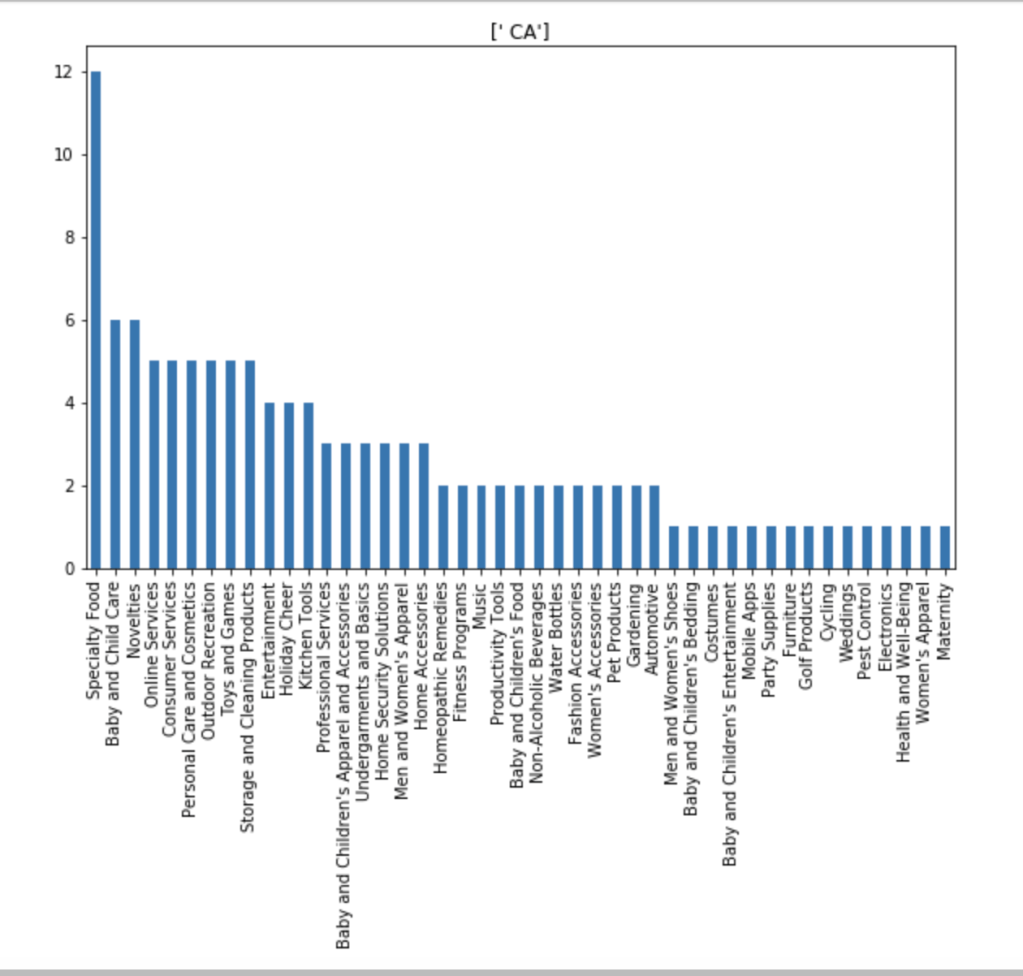
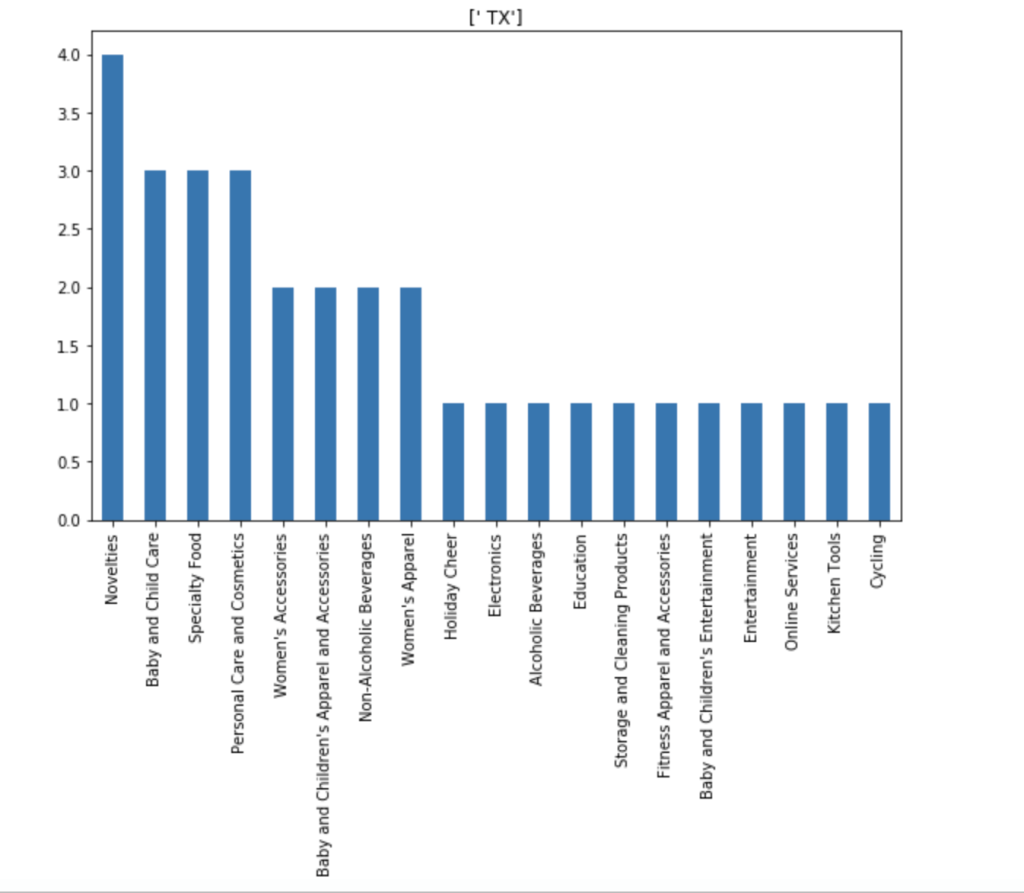
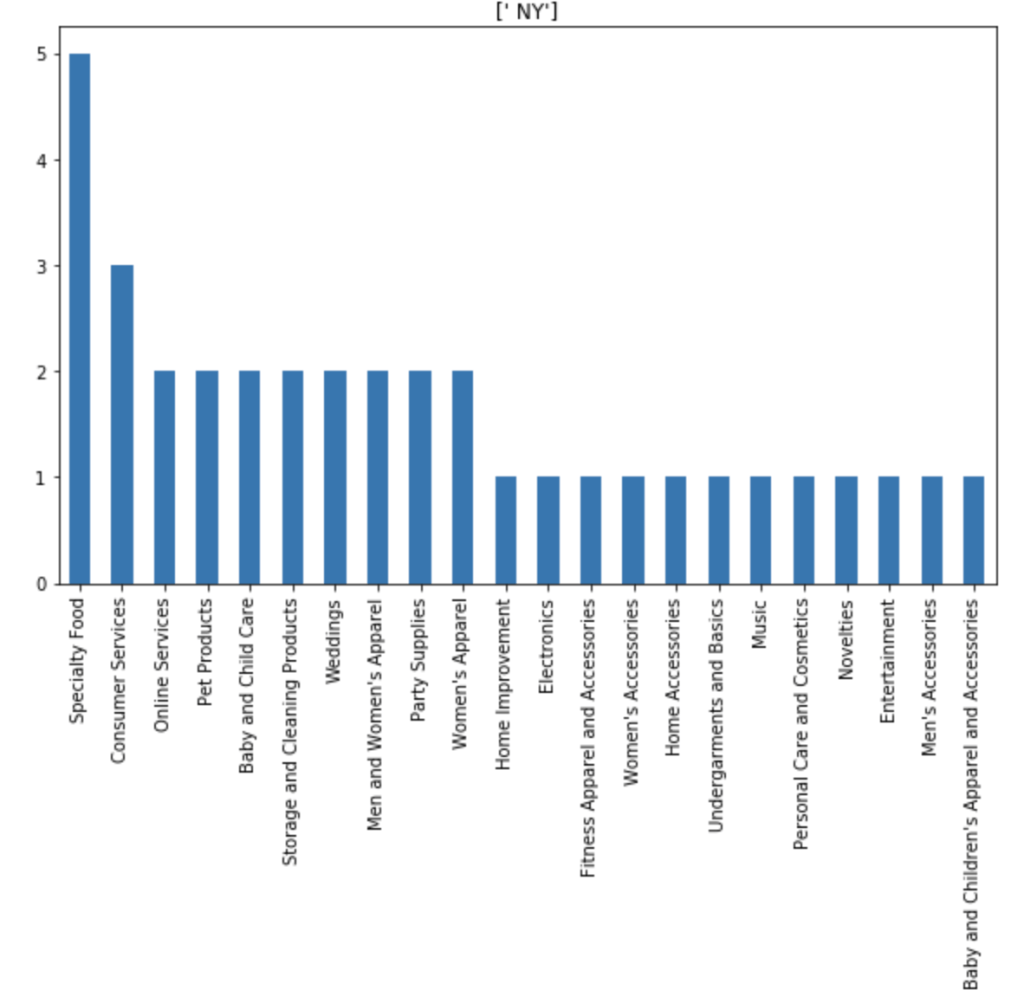
I also made some visuals of the amount of appearances of each unique category by each of the 50 states. We obviously won’t go through every state. Here are a couple, though:

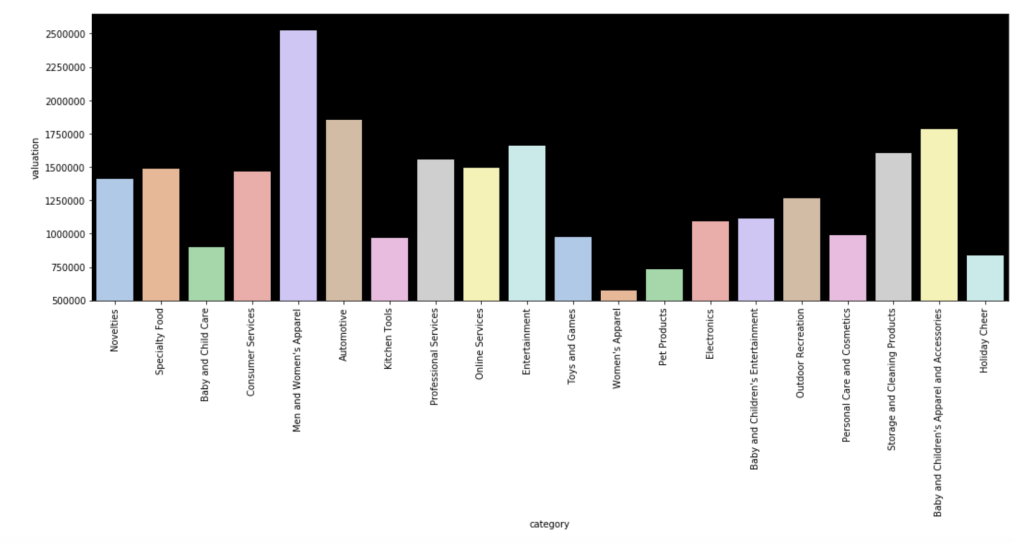
Here is the average valuation by category:

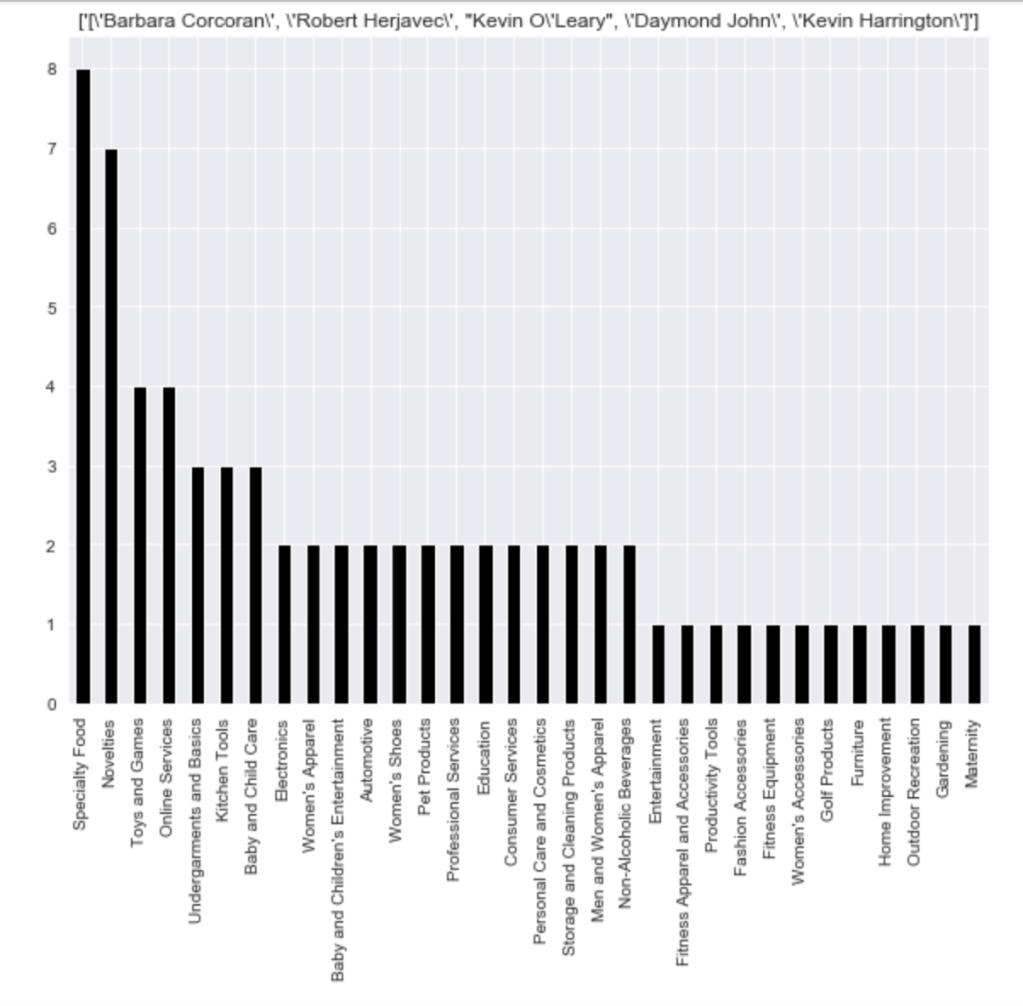
Here is a distribution of pitches to the different shark groups (please ignore the weird formatting):

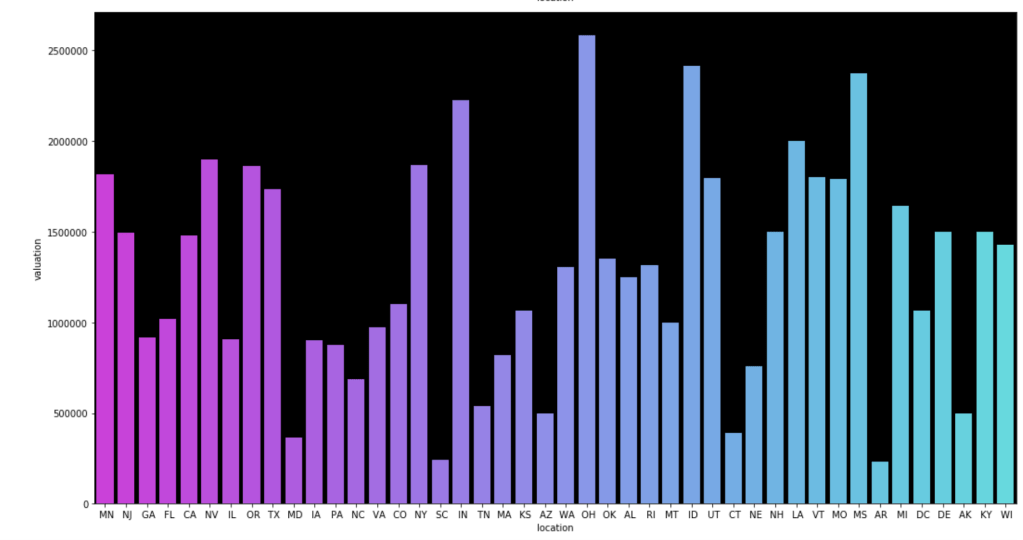
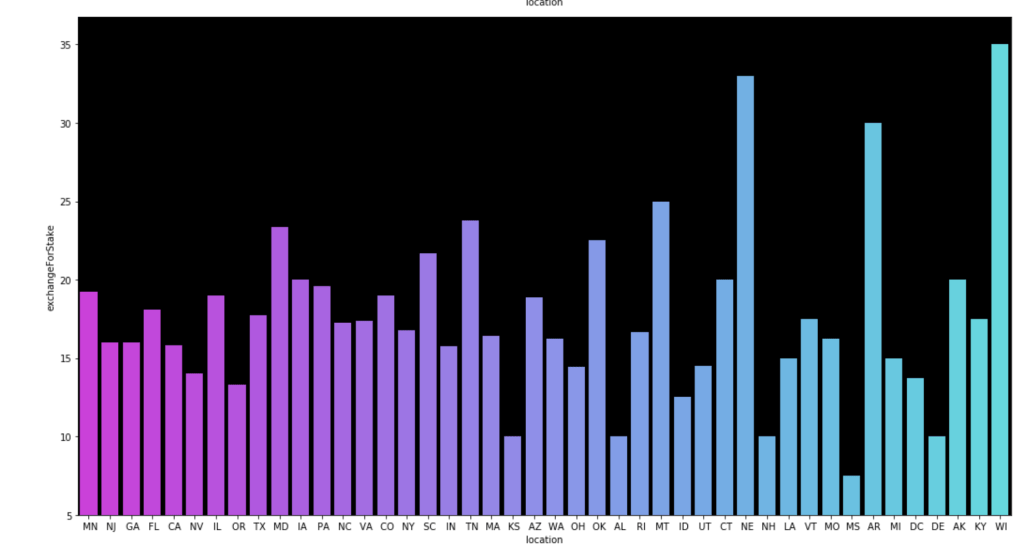
Here come some various visuals related to location:

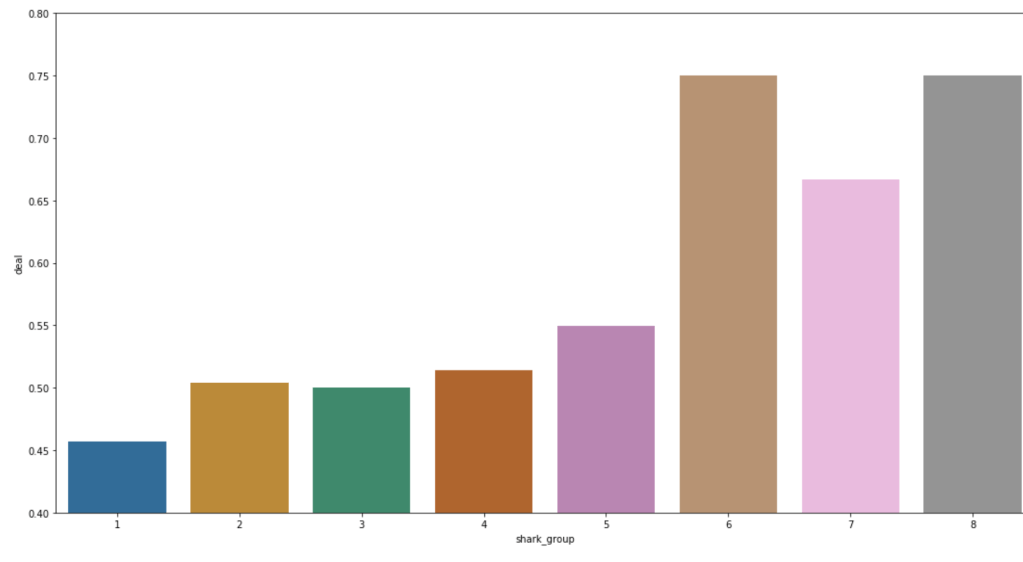
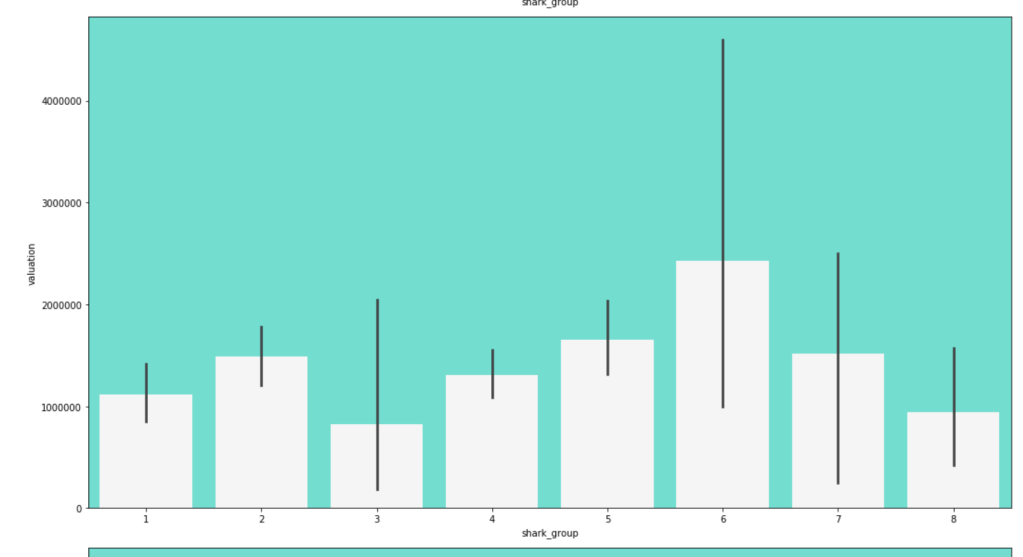
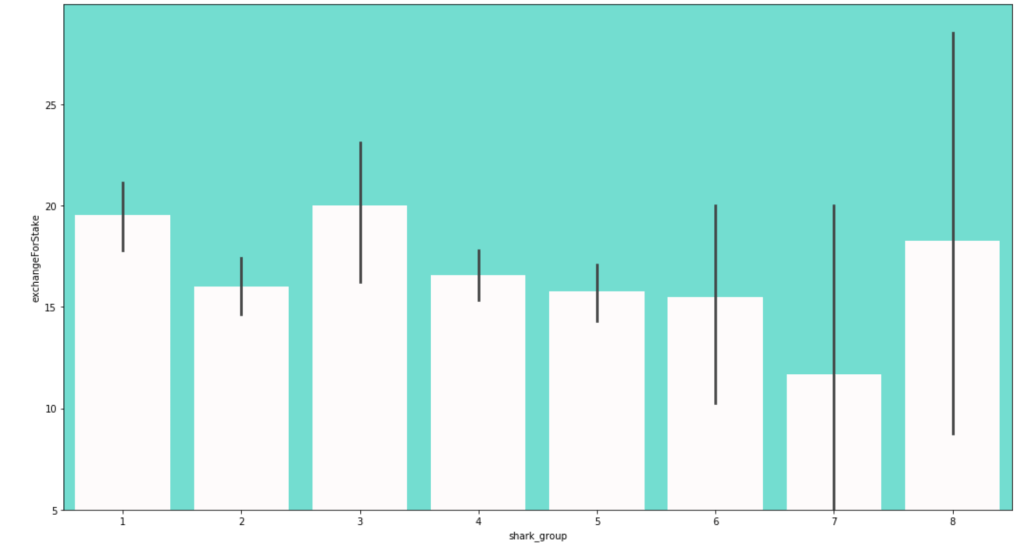
Here come some various visuals related to shark group

This concludes my EDA for now.

Modeling

After doing some basic data cleaning and feature engineering, it’s time to see if I can actually build a good model.

First Model

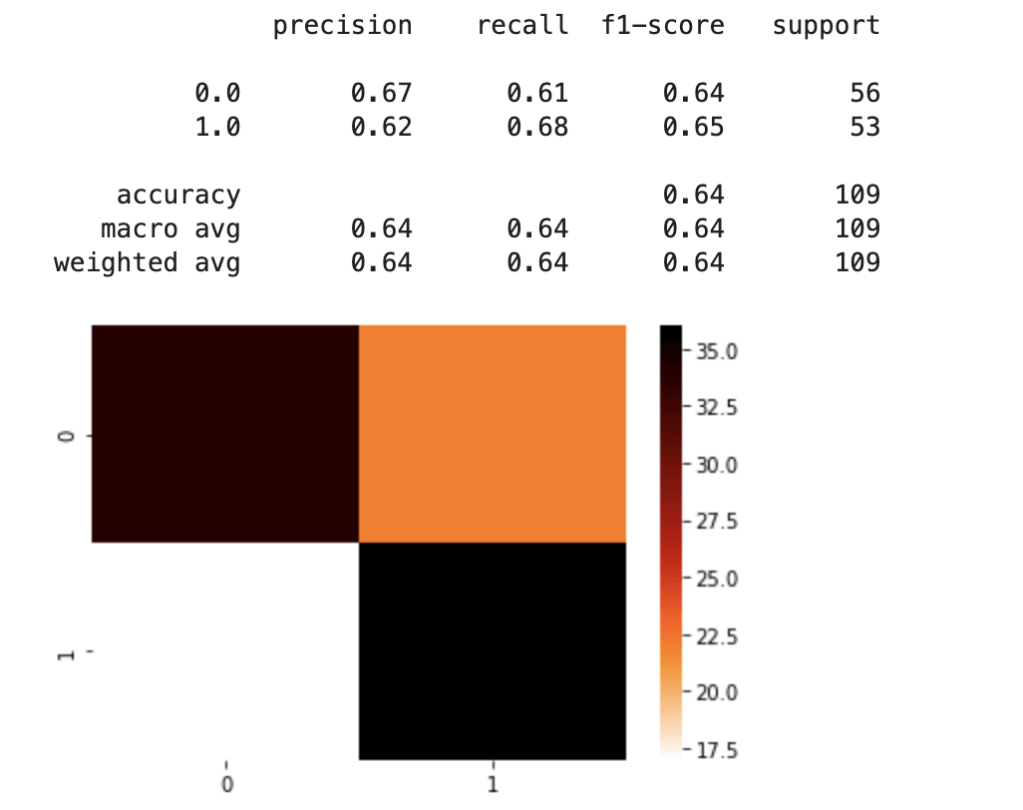
For my first model, I used dummy variables for the “category” feature and information on sharks. Due to the problem of having different instances of the category feature, I split my data into a training and test set after pre-processing the data. I mixed and matched a couple of scaling methods and machine learning classification models before landing on standard scaling and logistic regression. Here was my first set of results:

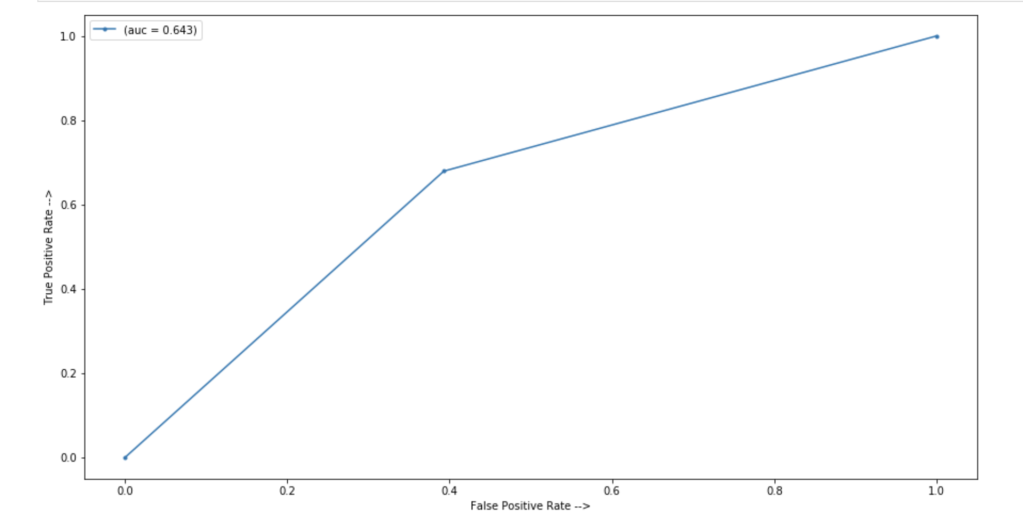
In terms of an ROC/AUC visual:

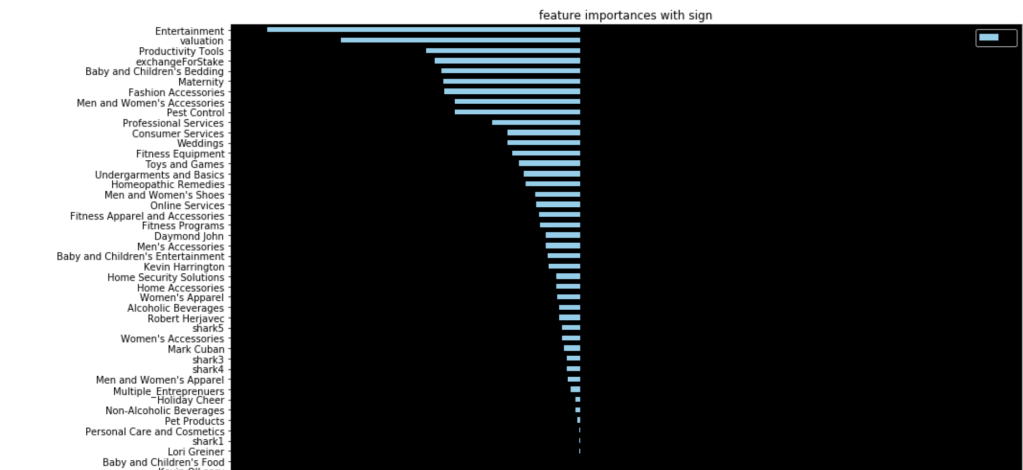
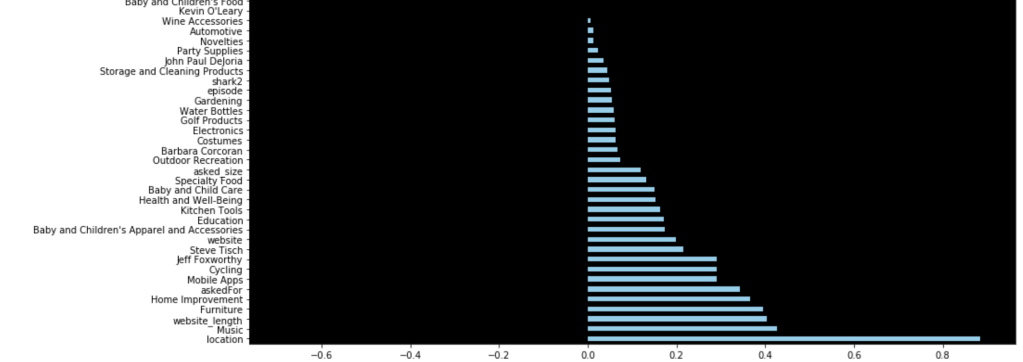
64% accuracy on a show where anything can happen is a great start. Here were my coefficients in terms of a visual:

Let’s talk about these results. It seems like having Barbara Corcoran as a shark is the most likely indicator of a potential deal. That doesn’t mean Barbara makes the most deals. Rather, it means that you are likely to get a deal from someone if Barbara happens to be present. I really like Kevin because he always makes a ridiculous offer centered around royalties. His coefficient sits around zero. Effectively, if Kevin is there, we have no idea whether or not there will be a deal. He contributes nothing to my model. (He may as well be dead to me). Location seems to be an important decider. I interpret this to mean that some locations appear very infrequently and just happened to strike a deal. Furniture, music, and home improvement seem to be the most successful types of pitches. I’ll let you take a look for yourself to gain further insights.

Second Model

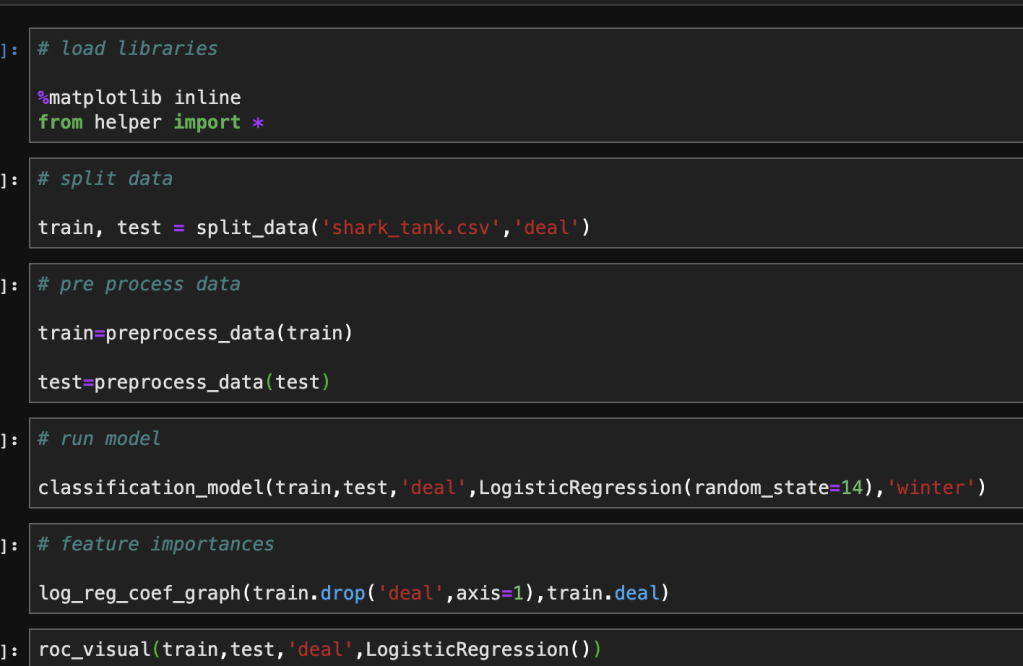
For my second model, I leveraged target encoding for all categorical data. This allowed me to split up my data before any preprocessing. I also spent time writing a complex backend helper module to automate my notebook. Here’s what my notebook looked like after all that work:

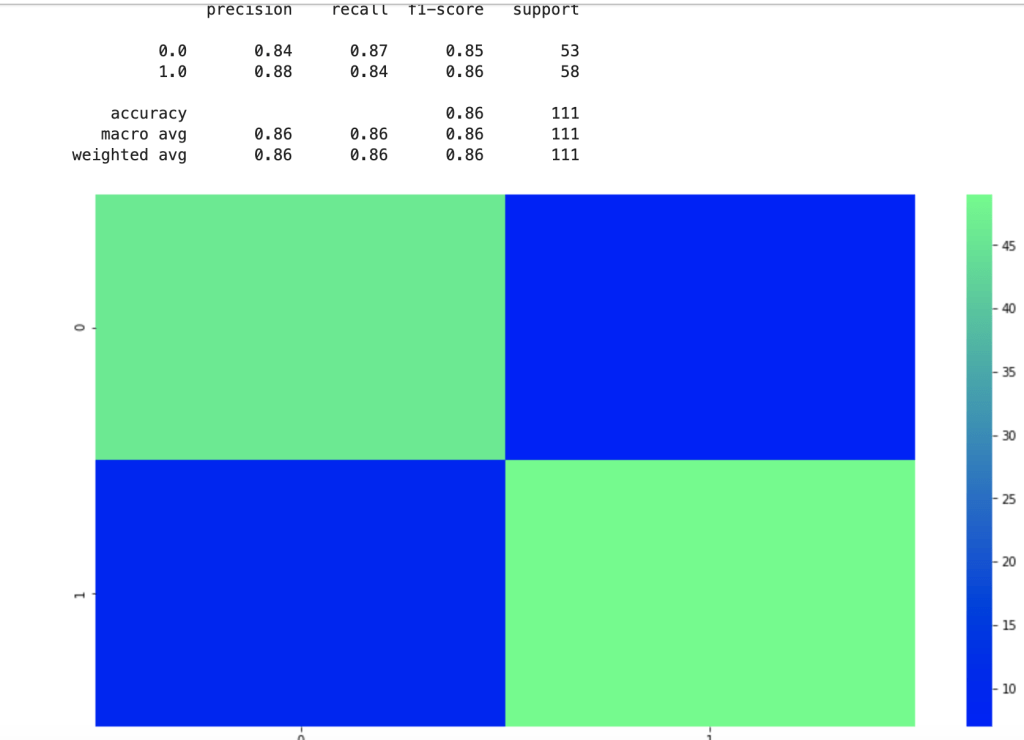
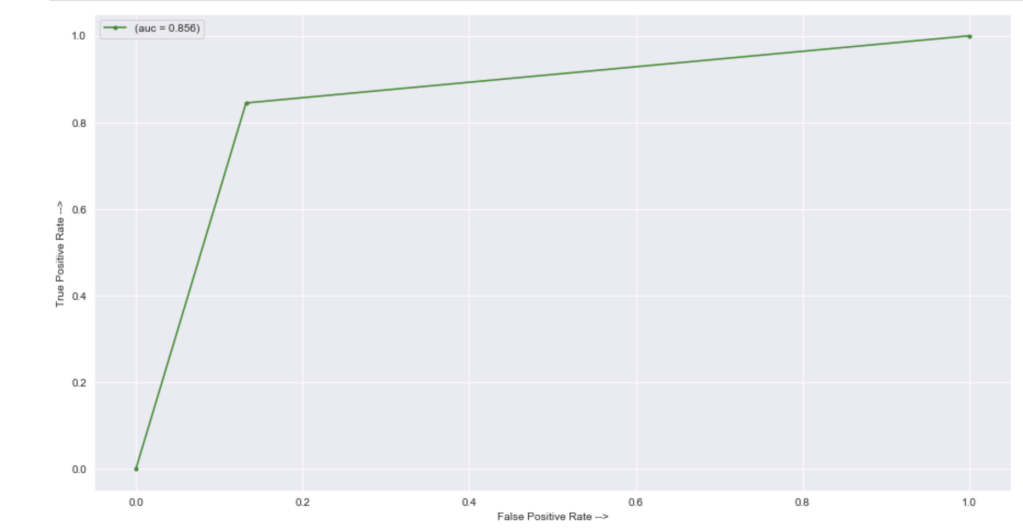
That was fast. Let’s see how well this new model performed given the new method used in feature engineering:

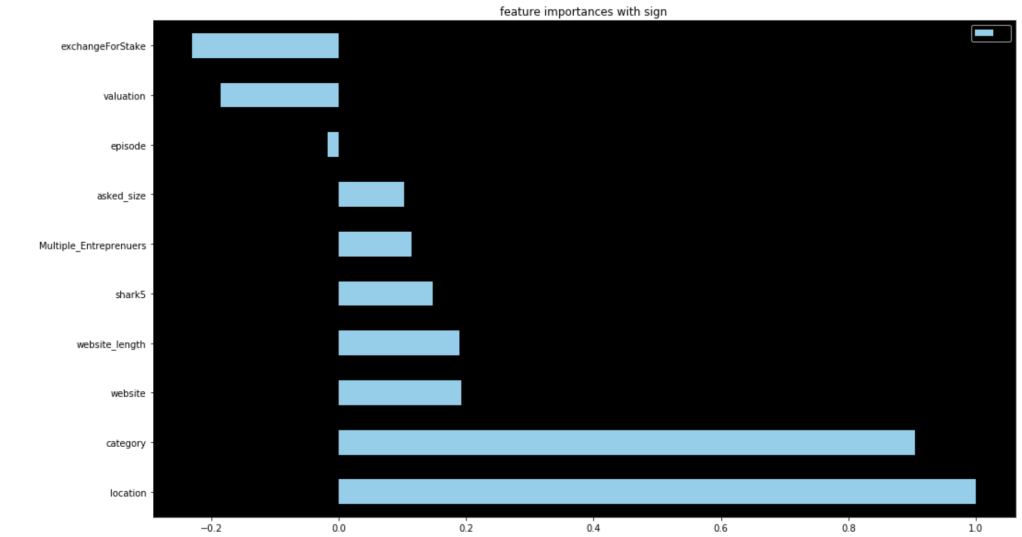
There is clearly a sharp and meaningful improvement present. That said, by using target encoding, I can no longer see the effects of individual categories pitched or sharks present. Here were my new coefficients:

These are a lot less coefficients than in my previous model due to the dummy variable problem, but this led to higher scores. This second model really shocked me. 86% accuracy for predicting the success of a shark tank pitch really surprised me given all the variability present in the show.

Conclusion

I was really glad that my first model was 64% accurate given what the show is like and all the variability involved. I came away with some insightful coefficients to understand what drove predictions. By sacrificing some detailed information I kept with dummy variables, I was able to encode categorical data in a different way which led to an even more accurate model. I’m excited to continue this project and add more data from more recent episodes to continue to build a more meaningful model.

Thanks for reading and I hope this was fun for any Shark Tank fans out there.

Anyway, this is the end of my blog…

shark tank - Imgflip

Machine Learning Metrics and Confusion Matrices

Understanding the Elements and Metrics Derived from Confusion Matrices when Evaluating Model Performance in Machine Learning Classification

It Hurt Itself in Its Confusion! | Know Your Meme

Introduction

Thanks for visiting my blog.

I hope my readers get the joke displayed above. If they don’t and they’re also millennials, they missed out on some great childhood fun.

What are confusion matrices? Why do they matter? Well… a confusion matrix, in a relatively simple case, shows the distribution of predictions compared to real values in a machine learning classification model. Classification can theoretically have many target classes, but for this blog we are going to keep it simple and discuss prediction of a binary variable. In today’s blog, I’m going to explain the whole concept and how to understand confusion matrices on sight as well as the metrics you can pick up by looking at them.

Plan

  1. Provide Visual
  2. Accuracy
  3. Recall
  4. Precision
  5. F-1
  6. AUC-ROC Curve

Quick note: there are more metrics that derive from confusion matrices beyond what’s listed above. However, these are the most important and relevant metrics generally discussed.

Visualization

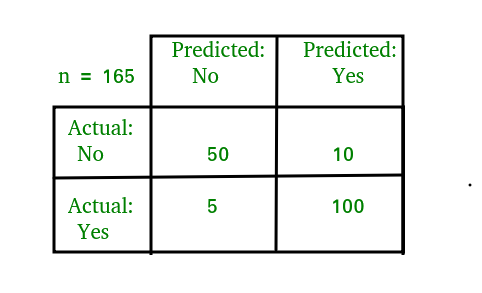
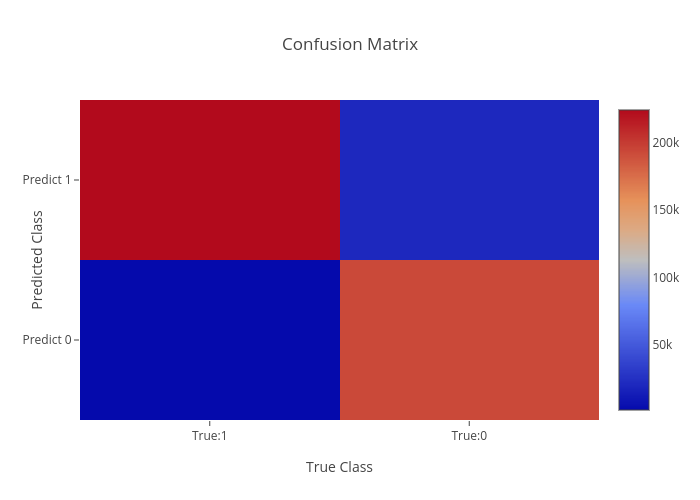
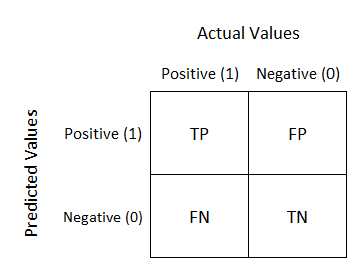
I have three visuals. The first one displays the actual logic behind confusion matrices while the second displays an example and the third displays a heat-map. Often, using a heat-map can be easier to decode and also easier to share with others. I’d like to also note that confusion matrix layouts can change. I would not get caught up on one particular format and just understand that rows correspond to predicted values columns correspond to actual values. The way the numbers within each of those are arranged is variable.

Basic explanation.

Understanding Confusion Matrix. When we get the data, after data ...

Now you will always have numbers in those quadrants and generally hope that the top left and bottom right have the highest values.

Confusion Matrix in Machine Learning - GeeksforGeeks

Heat-map.

Confusion Matrix | heatmap made by Wenbo5565 | plotly

As we can see above, knowing that red corresponds to higher values quickly gives us the reflection that our model worked well. In “error” locations, we have a strong blue color, while in “correct” areas we see a lot of red.

Before I get into the metrics, I need to quickly explain what TP, FP, TN, and FN mean. This won’t take long. TP is a true positive, like someone correctly being predicted to have a disease. TN is true negative, like someone correctly predicted to not have a disease. FN is a false negative, like some who was predicted to not have a disease but actually does. FP is a false positive, like some predicted to have a disease but actually doesn’t. This is a preview of some metrics to be discussed, but for certain models the importance of FN, FP, TN, and TP is variable and some may matter more than others.

Quick note: When I think of the words “accuracy” and “precision,” the first thing that comes to mind is what I learned back in Probability Theory; accuracy means unbiasedness and precision means minimal variance. I’ll talk about bias and variance in a later blog. For this blog, I’m not going to place too much focus on those particular definitions.

Accuracy

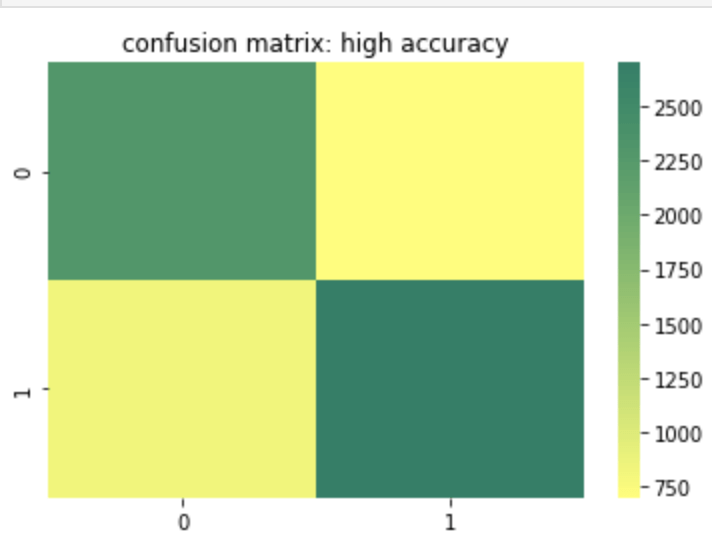
Accuracy is probably the most basic and simple idea. Accuracy is determined by summing true positive and true negative results over both the true positive and true negative predictions but also false positive and false negative predictions. In other words, of every single prediction you made, how many of them were right. So this means we want to know that if it was a negative how many times did you predict correctly and vice-versa for a positive. That being the case, when does accuracy become the most important metric to your model and when does accuracy fall short of being a strong or important metric? Let’s start with the cases where accuracy falls short. If you have a large class imbalance such as 10 billion rows in class 0 and 1 row in class 1, than you don’t necessarily have a strong model if it accurately predicts most of the majority class and predicts the minority class accurately the one time it occurs (or doesn’t predict the minority class correctly for that matter). Accuracy works well and tells a good story with more balanced data. However, as discussed above, it can lose meaning with a target class imbalance.

Here is a heat map of a high accuracy model.

Recall

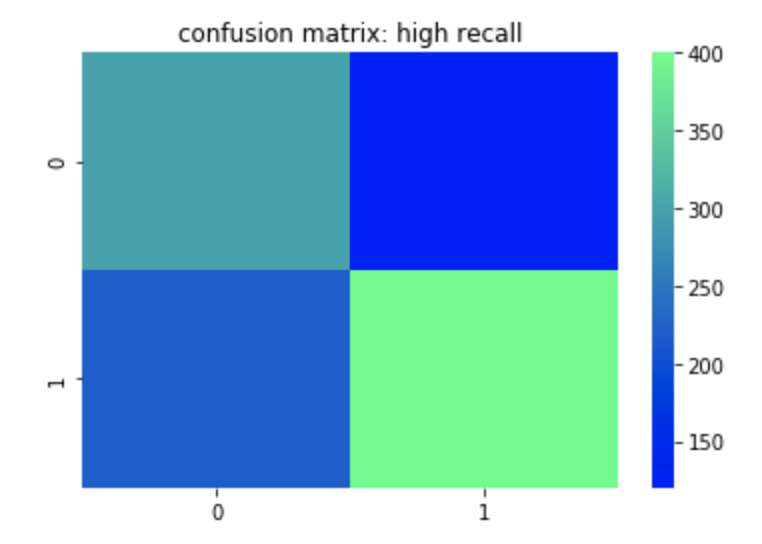
Recall can most easily be described as true positives divided by true positives and false negatives. This corresponds to the number of positives correctly identified when in fact the case was positive. A false negative means an unidentified positive. False positives and true negatives are not meant to be positives (in a perfect model) so are not included. So if you are trying to identify if someone has a disease or not, having high recall would be good for you model since it means that when the disease is present, you identify it well. You could still have low accuracy or precision in this model if you don’t predict the non-disease class well. In other words if you predict every row as having the disease than your recall will be high since you will have correctly predicted every occurrence where the disease was actually present. Unfortunately, however, the impact of having a correct prediction will be diminished and mean a whole lot less. That leads us to precision.

Here is a heat map of a high recall model.

Precision

Precision can most easily be described as true positives divided by true positives and false positives. Unlike recall, which is a measure of actual positives discovered from the pool of all positives, precision is a measure of actual positives from predicted positives. So false negatives and true negatives don’t matter as they were not predicted to have been positive in the first place. A great way to think about precision is how meaningful a positive prediction is given the context of your model. Off the top of my head, I would assume that in a business where you owe some sort of service or compensation based on a predicted positive, having high precision would be important as you would not want to waste resources. I recently worked on an email spam detector. That is another example where high precision is ideal.

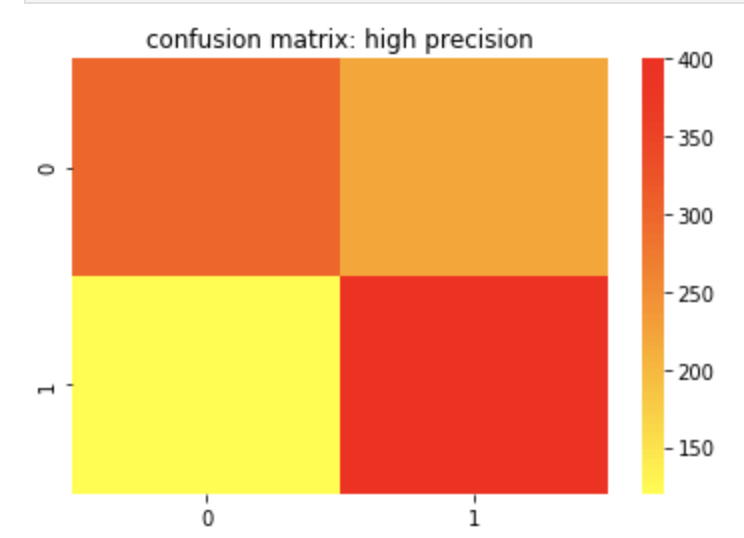
Here is a confusion matrix of a high precision model.

F-1 Score

The F-1 score is the harmonic mean of the precision and recall score which means its maximum value is the arithmetic mean of the two. (For more info on what a harmonic mean actually is – here is a Wikipedia page you may find helpful: https://en.wikipedia.org/wiki/Harmonic_mean). As you may have gathered or assumed from what’s written above, the F-1 score matters more in situations where accuracy may fall short.

Receiver Operating Curve (ROC) Curve

The basic description of this curve is that it measures how an increase in false positives to a model would correspond to increasing true positives which can evaluate your models ability to distinguish between classes. The horizontal axis values extend from 0% to 100% (or 0 to 1). The larger the area covered using the curve, the better your model is. You may be confused due to the lack of a visual. Let me show you what I mean:

How to Use ROC Curves and Precision-Recall Curves for ...

Above, the “No Skill” label means that you’ll get 50% of classifications right at random (don’t get too caught up on that point). The high increase early in the x values on the corresponding vertical axis are a good sign that as more information is introduced into your model, than its true positive rate climbs quickly. It maxes out around 30% and then begins a moderate plateau. This is a good sign and shows a lot of area covered by this orange curve. The more area covered, the better.

Conclusion

Confusion matrices are often a key part of machine learning models and can help tell and important story about the effectiveness of your model. Since there are varying ways data can present itself, it is important to have different metrics that derive from these matrices to measure success for each situation. Conveniently, you can view confusion matrices with relative ease using heat maps.

Sources and Further Reading

(https://towardsdatascience.com/metrics-to-evaluate-your-machine-learning-algorithm-f10ba6e38234)

(https://towardsdatascience.com/is-accuracy-everything-96da9afd540d)

(https://towardsdatascience.com/beyond-accuracy-precision-and-recall-3da06bea9f6c)

(https://towardsdatascience.com/understanding-auc-roc-curve-68b2303cc9c5)

Thank You Hand Drawn Lettering On Optical Illusion Background ...

Devin Booker vs. Gregg Popovich (vs. Patrick McCaw)

Developing a process to predict which NBA teams and players will end up in the playoffs.

Jim Mora Nfl GIF - JimMora Mora Nfl - Discover & Share GIFs

Introduction

Hello! Thanks for visiting my blog.

After spending the summer being reminded of just how incredible Michael Jordan was as a competitor and leader, the NBA is finally making a comeback and the [NBA] “bubble” is in full effect in Orlando. Therefore, I figured today would be the perfect time to discuss the NBA playoffs (I know the gif is for the NFL, but it is just too good to not use). Specifically, I’d like to answer the following question: if one were to look at some of the more basic NBA statistics recorded by an NBA player or team on a per-year basis, with what accuracy could you predict whether or not that player may find themselves in the NBA playoffs. Since the NBA has changed so much over time and each iteration has brought new and exciting skills to the forefront of strategies, I decided to stay up to date and look at the 2018-19 season for individual statistics (the three-point era). However, only having 30 data points to survey for team success will be insufficient to have a meaningful analysis. Therefore I expanded my survey to include data back to and including the 1979-80 NBA season (when Magic Johnson was still a rookie). I web-scraped basketball-reference.com to gather my data and it contains every basic stat and a couple advanced ones such as effective field goal percent (I don’t know how that is calculated but Wikipedia does: https://en.wikipedia.org/wiki/Effective_field_goal_percentage#:~:text=In%20basketball%2C%20effective%20field%20goal,only%20count%20for%20two%20points.) from every NBA season ever. As you go back in time, you do begin to lose data from some statistical categories that weren’t recorded yet. To give to examples here I would mention blocks which were not recorded until after the retirement of Bill Russell (widely considered the greatest defender to play the game) or three pointers made as three pointers were first introduced into the NBA in the late 1970s. So just to recap: if we look at fundamental statistics recorded by individuals or in a larger team setting – can we predict who will find themselves in the playoffs? Before we get started, I need to address the name of this blog. Gregg Popovich has successfully coached the San Antonio Spurs to the playoffs in every year since NBA legend Tim Duncan was a rookie. They are known to be a team that runs on good teamwork as opposed to outstanding individual play. This is not to say they have not had superstar efforts though. Devin Booker has been setting the league on fire, but his organization, the Phoenix Suns, have not positioned themselves to be playoff contenders. (McCaw just got lucky and was a role player for three straight NBA championships). This divide is the type of motivation that led me to pursue this project.

Playoff P" Art Print by cobyshimabukuro | Redbubble

Plan

I would first like to mention that the main difficulty in this project was developing a good web-scraping function. However, I want to be transparent here and let you know that I worked hard developing that function a while back and now realized this would be a great use of that data. Anyhow, in my code I go through the basic data science process. In this blog, however, I think I will try to stick to the more exciting observations and conclusions I reached. (here’s a link to GitHub: https://github.com/ArielJosephCohen/postseason_prediction).

The Data

First things first, let’s discuss what my data looked like. In the 2018-19 NBA season, there were 530 total players to play in at least one NBA game. My features included: name, position, age, team, games played, games started, minutes played, field goals made, field goals attempted, field goal percent, three pointers made, three pointers attempted, three point percent, two pointers made, two pointers attempted, two point percent, effective field goal percent, free throws made, free throws attempted, free throw percent, offensive rebounds per game, defensive rebounds per game, total rebounds per game, assists per game, steals per game, blocks per game, points per game, turnovers per game, year (not really important but it only makes the most marginal difference in the team setting), college (or where they were before the NBA – many were null and were filled as unknown), draft selection (un-drafted players were assigned the statistical mean of 34 – which is later than I expected. Keep in mind the drat used to exceed 2 rounds). My survey of teams grouped all the numerical values (with the exception of year) by each team and every season using the statistical mean of all its players that season. In total, there were 1104 rows of data, some of which included teams like Seattle that no longer exist in their original form. My target feature was a binary 0 or 1 with 0 representing a failure to qualify for the playoffs and 1 representing a team that successfully earned a playoff spot.

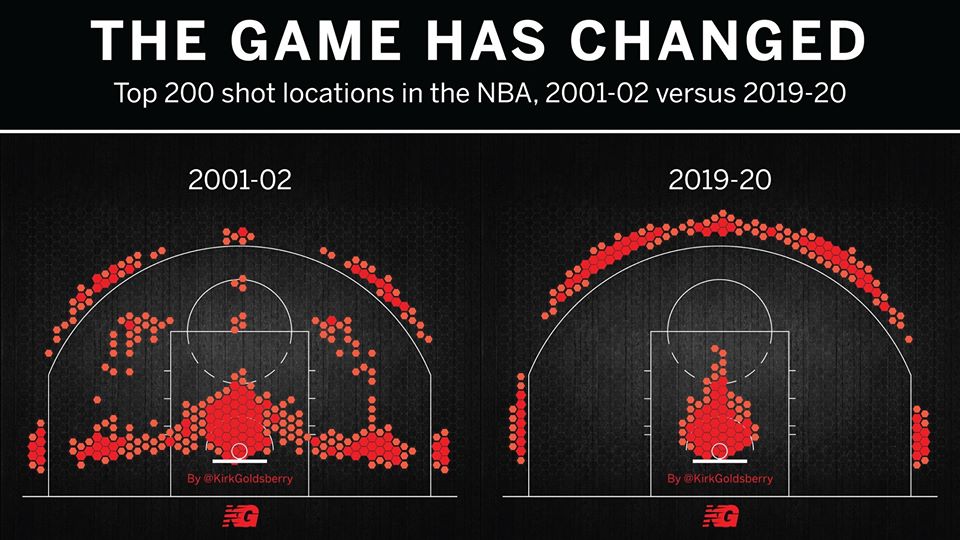
One limitation of this model is that it accounts for trades or other methods of player movement by assigning a player’s entire season stats to the team he ended the season with, regardless of how many games were actually played on his final team. In addition, this model doesn’t account for more advanced metrics like screen assists or defensive rating. Another major limitation is something that I alluded to earlier: the NBA changes and so does strategy. This makes this more of a study or transcendent influences that remain constant over time as opposed to what worked well in the 2015-16 NBA season (on a team level that is). Also, my model focuses on recent data for the individual player model, not what individual statistics were of high value in different basketball eras. A great example of this is the so-called “death of the big man.” Basketball used to be focused on big and powerful centers and power forwards who would control and dominate the paint. Now, the game has moved much more outside, mid-range twos have been shunned as the worst shot in basketball and even centers must develop a shooting range to develop. Let me show you what I mean:

Shot chart dramatically shows the change in the NBA game

Now let’s look at “big guy”: 7-foot-tall Brook Lopez:

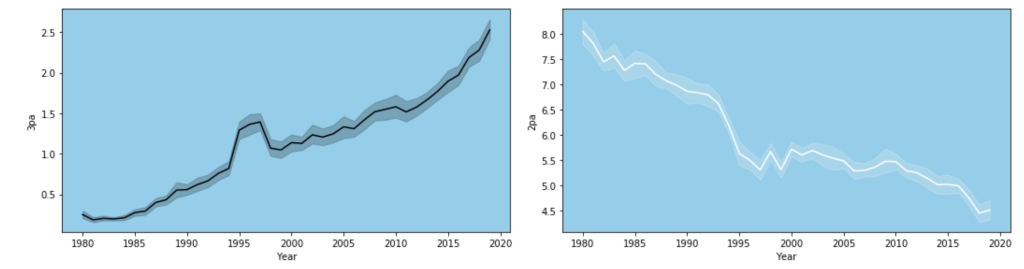
In a short period of time, he has drastically changed his primary shot selection. I have one more visual from my data to demonstrate this trend.

Exploratory Data Analysis

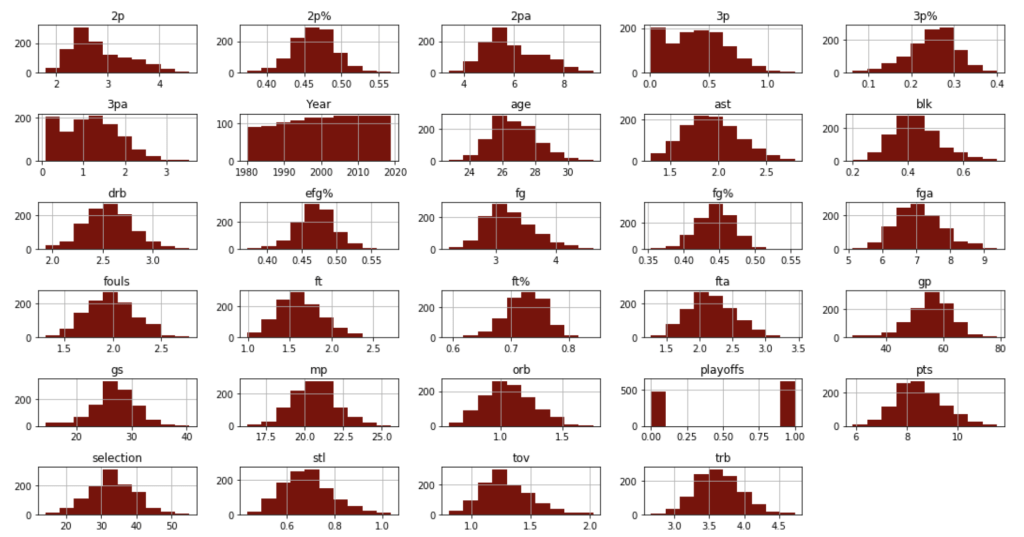
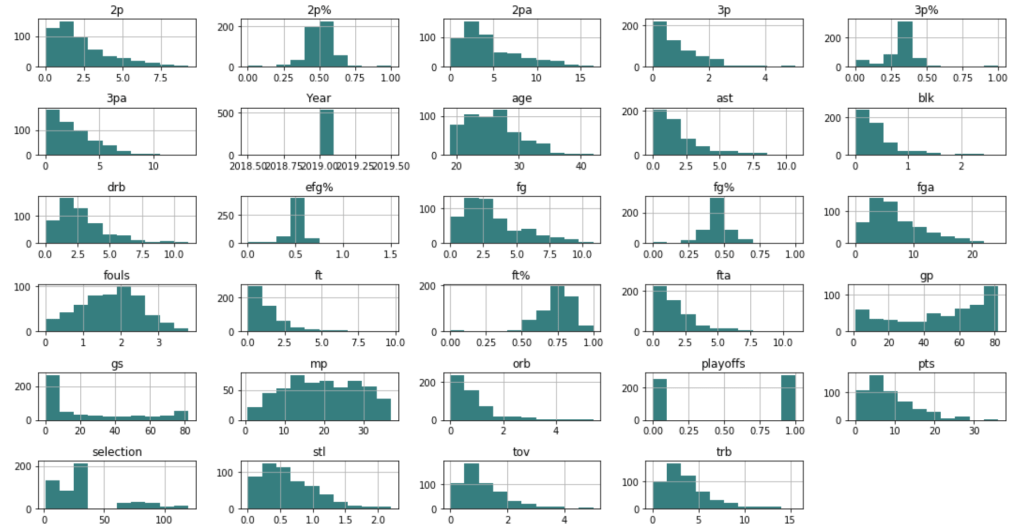
Before I get into what I learned from my model, I’d like to share some interesting observations from my data. I’ll start with two histograms groups:

Team data histograms
Individual data histograms
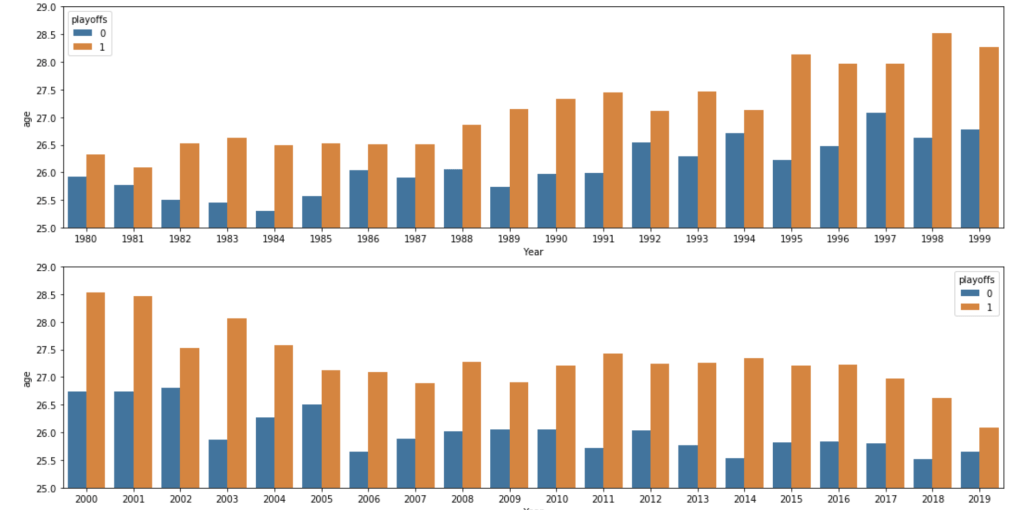
Every year – playoff teams tend to have older players
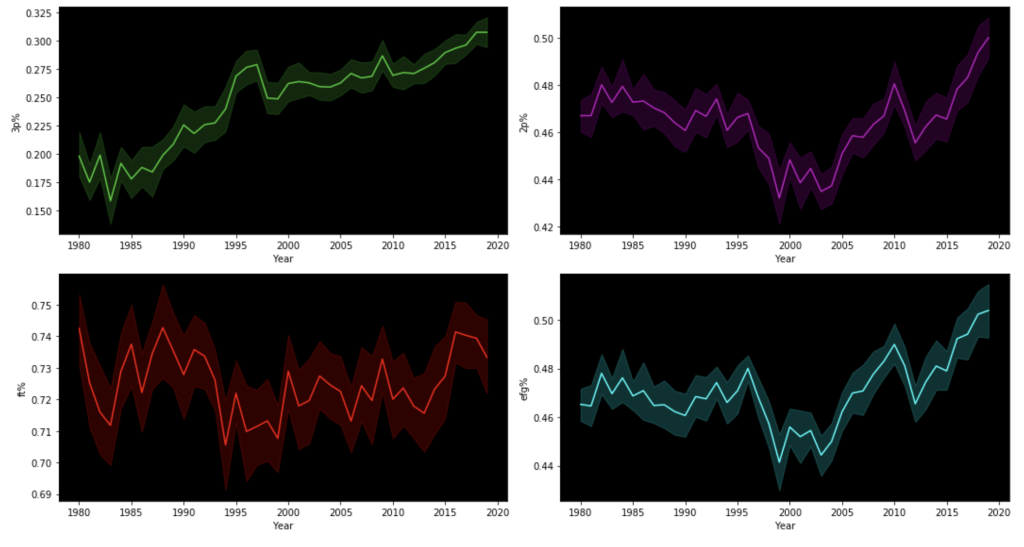
Trends of various shooting percentages over time

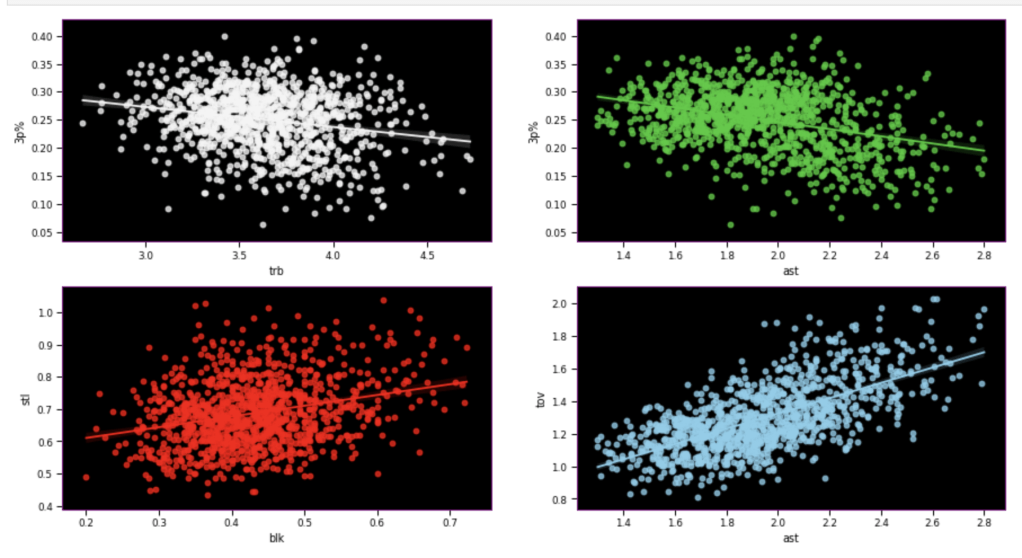
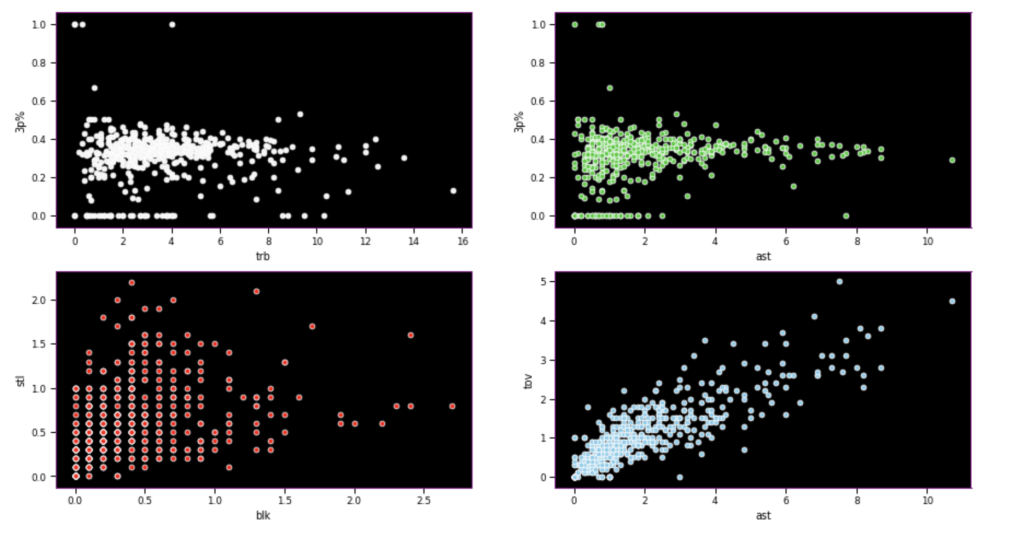
Here, I have another team vs. individual comparison testing various correlations. In terms of my expectations – I hypothesized that 3 point percent would correlate negatively to rebounds, while assists would correlate positively to 3 point percent, blocks would have positive correlation to steal, and assists would have positive correlation with turnovers.

Team data
Individual data

I seem to be most wrong about assists and 3 point percent while moderately correct in terms of team data.

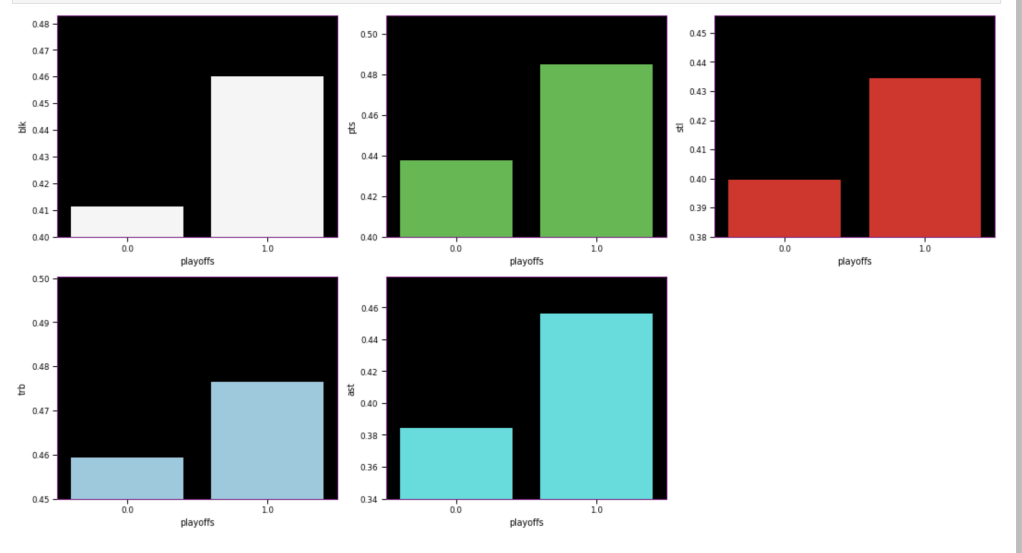
The following graph displays the common differences over ~40 years between playoff teams and non-playoff teams in the five main statistical categories in basketball. However, since the mean and extremes of these categories are all expressed in differing magnitudes, I applied scaling to allow for a more accurate comparison

It appears that the biggest difference between playoff teams and regular teams is in assists while the smallest difference is in rebounding

I’ll look at some individual stats now, starting with some basic sorting.

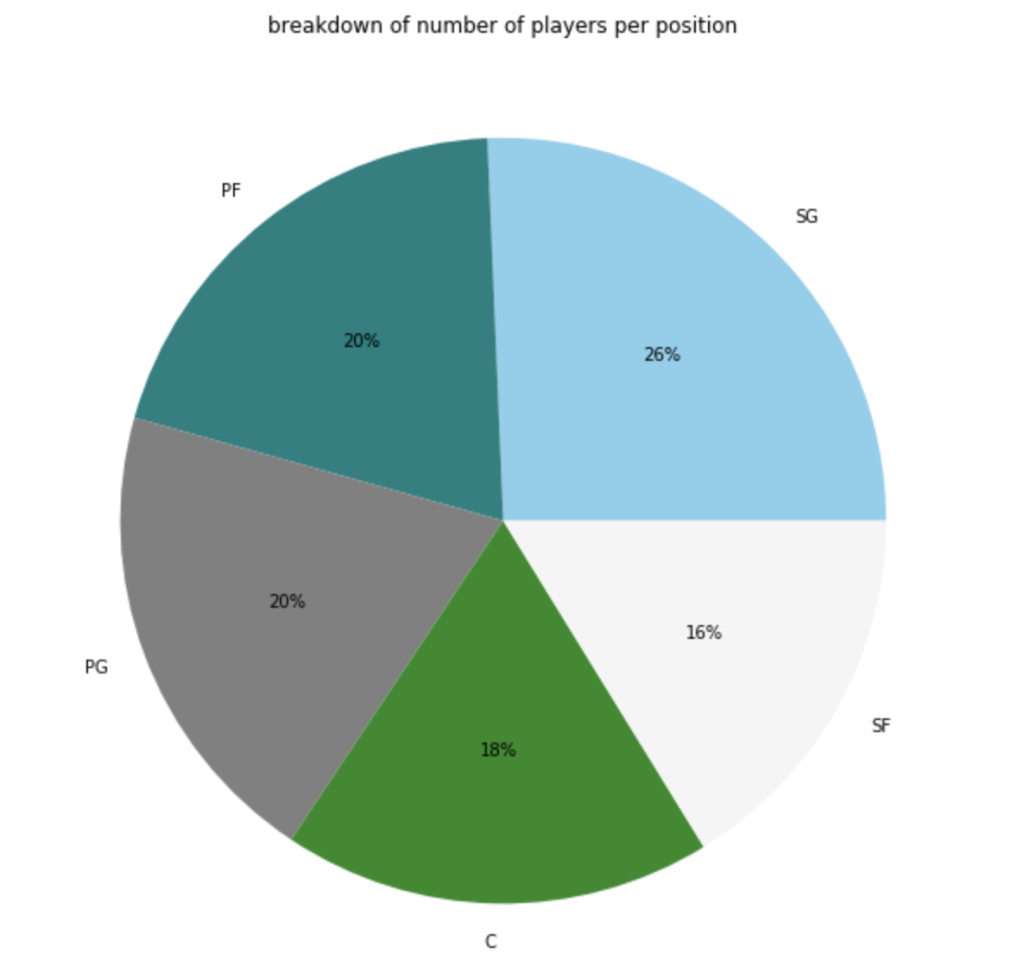
Here’s a graph to see the breakdown of current NBA players by position.

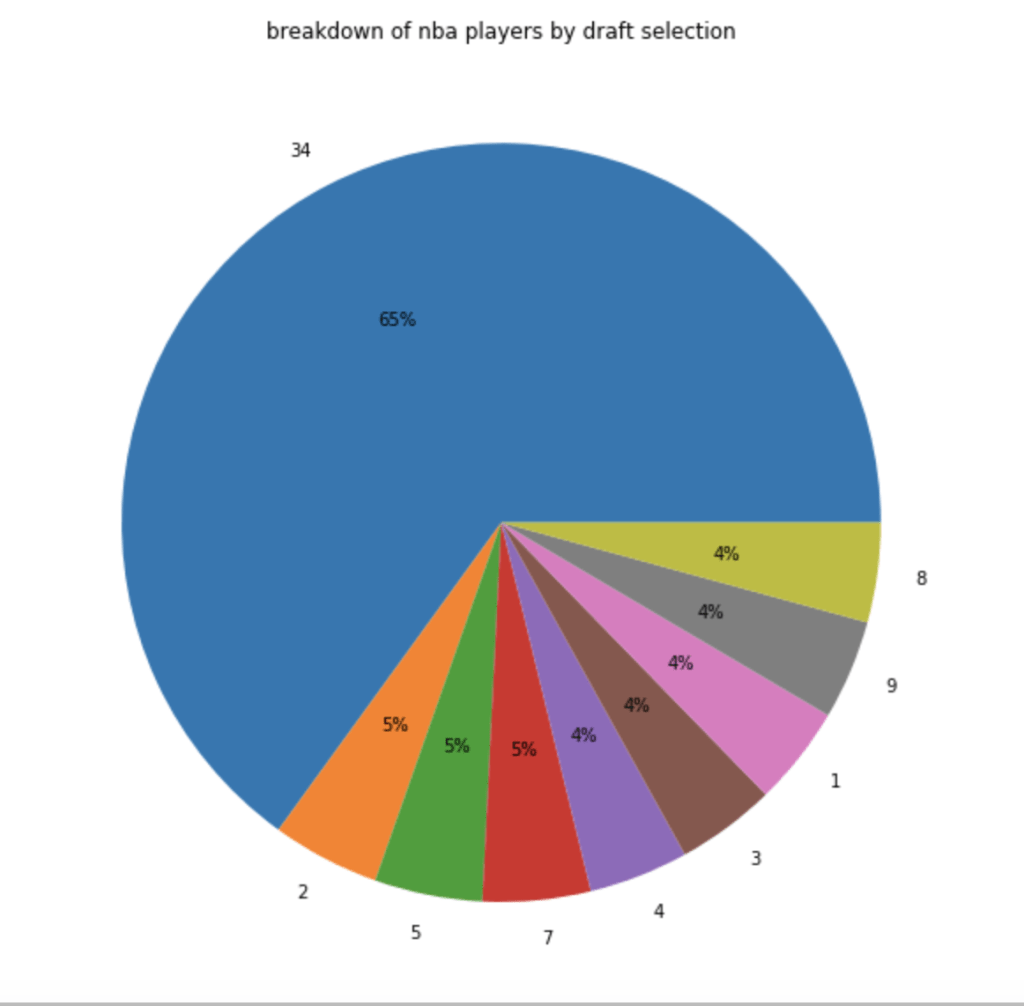
In terms of players by draft selection (with 34 = un-drafted basically):

In terms of how many players actually make the playoffs:

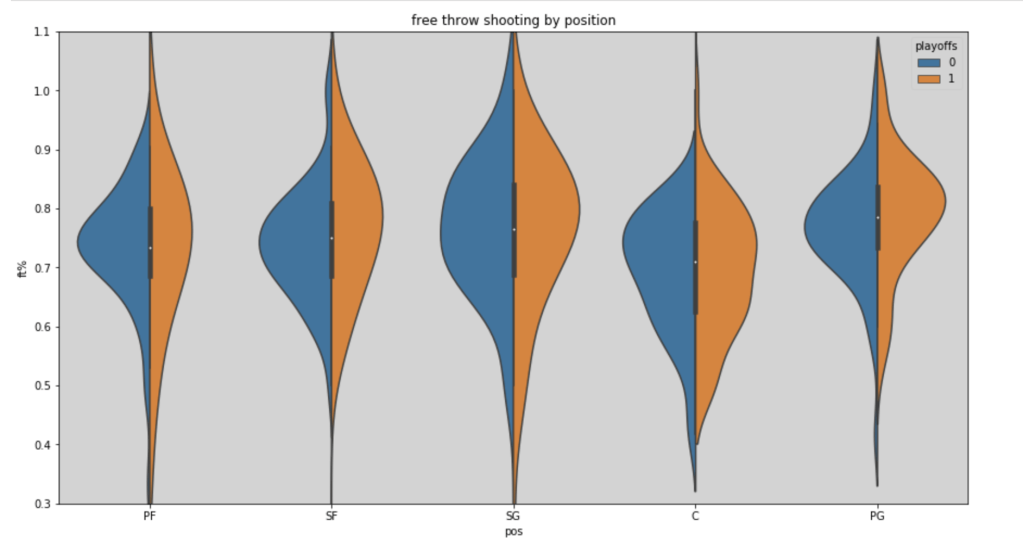
Here’s a look at free throw shooting by position in the 2018-19 NBA season (with an added filter for playoff teams):

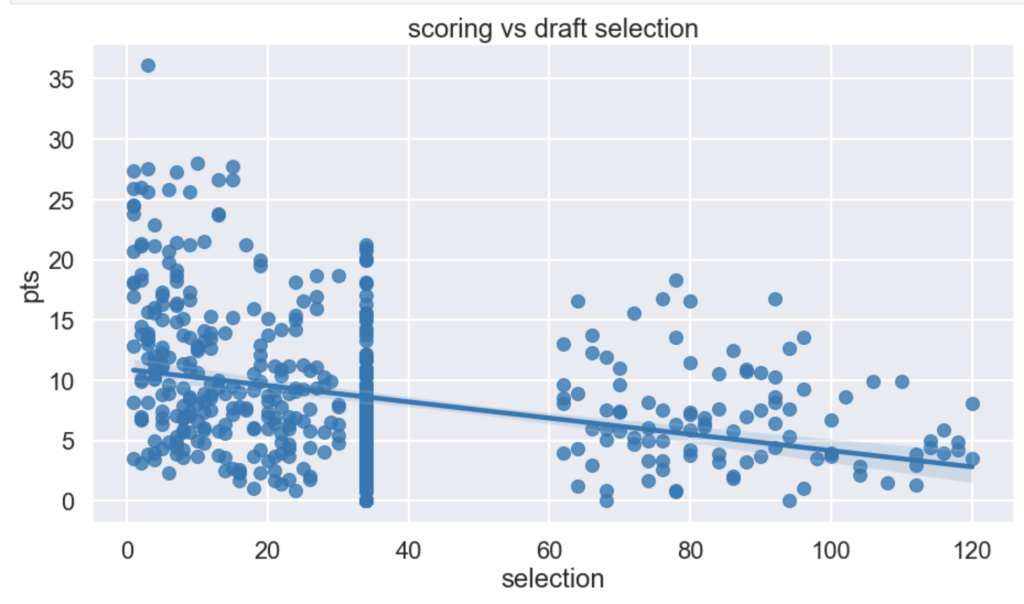
I had a hypothesis that players drafted earlier tend to have higher scoring averages (note that in my graph there is a large cluster of points hovering around x=34. This is because I used 34 as a mean value to fill null for un-drafted players).

It seems like I was right – being picked early in the draft corresponds to higher scoring. I would guess the high point is James Harden at X=3.

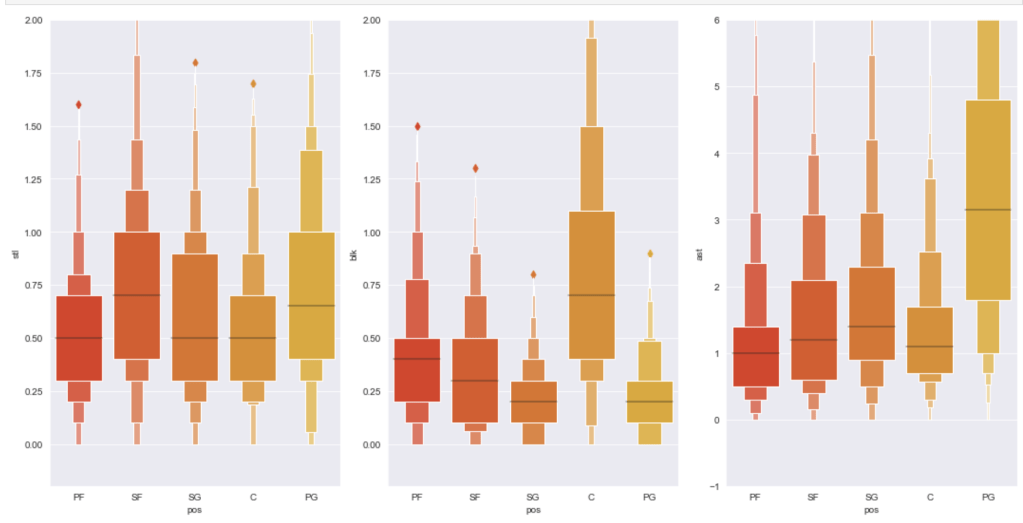
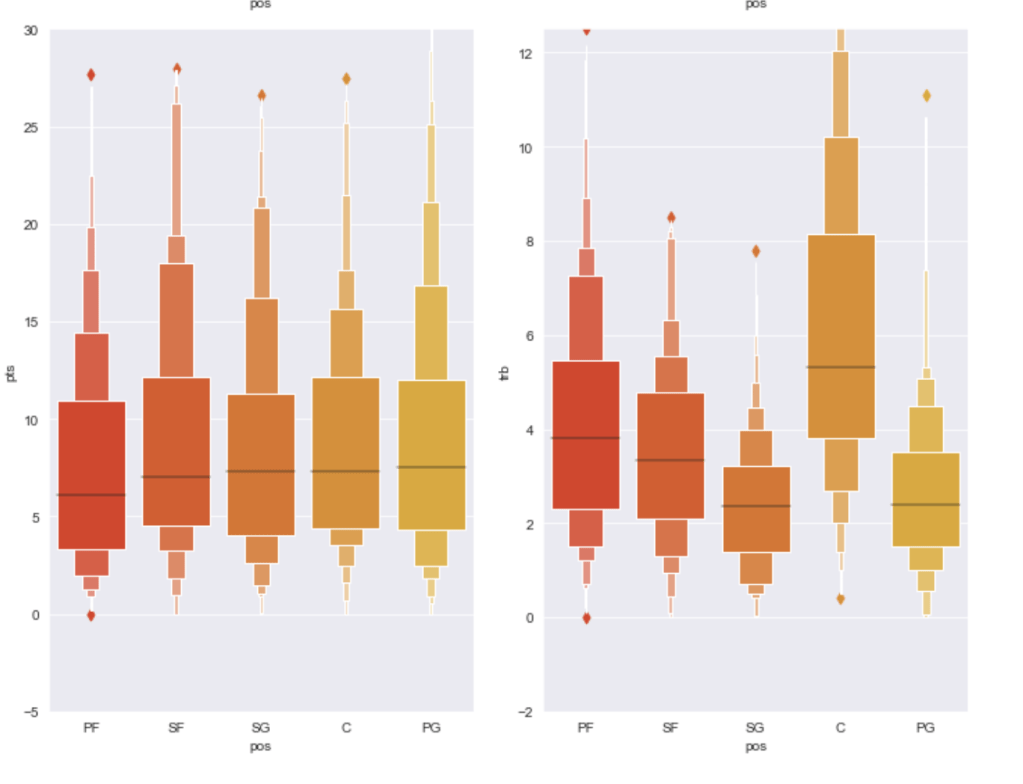
Finally I’d like to share the distribution of statistical averages by each of the five major statistics sorted by position:

Model Data

I ran a random forest classifier to get a basic model and then applied scaling and feature selection to improve my models. Let’s see what happend.

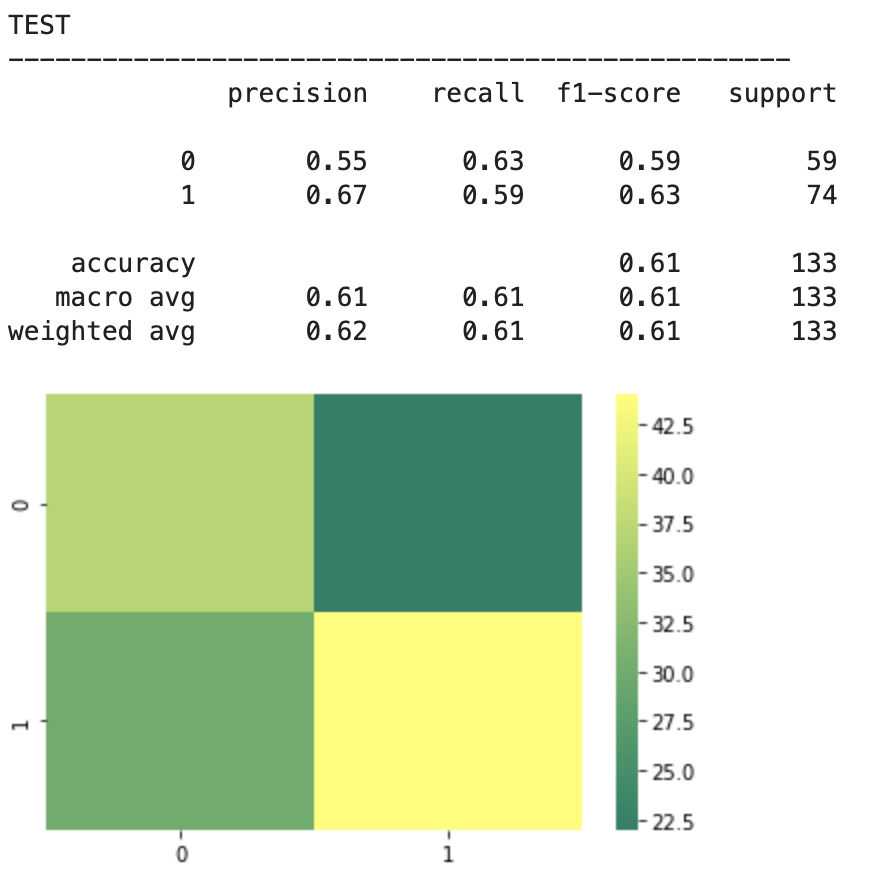
2018-19 NBA players:

The above represents an encouraging confusion matrix with the rows representing predicted data vs columns which represent actual data. The brighter and more muted regions in the top left and bottom right correspond to the colors in the vertical bar adjacent to the matrix and indicate that brighter colors represent higher values (in this color palette). This means that my model had a lot more values whose prediction corresponded to its actual placement that incorrect predictions. The accuracy of this basic model sits around 61% which is a good start. The precision score represents the percentage of correct predictions in the bottom left and bottom right quadrants (in this particular depiction). Recall represents the percentage of correct positions in the bottom right and top right quadrants. In other words recall represents all the cases correctly predicted given that we were only predicting from a pool of teams that made the playoffs. Precision represents a similar pool, but with a slight difference. Precision looks at all the teams that were predicted to have made the playoffs and the precision score represents how many of those predictions were correct.

Next, I applied feature scaling which is a process of removing impacts from variables determined entirely by magnitude alone. For example: $40 is a lot to pay for a can of soda but quite little to pay for a functional yacht. In order to compare soda to yachts, it’s better to apply some sort of scaling that might, for example, place their costs in a 0-1 (or 0%-100%) range representing where there costs fall relative to the average soda or yacht. A $40 soda would be close to 1 and a $40 functional yacht would be closer to 0. Similarly, a $18 billion yacht and an $18 billion dollar soda would both be classified around 1 and conversely a 10 cent soda or yacht would both be classified around 0. A $1 soda would be around 0.5. I have no idea how much the average yacht costs.

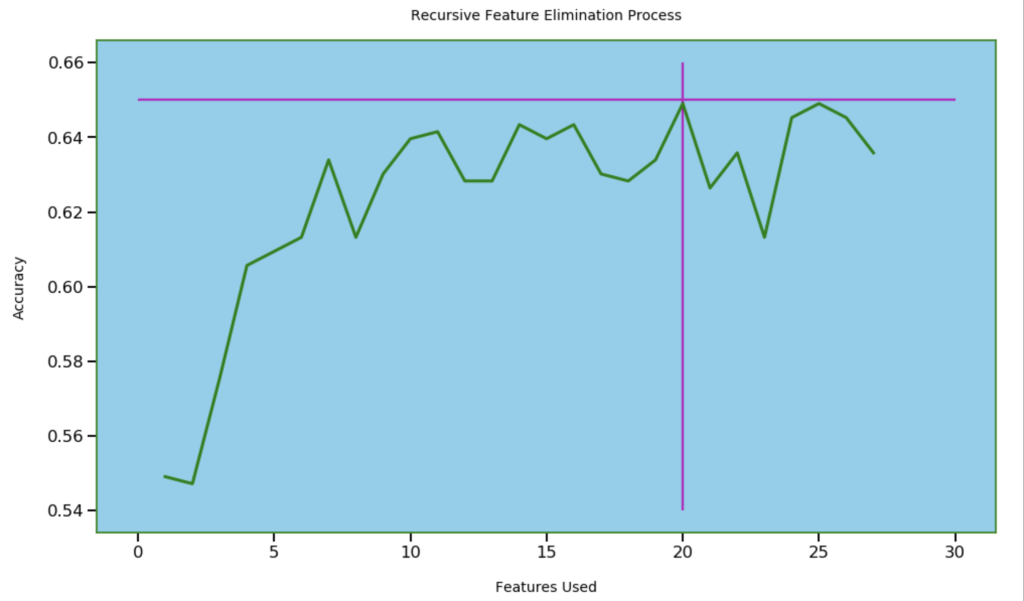
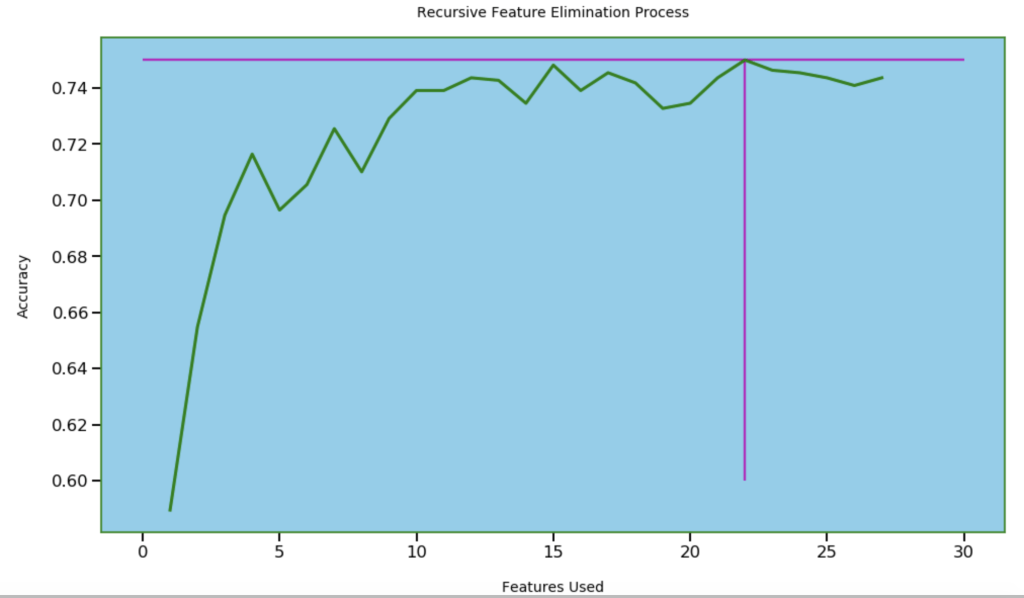
Next, I wanted to see how many features I needed for optimal accuracy. I used recursive feature elimination which is a process of designing a model and the using that model to look for which features may be removed to improve the model.

20 features seems right

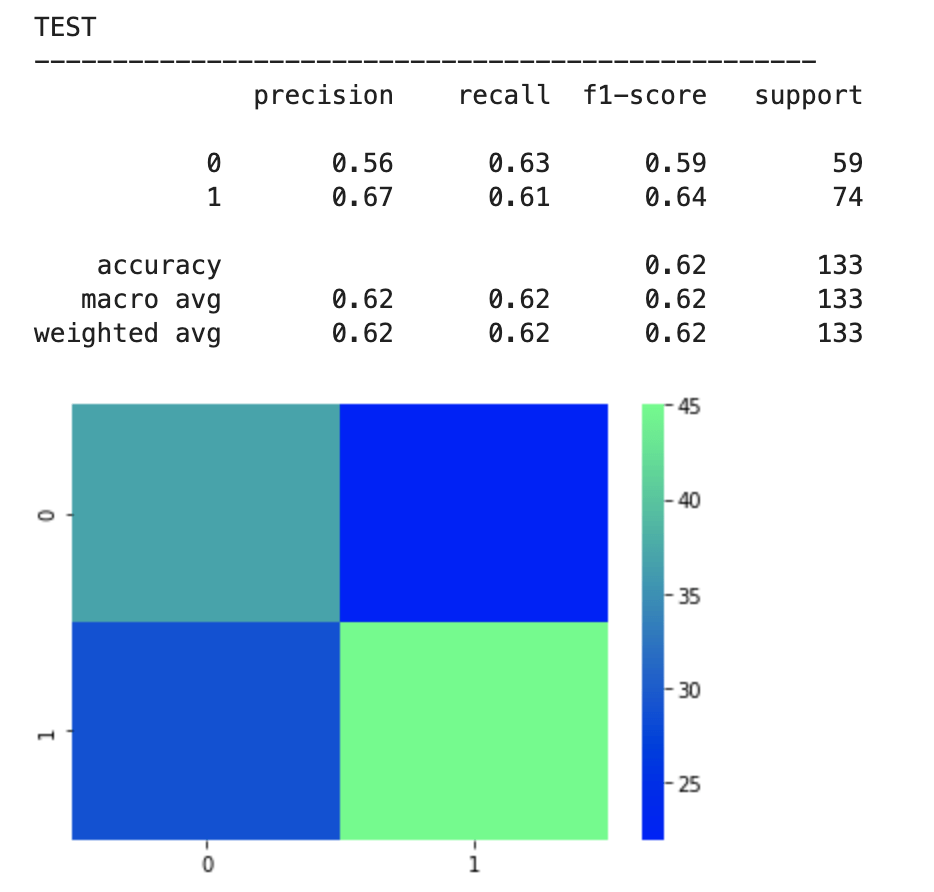
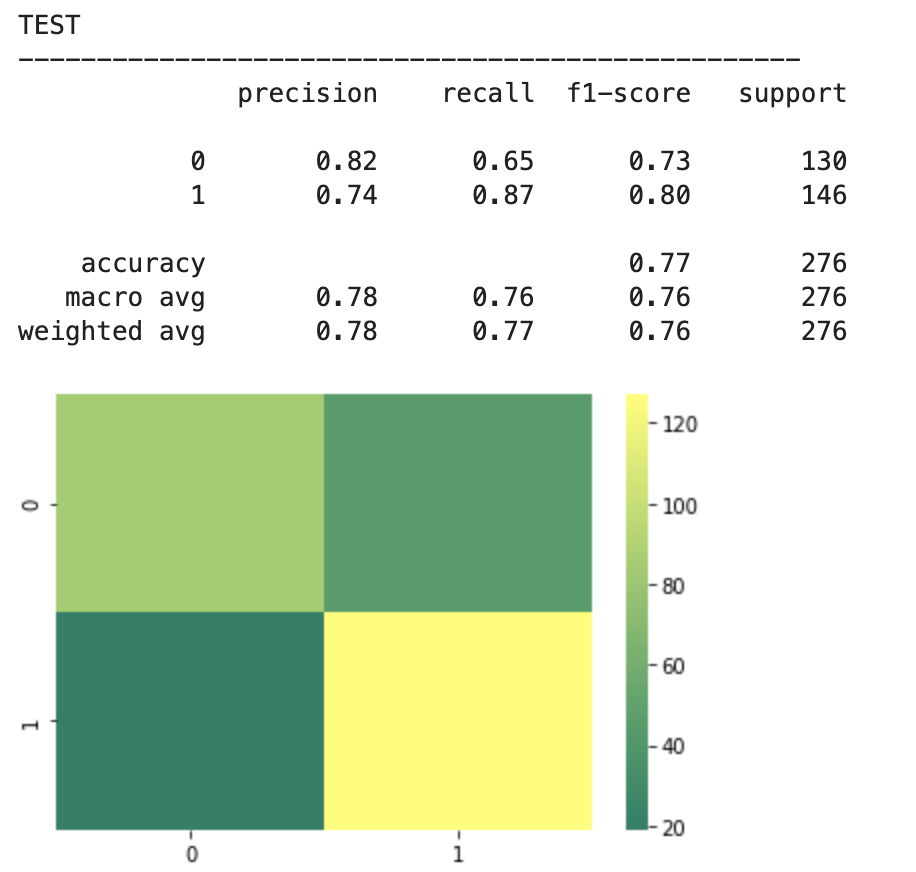
After feature selection, here were my results:

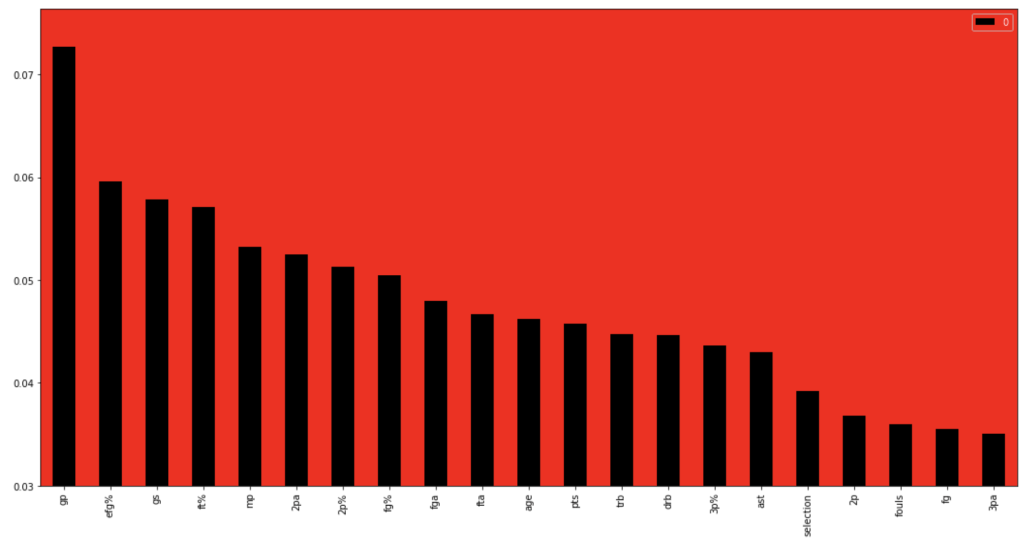
64% accuracy is not bad. Considering that a little over 50% of all NBA players make the playoffs every year, I was able to create a model that, without any team context at all, can predict to some degree which players will earn a trip to the playoffs. Let’s look at what features have the most impact. (don’t give too much attention to vertical axis values). I encourage you to keep these features in mind for later to see if they differ from the driving influences for the larger scale, team-oriented model.

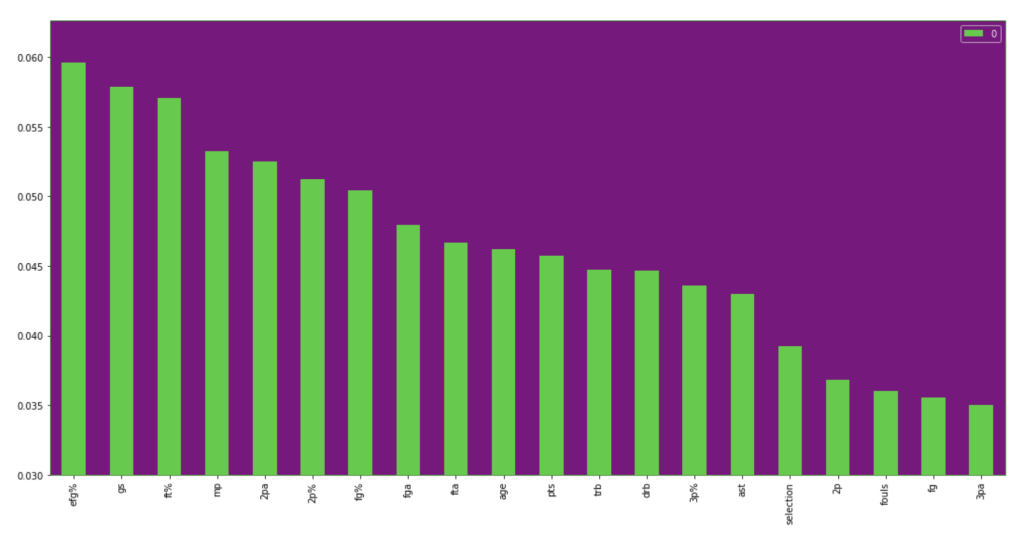
If I take out that one feature at the beginning that is high in magnitude for feature importance, we get the following visual:

I will now run through the same process with team data. I will skip the scaling step as it didn’t accomplish a whole lot.

First model:

Feature selection.

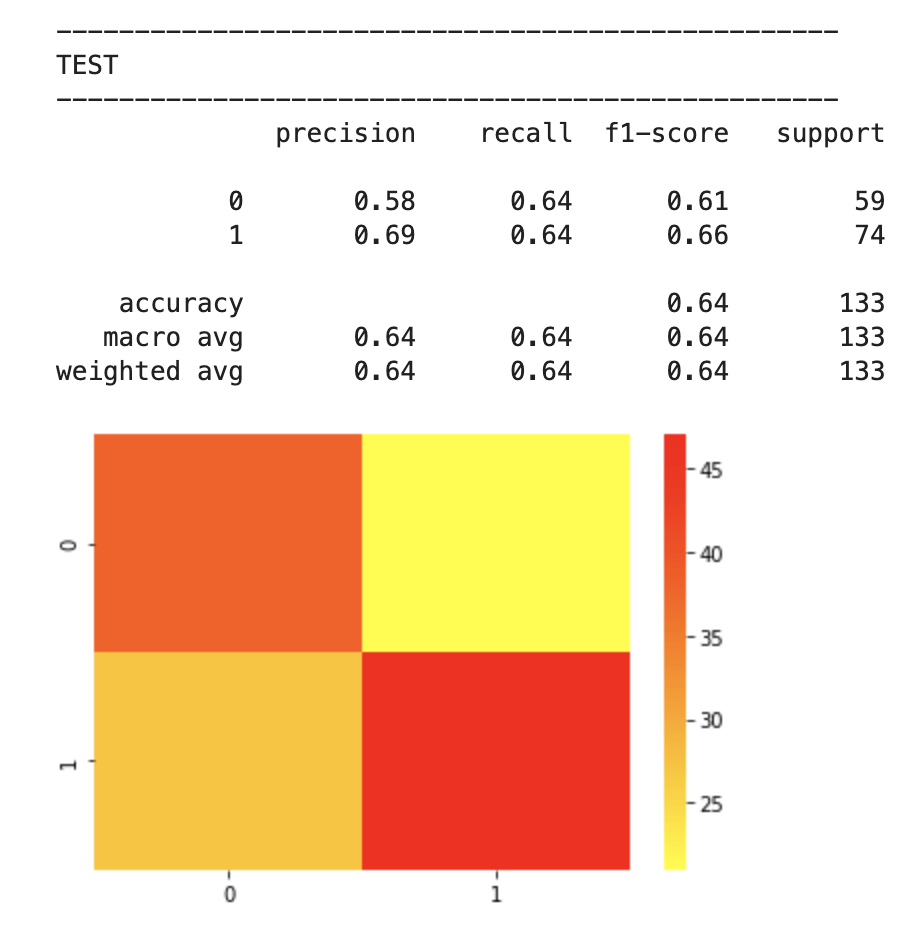
Results:

78% accuracy while technically being a precision model

Feature importance:

Feature importance excluding age:

I think one interesting observation here is how much age matters in a team context over time, but less in the 2018-19 NBA season. Conversely, effective field goal percent had the opposite relationship.

Conclusion

I’m excited for sports to be back. I’m very curious to see the NBA playoffs unfold and would love to see if certain teams emerge as dark horse contenders. Long breaks from basketball can either be terrible or terrific. I’m sure a lot of players improved while others regressed. I’m also excited to see that predicting playoff chances both on individual and team levels can be done with an acceptable degree of accuracy. I’d like to bring this project full circle. Let’s look at the NBA champion San Antonio Spurs from 2013-14 (considered a strong team-effort oriented team) and Devin Booker from 2018–19. I don’t want to spend too much time here but let’s do a brief demo of the model using feature importance as a guide. The average age of the Spurs was two years above the NBA average with the youngest members of the team being 22, 22, and 25. The Spurs led the NBA in assists that year and were second to last in fouls per game. They were also top ten in fewest turnovers per game and free throw shooting. Now, for Devin Booker. Well, you’re probably expecting me to explain why he is a bad team player and doesn’t deserve a spot in the playoffs. That’s not the case. By every leading indicator in feature importance, Devin seems like he belongs in the playoffs. However, let’s remember two things. My individual player model was less accurate and Booker sure seems like an anomaly. However, I think there is a bigger story here, though. Basketball is a team sport. Having LeBron James as your lone star can only take you so far (it’s totally different for Michael Jordan because Jordan is ten times better, and I have no bias at all as a Chicago native). That’s why people love teams like the San Antonio Spurs. They appear to be declining now as their leaders have recently left the team in players such as Tim Duncan and Kawhi Leonard. Nevertheless, basketball is still largely a team sport. The team prediction model was fairly accurate. Further, talent alone seems like it is not enough either. Every year, teams that make the playoffs tend to have older players. Talent and athleticism is generally skewed toward younger players. Given these insights, I’m excited to have some fresh eyes with which to follow the NBA playoffs.

Thanks for reading.

Have a great day!

Thank you to all of the parents for... - Hamilton Little Lads ...

Exciting Graphs for Boring Maths

Understanding style options available in Seaborn that can enhance your explanatory graphs and other visuals.

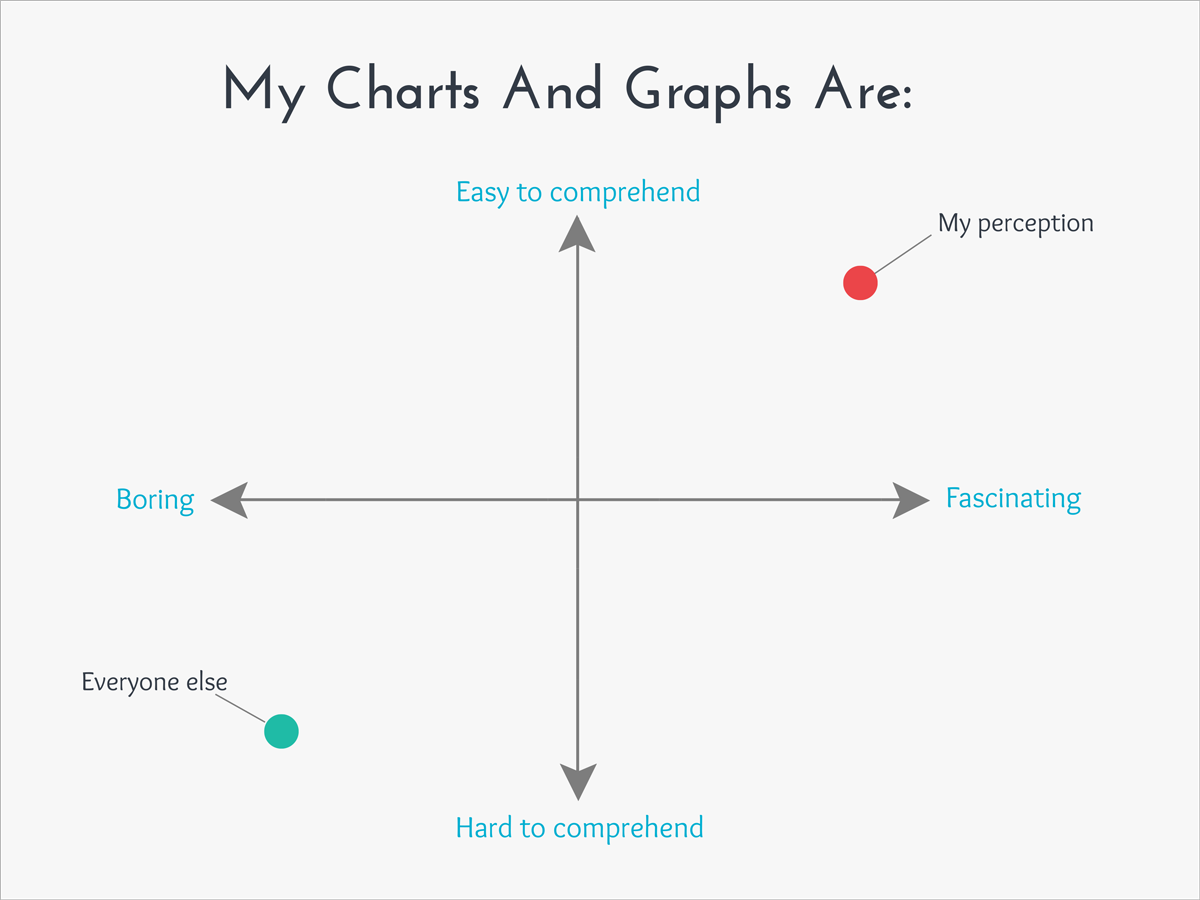
10 Funny Graphs That Perfectly Explain Everyday Life

Introduction

Welcome to my blog! Today, I will be discussing ways to leverage Seaborn (I will often use the ‘sns’ abbreviation later on) into spicing up python visuals. Seaborn [and Matplotlib – abbreviated as ‘plt’] are powerful libraries that can enable anyone to swiftly and easily design stunning and impressive visuals that can tell interesting stories and inspire thoughtful questions. Today, however, I would like to shift the focus to a different aspect of data visualizations. I may one day (depending on when this is read – maybe it happened already) write about all the amazing things Seaborn can do in terms of telling a story, but today that is not my focus. What inspired me to write this blog is that all my graphs used to all be… boring. Well, I should qualify that. When I use Microsoft Excel, I enjoy taking a “boring” graph and doing something exciting like putting neon colors against a dark background. In python, my graphs tend to be a lot more exciting in terms capability in describing data but were boring visually. They were all in like red, green, and blue against a blank white background. I bet a lot of readers out there may know some ways to spice up graphs by enhancing aesthetics but I would like to discuss that very topic today for any readers who may not really know these options are available (like I didn’t at first) and hopefully, even provide some insights to more experienced python users. Now, as a disclaimer: this information can all be found online in Seaborn documentation, I’m just reminding some people it’s there. Another quick note: Matplotlib and Seaborn go hand in hand but this blog will focus on Seaborn. I imagine at times it will be implied that you may or may not also need Matplotlib. Okay, let’s go!

Plan

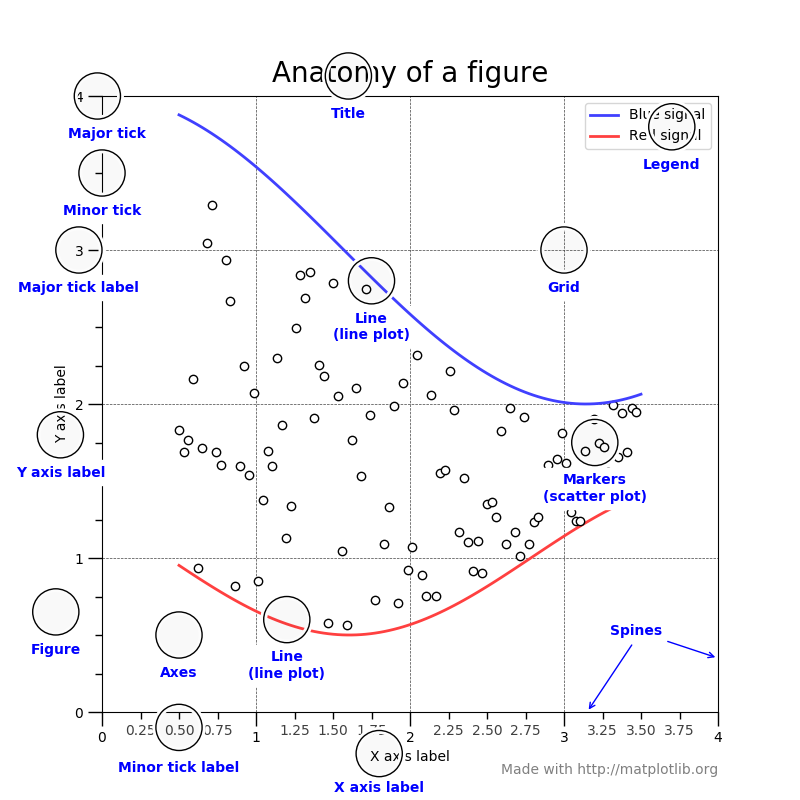
First of all, I found the following image at this blog: https://medium.com/@rachel.hwung/how-to-make-elegant-graphs-quickly-in-python-using-matplotlib-and-seaborn-252344bc7fcf. It’s not exactly a comprehensive description of what I plan to discuss today, but let me use it as an introduction to give you an understanding of some of the style options available in a graph.

Anatomy of a figure — Matplotlib 3.1.2 documentation

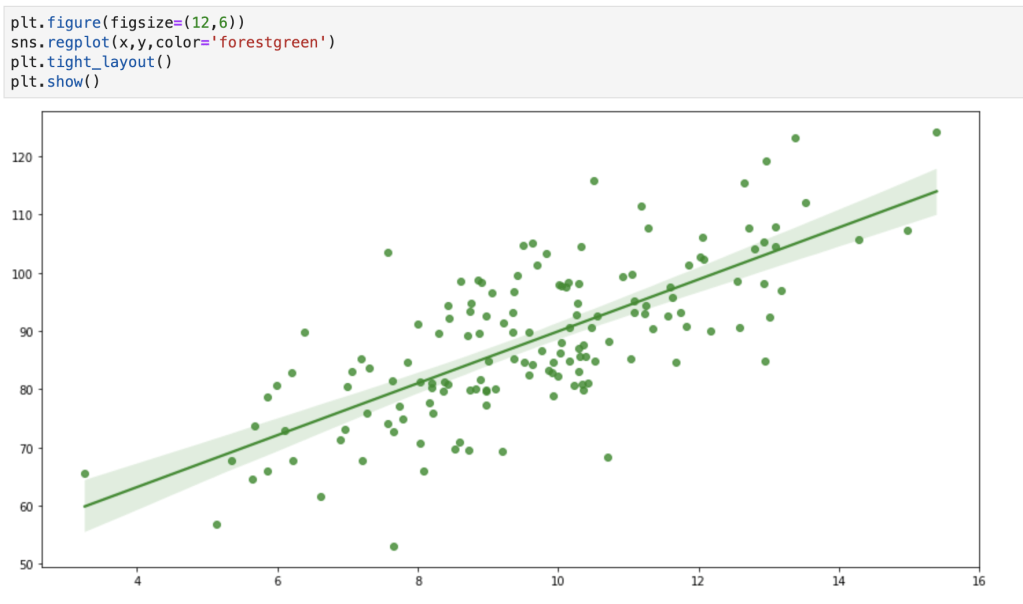
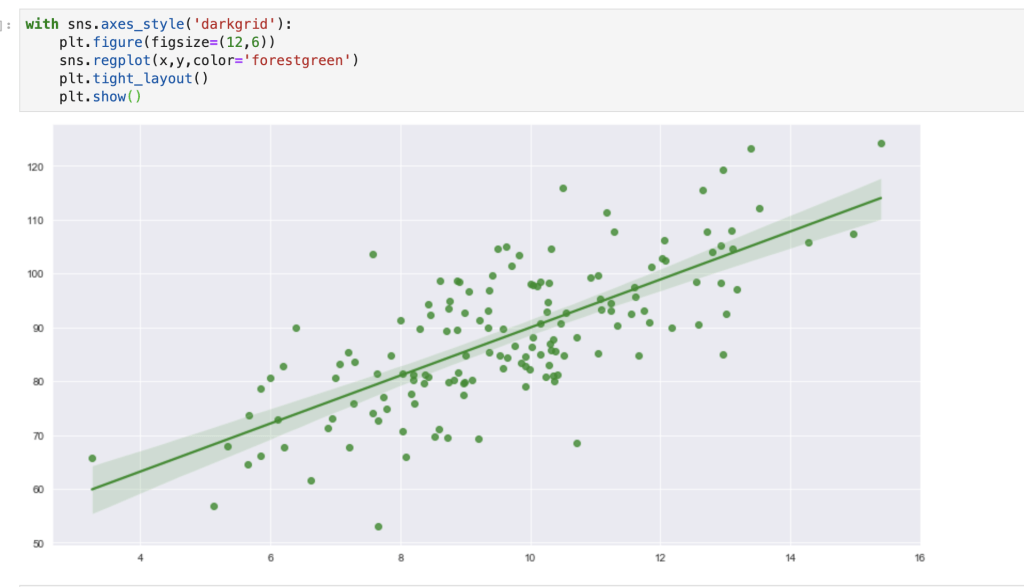
(I hope you are comfortable with scatter plots and regression plots). The plan here is to go through all the design aesthetics functions in Seaborn (in particular – style options) and talk about how to leverage them into spicing up data visualizations. One quick note here: I like to use the ‘with’ word in python as this does not change all my design aesthetics for my whole notebook, just that one visual or set of visuals. In other words – if you don’t write ‘with’ your changes will be permanent. Let me show you what I mean:

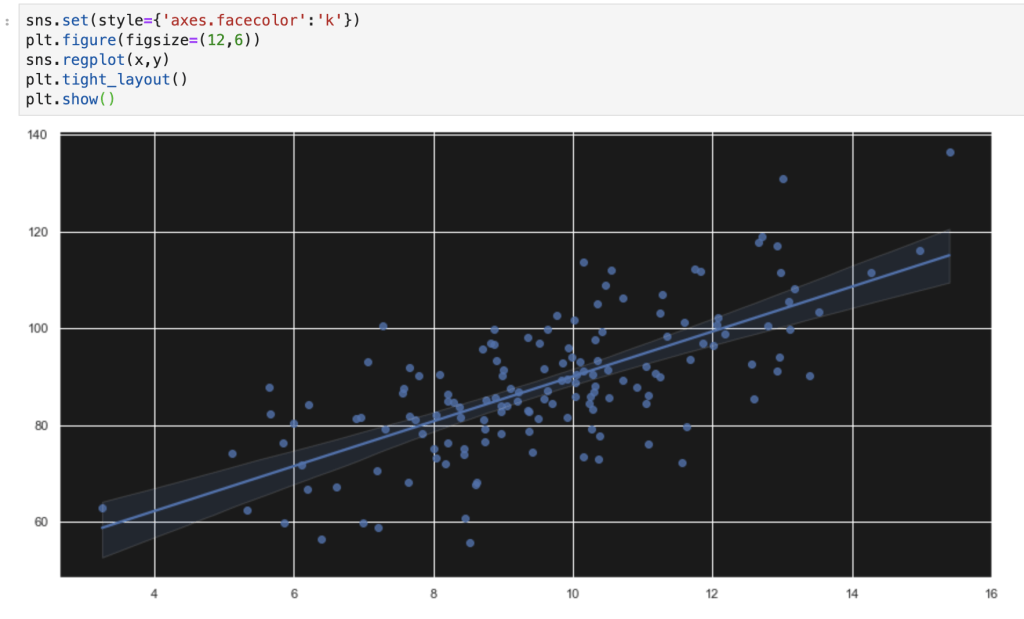
Using no design aesthetics
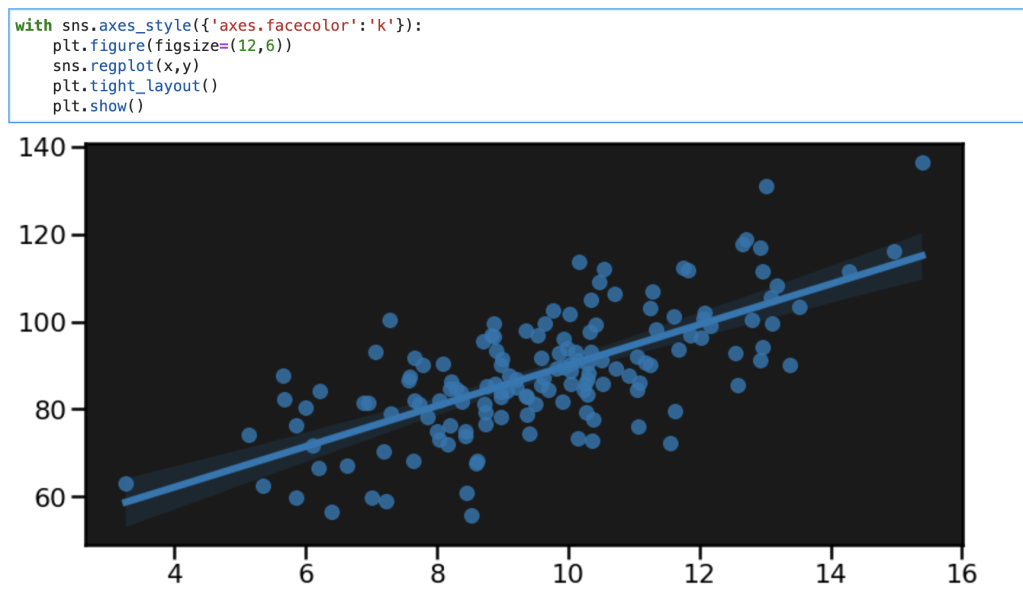
Using ‘with’ keyword

It may be annoying to always add the with keyword, so you obviously can just set one style for your whole notebook. I’ll talk about what happens when you want to get rid of that style later on.

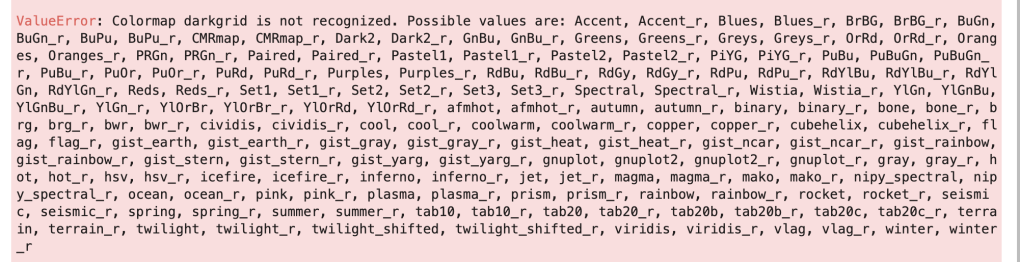
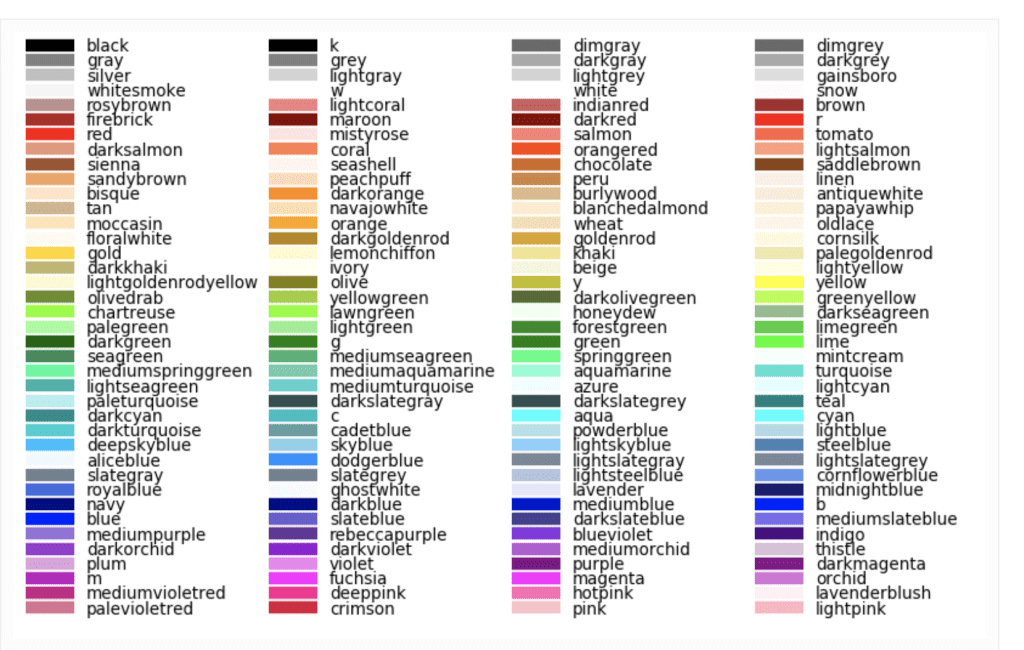
One more note: You may notice I added a custom color. Below I have included every basic python color and color palette (at least, I think I have). I’m fairly certain you can create custom colors but that is beyond the scope of this blog (I may blog bout that some other time and that very blog may already exist depending on when this is read, so keep your eyes open). The reason that the color palettes are in an error message is to give any reader a trick to remember them all. If you use an incorrect color palette (which will be discussed shortly), then python will give you your real options. I really like this feature. Just keep in mind that some of these, like ‘Oranges,’ go on past the end of the line, so make sure that doesn’t confuse you. You may also notice that every palette has a ‘normal’ color and a second ‘normal_r’ color. Look at ‘Blues’ and ‘Blue_r,’ for example. All it means is that the colors are reversed. I’m not familiar with Blues, but if it were to start with light blue and move toward dark blue, I imagine the reverse would start at dark and move to light. Color palettes sometimes can be ineffective if you don’t need (or don’t want) a wide range of colors. Example: my graph above of a regression plot. In the case that color palettes are of little value, I have provided the names of colors as well.

Okay, let’s start!

sns.reset_defaults()

This is probably the easiest one to explain. If you have toyed with your design aesthetic settings, this will reset everything.

sns.reset_orig()

This function looks similar to the one above but is slightly different in its effect. According to the Seaborn documentation, this function resets all style but keeps any custom rcParams. To be honest, I tried to put this in action and see how it was different than reset_defaults( ). I was not very successful. In case you want to learn more about what rcParams are, check out this link: https://matplotlib.org/3.2.2/users/dflt_style_changes.html. I think rc stands for ‘Run & Configure.’ I’ll need to investigate this further. If any readers understand this and how it is different from reset_defaults(), please feel free to reach out.

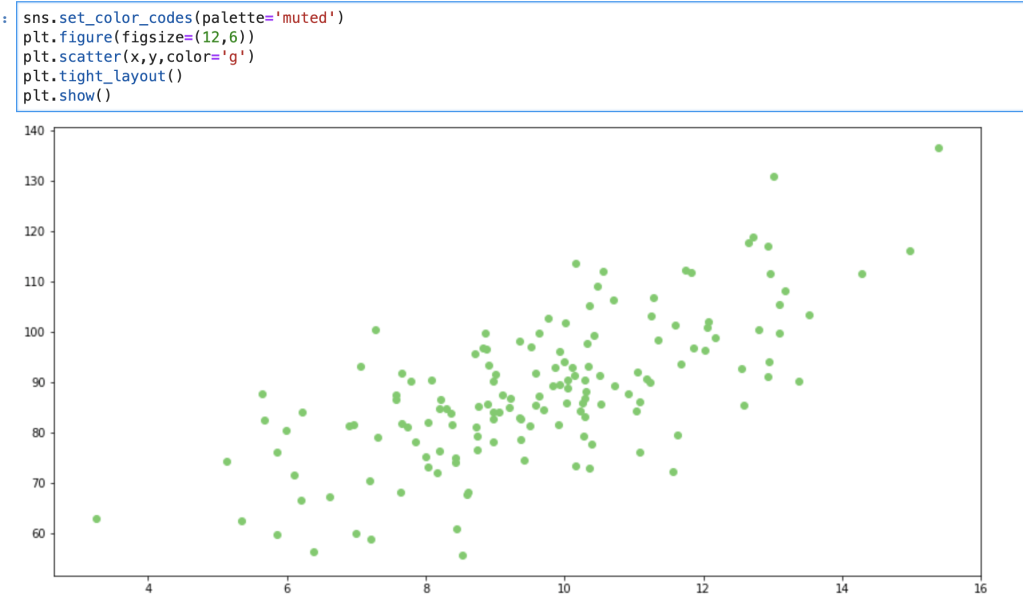
sns.set_color_codes()

This one is quick but interesting. My understanding is that it allows you to control how Matplotlib colors are interpreted. Let me show you what I mean:

‘muted’ palette
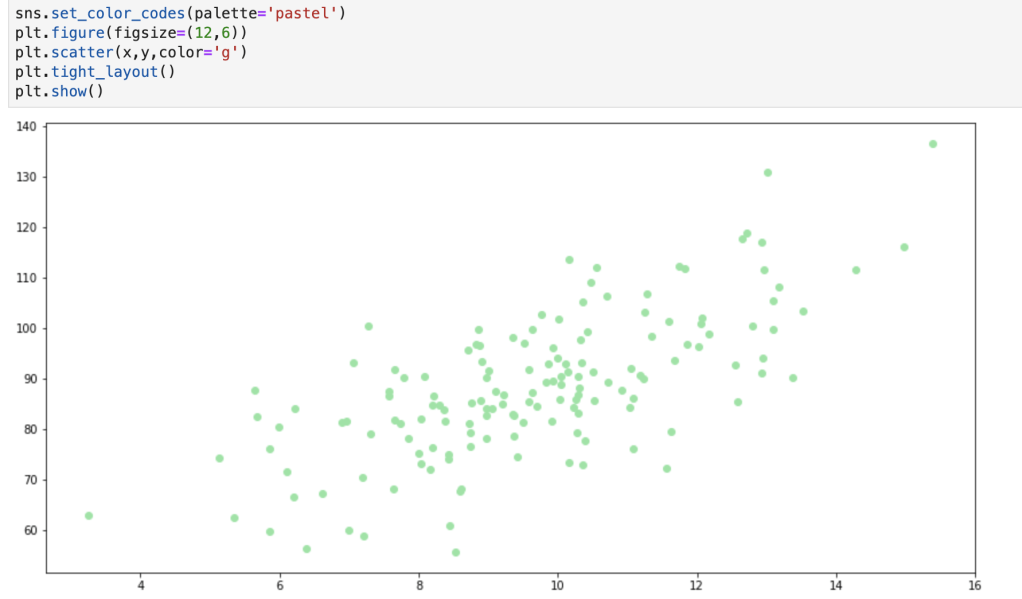
‘pastel’ palette

The change above is subtle, but can be effective, especially if you add further customizations. In total, color code options include: deep, muted, pastel, dark, bright, and colorblind.

I’d like to record a quick realization here: while writing this blog I learned that there are also many Matplotlib customization options that I didn’t know of before and, while that is beyond the scope of this blog, I may write about that later (or have already written about it depending on when this blog is being read). I think the reason I never noticed this is because, and I’m just thinking out loud here, I only ever looked at the matplotlib.pyplot module and never really looked at modules like matplotlib.style. I’m wondering to myself now if the main virtue of Seaborn (as opposed to Matplotlib) is that Seaborn can generate more descriptive and insightful visuals as opposed to ones with creative aesthetics.

sns.set_context()

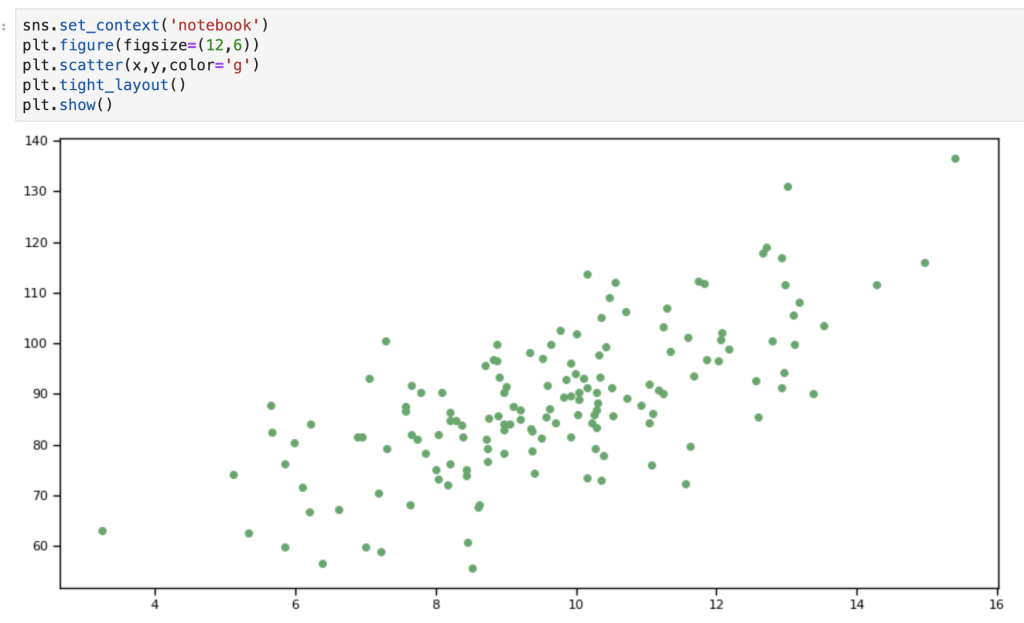
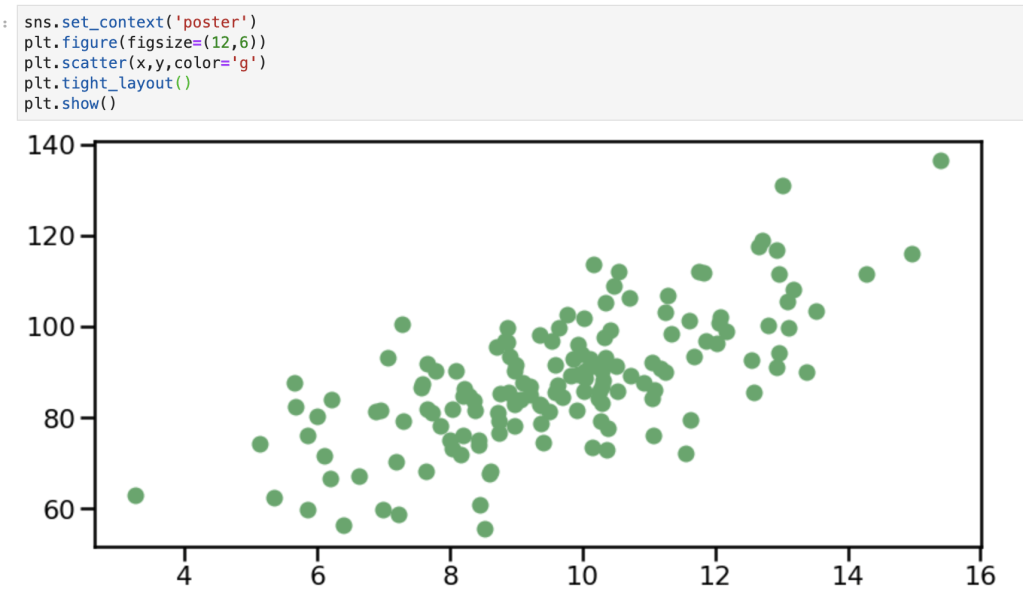
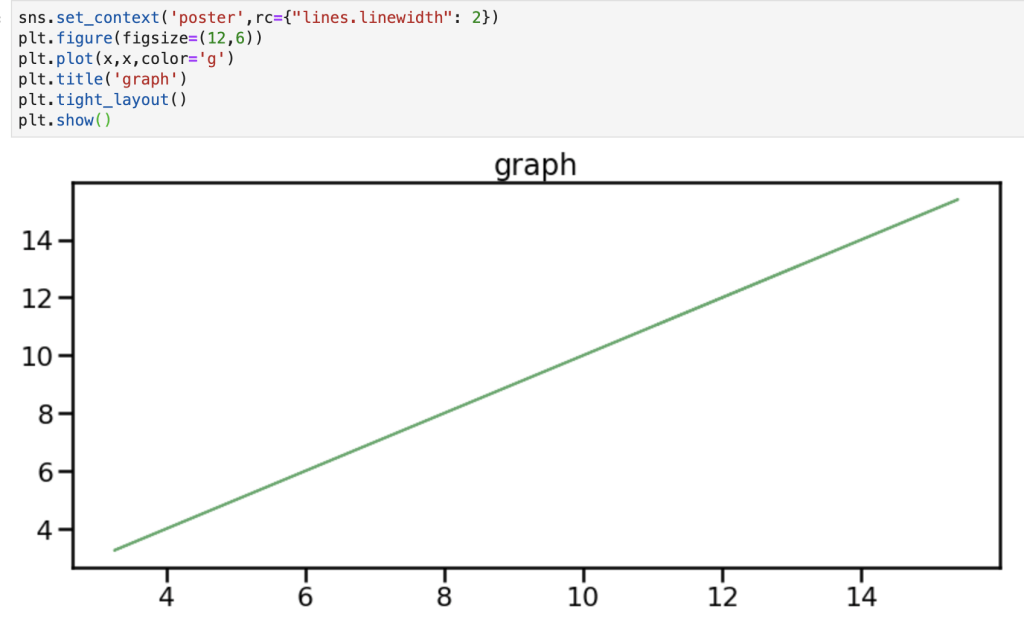
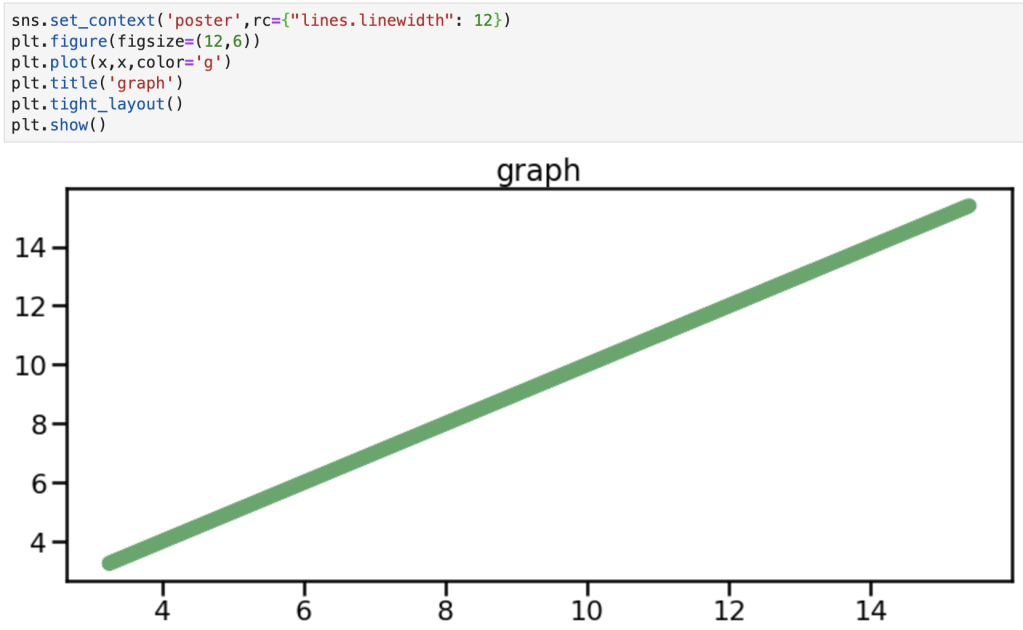
This one is very similar to one yet to be discussed. Anyways, to quote the documentation: “This affects things like the size of the labels, lines, and other elements of the plot, but not the overall style.” There are 4 default contexts: talk, paper, notebook and poster. This function also (can) take the following parameters: context (things like paper or poster), font_scale (making the font bigger or smaller), and rc (a dictionary of other parameters discussed earlier used “to override the values in the preset [S]eaborn context dictionaries” according to the documentation). Here are some visuals:

notebook context
poster context
rc params in poster context
rc params changing line size in poster context

sns.plotting_context()

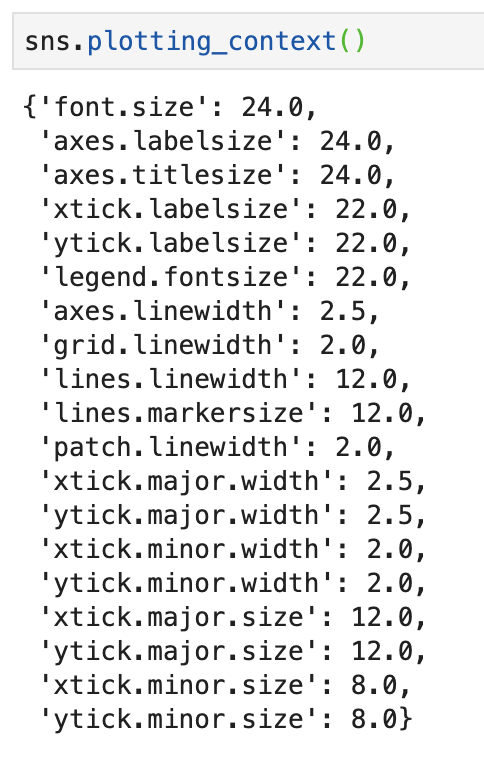
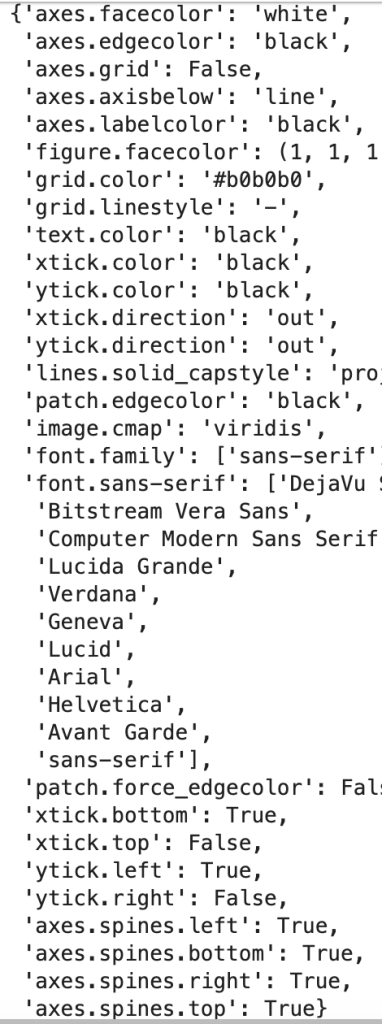
This function has the same basic application as the one above and even has the same parameters. However, as will be the trend with other topics, by typing the function above you will actually get a return value. To be clear, by typing sns.plotting_context() (I’ll have a visual) you will get a return value of a dictionary that provides you with all the rcParams available for plotting context. So not only can you set a context, but you can also see your options if you forget what’s available. One difference I have found between this function and the one above is that this one works (maybe only works?) with something like the ‘with’ keyword as opposed to the one before which functions independently of that keyword. (I’ll need to do some more research here). In any case, we’re going to see another dictionary later, but here is our first one.

sns.set_style()

I’m going to skip this, you’ll understand why.

sns.axes_style()

The two functions listed above basically work together in the same way that set context and plotting context do. The default options for setting an axes style are: darkgrid, whitegrid, dark, white, and ticks. In addition, in the axes_style version, you can just enter sns.axes_style() to return a dictionary of all your additional options. If you look back at the regplots at the beginning of the blog you may notice that I leveraged the darkgrid option and I encourage you to scroll back up to see it in action.

All I did in the graph above was set a black background, but now the graph looks far more exciting and catchy than any of the ones above.

I’d like to record another thought here. It really does seem that the ‘with’ keyword only works with some functions as described above. Unless I am missing some key point, I find it works with things like axes_style and plotting_context but not set_style and set_context. I’m going to have to dive deeper into what that means about the functions and how they are different.

sns.set()

Today’s blog is about style options and this is the last one to cover (although I didn’t really go in any particular order). I think that this function is a bit of a catch-all. The parameters are: context, style, palette, font, font_scale. The documentation says that context and style correspond to the parameters in the axes_style and plotting_context ‘dictionaries’ cited above. I’d like to also look at the palette option. I alluded to this earlier in the blog with all the available color palettes. In the documentation color palette is not part of the style options. I would still encourage using the (with) sns.color_palette() function (that can use the ‘with’ keyword) to be able to set interesting color palettes like the ones listed above. It appears that this function (back to sns.set()) doesn’t easily work with the ‘with’ keyword. Also, the color_codes parameter is a true-false value, but it’s not entirely clear to me how it works. Here’s what the documentation says: ‘If True and palette is a Seaborn palette, remap the shorthand color codes (e.g. “b”[lue], “g[reen]”, “r[ed]”, etc.) to the colors from this palette.’ I found this link for all the fonts available for Seaborn / Matplotlib: http://jonathansoma.com/lede/data-studio/matplotlib/list-all-fonts-available-in-matplotlib-plus-samples/. When I provide some visuals, I encourage you to pay attention to how I enter the font options.

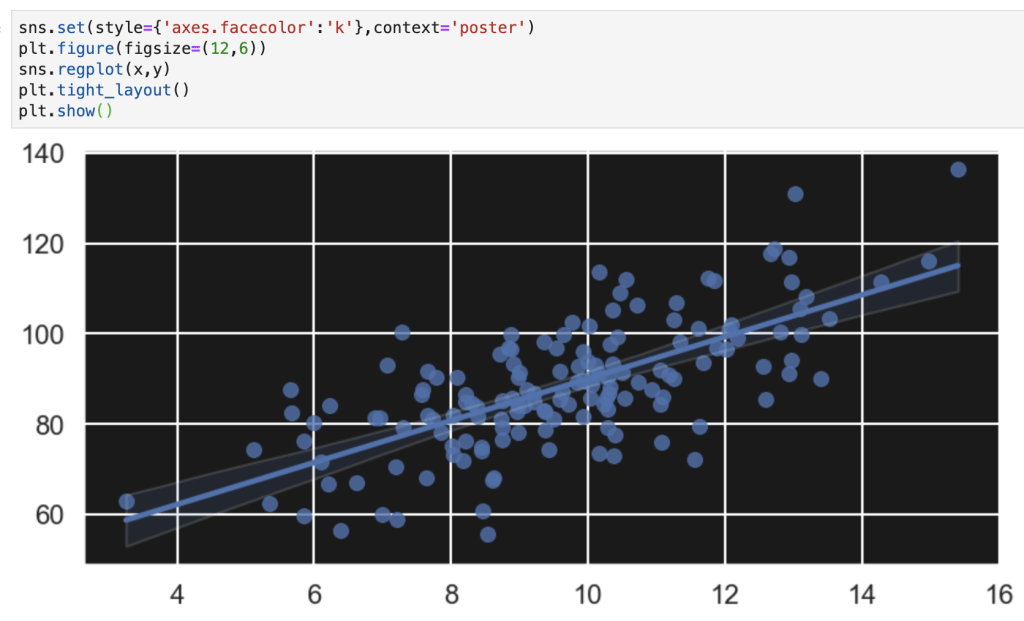
set background color
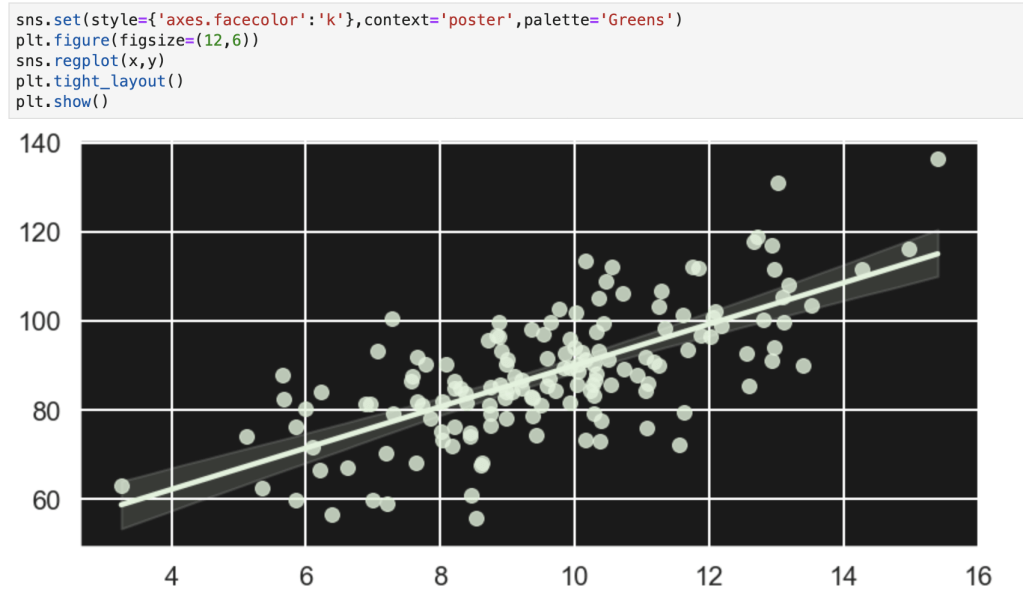
set context
The palette only shows one color in this case so I will provide some palette examples later
set font and font size – unlike colors, however, fonts are not entered as one word – they have spaces. A color is written as ‘forestgreen’ as opposed to ‘forest green’ but fonts work differently
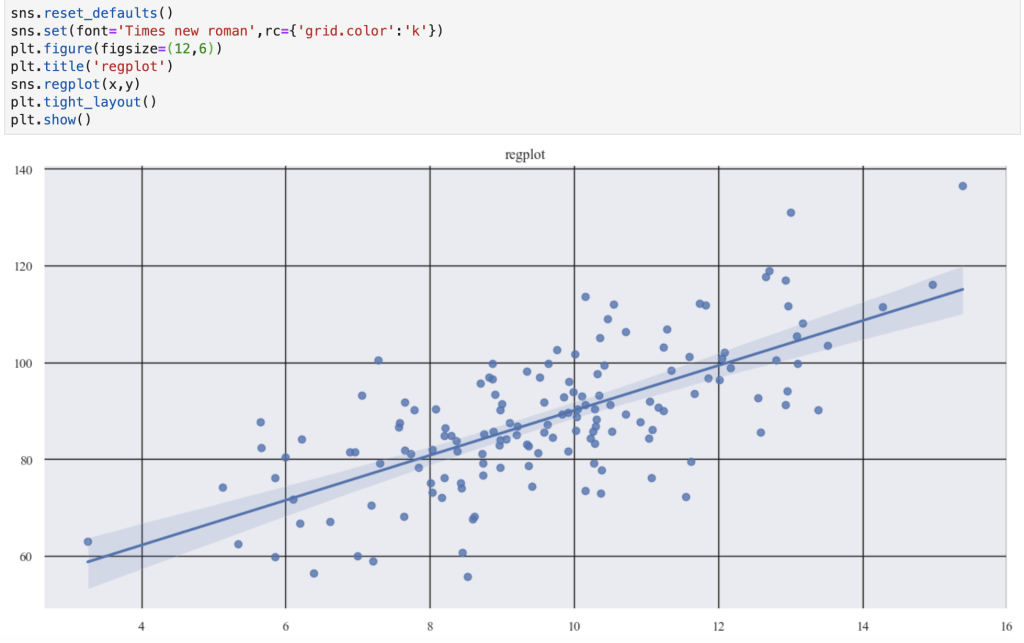
set grid color with rcParams
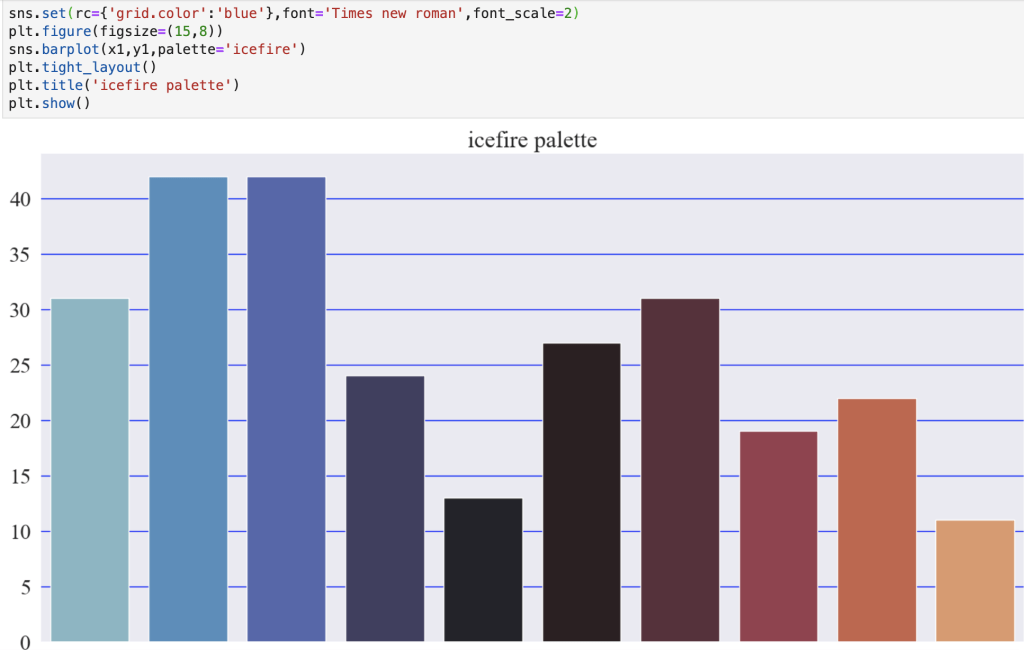
I’ve used the icefire palette referenced above in the error message
here is icefire_r

You may notice how I added the palette in the function that makes the graph. Yes, it is an option. However, if you want to make a lot of graphs it can be inefficient. I suppose one interesting option would be to create a list of palettes and just loop through them if you want to keep mixing things up.

Conclusion

Creating visuals to tell a story or identify a trend is exciting and important to data science inquiries. If this is indeed the case, why not make your visuals catchy and exciting? People are drawn to things that look ‘cool.’ In addition, while I know the focus in this blog was on style, we did briefly explore color options. I found this blog that quickly talks about strategically planning how you use colors and color palettes in your visuals: https://medium.com/nightingale/how-to-choose-the-colors-for-your-data-visualizations-50b2557fa335. Like I said, though, the focus here has been on style options. Writing this blog has been a bit of a learning experience for me as well. I have realized that there are a lot more options to spice up graphs and make them more interesting and meaningful. For example, I probably haven’t taken full advantage of all the options available in Matplotlib and its various modules. I’m going to have to do more research on various topics and possibly update and correct parts of my blog post here, but I think this is a good starting point.

Thanks for reading and have a great day.

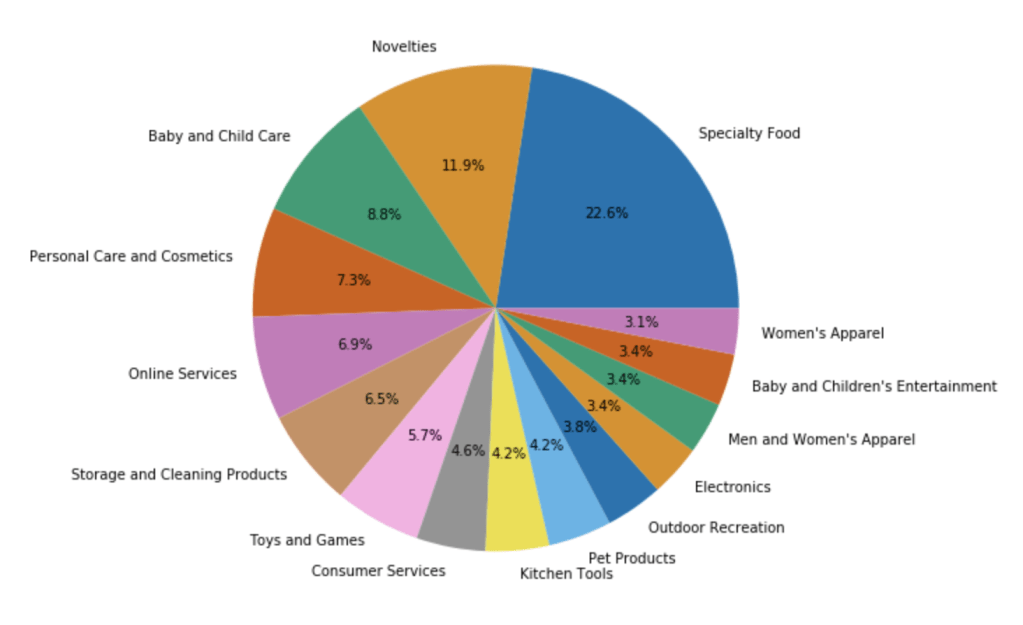
By the way… here’s some graphs I made using Matplotlib and Seaborn: